
Install the app
How to install the app on iOS
Follow along with the video below to see how to install our site as a web app on your home screen.
Note: This feature may not be available in some browsers.
-
After 15+ years, we've made a big change: Android Forums is now Early Bird Club. Learn more here.
You are using an out of date browser. It may not display this or other websites correctly.
You should upgrade or use an alternative browser.
You should upgrade or use an alternative browser.
***Droid X Software Update***
- Thread starter NKT
- Start date
-
- Tags
- motorola droid x
- Status
- Not open for further replies.


There never was a charging led in the first place
I think the update the other night gave us a charging indicator. Mine only came on when it was totally powered off (you can't miss it).
It doesn't appear to be on while the phone is booted up? (at least that's how mine is behaving)
yeah mine shows up when the phone is off just not when its on which i wish there was one for when it was on
Well you know what this means! Motorola is forced to send out another OTA update, and while their at it they can throw in another couple of goodies too!
Yeah who knows they need to get on it to fix those things and this phone will be just about as perfect as it can get until froyo comes!

ylexot
Android Expert
I doubt that there will be another minor update...Froyo isn't that far off.Well you know what this means! Motorola is forced to send out another OTA update, and while their at it they can throw in another couple of goodies too!
yeah mine shows up when the phone is off just not when its on which i wish there was one for when it was on
Well I've not had an LED light on either before or after the update. What's going on here with some people having the light and others not? Ideas????

ekyle
Android Expert
I leave "use wireless networks" on for foursquare but other than that i only use GPS when I need directions or something like thatDoh... and I figured out with mine that the GPS was turned on for some reason. I wonder if the update did it or I somehow turned it on by accident. Either way the battery life is A LOT better with it turned off.

The way the system works is once the update is downloaded it gives you a 12 hour window before it asks again. When that time is up if you fail to respond within a certain amount of time (2hrs I think) it installs automatically. If you respond within that time then the cycle restarts.I've been reluctant to install the update but this morning when i woke up i found on my phone "update successfully installed". Has anybody else been forced updated?
Correct but with a caveot.
If the GPS can't lock onto a signal, then it stays on for quite a while, searching for satellites. Some widgets I have running (Beautifu Widgets location based weather, for example) try to ping the GPS and if it can't get a signal, then it keeps trying. Battery life in this case is definately affected.
In my case, the secure building I work in makes the battery life worse with GPS enabled. It keeps searching. At home, the battery lasts forever.
Here's hoping the update improved the GPS performance.
You really need your weather location to be accurate within 3m? The 500-1000m network accuracy isn't good enough? Even that close it could still guess the wrong city anyway depending on how close you are to city center points.
You can make Beautiful Widgets just use network locations, and leave GPS on for anything else. In fact if you leave GPS on you usually get a lock in 5-10 seconds. If it's off it could take a minute or two. That seems like a waste to me.

Dragon Punch
Newbie
This ****ing update broke my camera Now I can't take videos or pictures. A black screen comes up when I load the camera app.
And if you press and hold that red dot it will open a little magnifying window to help you place your cursor.
There are plenty of forums where you don't get the targeting cursor at all, and the cursor doesn't end up where you place your finger anyway.
**edit - I just visited one, and now the cursor seems to place itself properly but still no targeting cursor.


Mutt Slayer
Newbie
Had no problems before the update, now i've locked up at least once a day. Phone is definately more laggy and doesn't respond right away all the time.
I really have no clue why any of that happened. I'd sure like to go back to the original as well.
Can you back up somehow, do a factory reset and then reinstall via the backup, or will that just give the same scenario I have now?
I really have no clue why any of that happened. I'd sure like to go back to the original as well.
Can you back up somehow, do a factory reset and then reinstall via the backup, or will that just give the same scenario I have now?
CominWitDaSauce
Lurker
OK I need help...I downloaded the update. I clicked install later as I was finishing something up...I when back to about phone, check for update and clicked install...I got a blue screen that said select using camera button...now I have a black screen that says
Bootloader
29.01
err:a5,69,35,00,21
battery ok
ok to program,
connect usb
data cable
Help please
I have the same exact problem, did you figure out how to fix it?
MiamiFin33
Newbie
My battery life is worse and my phone is much laggyer then before the update. Im pissed

CominWitDaSauce
Lurker
I have the same exact problem, did you figure out how to fix it?
Ok, for anyone else who had this problem, do not send your phone back to verizon and get a new one. The phone is fine, and that will just waste a couple days of your time. If you get the black screen with the boot loader 27.01 or 29.01 error message in the top left, charge your phone in a wall out. Using a USB will not solve the problem. Once you charge it, turn on the phone, it should work now, and finish the software update. Once your phone is at at least 80% bttery, plug it into the USB port again. The boot loader error screen should not appear. I'm told the problem was that you need a certain amount of battery before you do the update, and charging it in a USB will not charge the phone during the update. They wanted me to wait a week for a new phone, but I was able to figure out the problem for myself. Hope that helps anyone else with this issue.

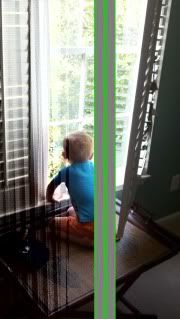
I get this with my camera now. This has happened 2 times since the update.
I got this on a much lesser level twice now. Overall the camera seems to have gone to shot with this update.
There never was a charging led in the first place
Yes there used to be a charging LED
I had a green charging LED before the update, and mine too is gone. It would blink while charging and be solid when fully charged

matty032
Android Enthusiast
I for one don't miss the led charging indicator. Keeps me from seeing email notifications.Yes there used to be a charging LED
I had a green charging LED before the update, and mine too is gone. It would blink while charging and be solid when fully charged
- Status
- Not open for further replies.