• After 15+ years, we've made a big change: Android Forums is now Early Bird Club. Learn more here.

Help Email shows "Loading messages..." when I try to reply to an email

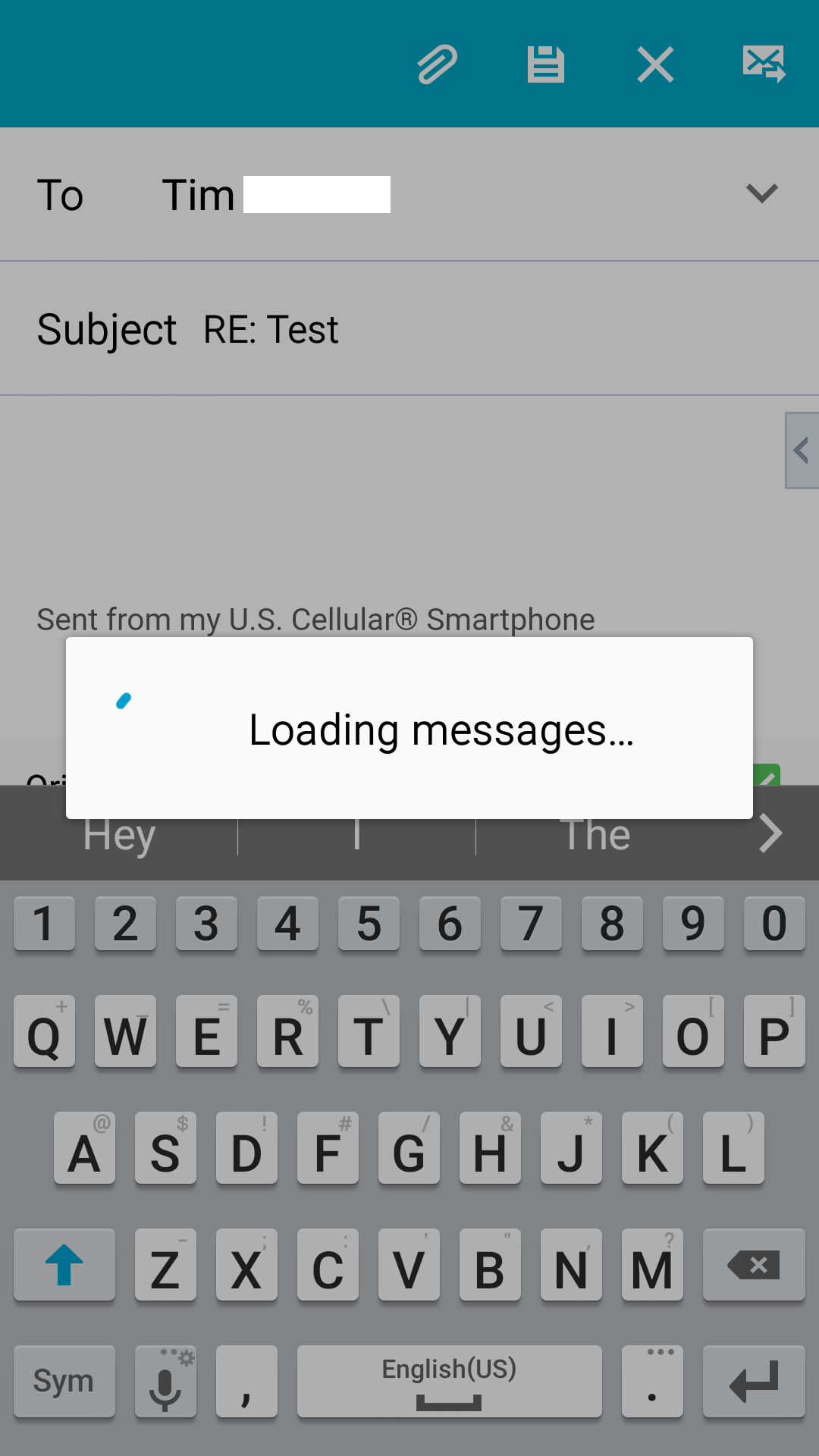
OK, in the Android Email app, not gmail, but the actual Email app, I can receive messages. I can send a new message. But any time I try to reply to a message, as soon as I click reply, the compose window opens and then there is a box that says "Loading messages..."

This is on a Samsung Note 3 phone. My email comes in just fine on my Samsung Tab E tablet. The server settings and credentials are all set correctly. Just start happening today. Have gone into the application manager to email, and cleared the cache for the email app.
screenshot.png


Any suggestions would be greatly appreciated....
Reset app settings and remove defaults
OK, in the Android Email app, not gmail, but the actual Email app, I can receive messages. I can send a new message. But any time I try to reply to a message, as soon as I click reply, the compose window opens and then there is a box that says "Loading messages..."

This is on a Samsung Note 3 phone. My email comes in just fine on my Samsung Tab E tablet. The server settings and credentials are all set correctly. Just start happening today. Have gone into the application manager to email, and cleared the cache for the email app.
screenshot.png


Any suggestions would be greatly appreciated....
Reset app prefrences and restore defaults 100% works
 
Here is the trick... My work email hit the 5000 email limit and the problem started happening. My auto-archive had to be changed to reduce that... Somehow the email app seems to get stuck there and always showed the Loading Message as shankscomp showed. I got rid of it by changing my default account from the one that was full to another one and back. Problem gone...
Email -> Manage Accounts select another account and make it the default account. The message should go away, then go back and set your default account back to the one you want.
 
More info... after more testing it turns out that the issue seems to be related to my outlook corporate account. I do not have the issue if I set any other account as the default. Off to Microsoft support I go... (or get another email app...)
 
Last edited:
Had this problem today and found the answer on another forum- totally solved my issue. It's a December 5th update to your Android System Web Viewer. Go into settings- app manager- Android System Web Viewer, and depending on your phone, either uninstall updates, or if that option isn't available, disable the app. Restart your phone, and everthing works like it should again. Just make sure you have auto updates turned off or it will happen again. I assume they'll have a fix sometime soon, at which point we can maybe update it without worrying?
 
Thanks Loges, This final solved it. Android System Web Viewer.

I am just astounded that Google Inc could not solve this issue after two months of worldwide mayhem.
.
 
OK, in the Android Email app, not gmail, but the actual Email app, I can receive messages. I can send a new message. But any time I try to reply to a message, as soon as I click reply, the compose window opens and then there is a box that says "Loading messages..."

This is on a Samsung Note 3 phone. My email comes in just fine on my Samsung Tab E tablet. The server settings and credentials are all set correctly. Just start happening today. Have gone into the application manager to email, and cleared the cache for the email app.
screenshot.png


Any suggestions would be greatly appreciated....
Does following the recommended fix have any side effects?
 
Yes indeed Loges was right!! somehow my phone started misbehaving again and I noticed that I was able to reply to some messages but not all. Wondering if it had to do with messages sent in plain-text vs HTML... But as Loges stated the Android System Web Viewer is the issue. Turning it off will prevent you from seeing the web content (pretty pictures etc...) But I'd rather be able to reply to an email than see the pretty pictures... One more test... I just uninstalled the app which in reality only uninstalls the update as it is a built in app. it is enabled and working on the original version, I assume until they push another update...
 
Last edited:
I just tried something else with the webviewer... I turned off all the notification settings, then was immediately able to forward/reply etc with no issues.
I will post again if the issue returns.
 
Ok never mind. It only worked once. Issue is back. Guess I am stuck with uninstalling the updates then ignoring the update requests I get every ten minutes.
 
Ok never mind. It only worked once. Issue is back. Guess I am stuck with uninstalling the updates then ignoring the update requests I get every ten minutes.

This is just a shot in the dark but I have experienced issues with apps such as email and calendar updating that have been resolved by (a) turning Power Saving mode OFF or (b) if updating using cell data turning Restrict Background Data OFF. I don't have any reason to believe that this is your issue but it would be easy enough to try.
 
This is just a shot in the dark but I have experienced issues with apps such as email and calendar updating that have been resolved by (a) turning Power Saving mode OFF or (b) if updating using cell data turning Restrict Background Data OFF. I don't have any reason to believe that this is your issue but it would be easy enough to try.
Thank you! I appreciate the feedback. I do have those settings off already... I think those who suggested disabling the webviewer have the best solution. Perhaps if I disable it instead of just uninstalling updates, then I won't get the constant playstore update reminders. Just hoping there are no unintended side effects to disabling webviewer! Thanks again for responding.
 
Have been having some problems with the "Page not responding" problem and somebody suggested checking
the ASW app and sure enough it was still disabled. Must have enabled it on my S5 and not on my Tab E. Now I can't get it to enable. On the Tab the enable button is greyed out. And when I try to do it from the Google Play Store the "Enable" button will finally react and download the latest version and install it but when I go back to the Tab E it still shows the old version and it is still disabled.
 
Found this on another site:

"After Nougat the Android System Webview is included in the Chrome app so the old app stays disabled until you disable Chrome."

I am running 7.1.1 on my Tab E.
 
OK, in the Android Email app, not gmail, but the actual Email app, I can receive messages. I can send a new message. But any time I try to reply to a message, as soon as I click reply, the compose window opens and then there is a box that says "Loading messages..."

This is on a Samsung Note 3 phone. My email comes in just fine on my Samsung Tab E tablet. The server settings and credentials are all set correctly. Just start happening today. Have gone into the application manager to email, and cleared the cache for the email app.
screenshot.png


Any suggestions would be greatly appreciated....
Thank you. My email is fixed.
 
Back
Top Bottom