• After 15+ years, we've made a big change: Android Forums is now Early Bird Club. Learn more here.

Help Email shows "Loading messages..." when I try to reply to an email

Brilliant work people.. I can confirm this has got my work phone ( Samsung Galaxy NOTE 4 ) back to how it should be.. I can now reply to emails like i did before and the loading messages thing is not an issue anymore
 
Hi New member here. My wife had this email problem on her Galaxy 5. (I do not use Android myself). I wasted hours trying to fix it. Finally, went to our IT consultant (will cost us about €100 in their time) who found the solution already posted here . The whole thing gives me a very bad impression of Android and I will never use it myself ( I'm an Apple user). How a developer can release an update that it knows will cause a malfunction on some of its clients phones is beyond my comprehension. Where do I write to ask for a refund of the fee I just paid?
 
Welcome to Android Forums, @SilverFlipper . I wish it were under happier circumstances.

Unfortunately this is just one of those bugs that crop up from time to time with all technology advancements. WebView is a helper service that's part of Android, but the problem lies with Samsung's email stock client. This doesn't affect anyone else.

Of course prior to the WebView update the stock client worked as intended so you can't really say they released a known defect. And, since every other email client from every other Phone manufacturer works without problems with the update, you can't really blame Android either.

Moreover, when the Android OS has a major release pending, developers do get access to the new resources prior to them being released, but bug fixes and security patches get released right away. I'm sure Samsung is working on a fix to their app and the workaround of rolling back the WebView update does restore functionality, but these things take time and can be tough to troubleshoot from a developers end.

It's clear (to me) that no one knew this was going to happen, or they would have had a fix out to users already.
Where do I write to ask for a refund of the fee I just paid?

I guess the ultimate responsibility is Samsung's, but I doubt it goes beyond fixing their app.
 
I just want to make sure I choose the correct option. When I go to settings/ application manager/ android system web viewer- there are two options that people have mentioned- one is to select uninstall updates or disable the web viewer app. Which is the best and safest option? The disable options says may cause problems with other apps and data will be deleted. The uninstall updates says all updates to this android system app will be uninstalled. Both seem like I could mess something up!!!!
 
Uninstall updates is your safest option. While WebView isn't a critical system app and wouldn't crash your phone or anything very serious, it does allow apps to open web-based content from a window within the app rather than opening a web browser.

Rolling back the updates shouldn't break anything.
 
Same thing happened to me as from this morning Dec the 11th (it might have happened even day-two earlier but didn't use it over the weekend). Samsung Galaxy Note 4 (SM-N910C), Android version 5.0.1. I can properly receive and send emails. But when I try to REPLY to an email that is already in my Inbox, is starts looping "Loading messages" forever.... and don't do anything. Tried everything except rebooting the android and nothing works. Now I see some of you even rebooted their phones and even then no fix.
In the meantime I am using Bob's workaround (with Save/Draft). Any new ideas for real fix or news about this bug, guys?
 
This has worked for me. Thank you so much, and to everyone who has posted under this thread.
I have a Note 3. Uninstalling the "Android System WebView" app in Application Manager solved my problem about not being able to reply to and forward email messages. I called Samsung who assured me that I don't need the app to make my phone run safely and properly.
 
A work-around I am using is to compose the email, then save it to drafts, and then send it.
I am using the Android Email app on the Note Edge.
 
OK, in the Android Email app, not gmail, but the actual Email app, I can receive messages. I can send a new message. But any time I try to reply to a message, as soon as I click reply, the compose window opens and then there is a box that says "Loading messages..."

This is on a Samsung Note 3 phone. My email comes in just fine on my Samsung Tab E tablet. The server settings and credentials are all set correctly. Just start happening today. Have gone into the application manager to email, and cleared the cache for the email app.
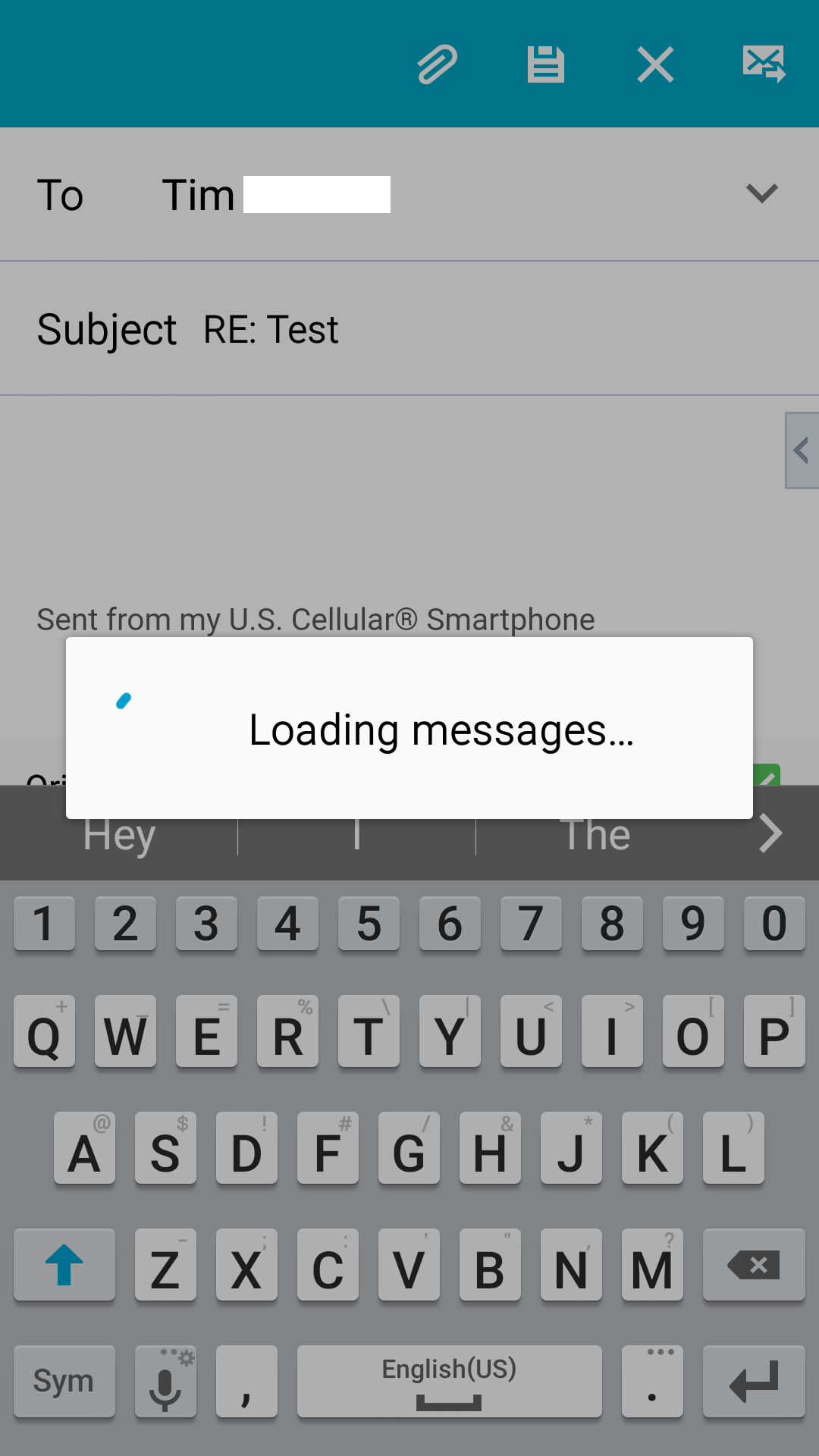
screenshot.png


Any suggestions would be greatly appreciated....
 
A work-around I am using is to compose the email, then save it to drafts, and then send it.
I am using the Android Email app on the Note Edge.
I now have uninstalled the "Android System WebView" app in Application Manager, and my phone works fine again. BTW, I called Samsung before I uninstalled the app. They assured me that the removal of "Android WebView" will cause no harm to the phone.
 
Thankyou very much for the help getting email problem solved! I has been struggling for several days before I found this forum and the guidance how to get problem fixed. Great job! Hopefully someone informs on this page when Samsung has built a fix so I can go to automatic updates on the Android system web view app. (I suspect that it would be useful for the future...)
 
Thank you Jamie's method, it works, quote" Went to settings- apps- app manager- android system webviewer. Hit disable which rolls it back to an earlier version. Seems to be forwarding or replying now on over ten tests."
 
Resetting the Android System Web View caused some side effects too: Instagram app does not show your uploaded picture anymore on the ig app. It showed only black space instead of the uploaded photo.
So hopefully there will be a fix since I want to be able to do both: use IG and eMail if it isn´t too much to ask for ;)
 
Resetting the Android System Web View caused some side effects too: Instagram app does not show your uploaded picture anymore on the ig app. It showed only black space instead of the uploaded photo.
So hopefully there will be a fix since I want to be able to do both: use IG and eMail if it isn´t too much to ask for ;)
I don't use Instagram, so I have not noticed, and I'm sorry to hear that. If anybody hears about an update to fix the WebView issue, please post..
 
Resetting the Android System Web View caused some side effects too: Instagram app does not show your uploaded picture anymore on the ig app. It showed only black space instead of the uploaded photo.
So hopefully there will be a fix since I want to be able to do both: use IG and eMail if it isn´t too much to ask for ;)


If you disabled WebView, you can re-enable it but turn off automatic updates. Disabling it rolls it back to the original version and it was the last update that caused the problem. Instagram should them work for you again (you may need to reboot the phone).
 
Sure glad I found this page, uninstalled the system webview now on version 55.0.2883.91 and working fine.
There are a lot of forums with really bad suggestions about permissions being wrong on the user and having to make sure that Inherited Permissions was set and all kinds of other strange recommendations. I know I didn't change anything on my exchange server (I'm the only admin/owner) so nothing changed in the AD or Exchange to suddenly make this stop working on my phone. I knew something was changed on the phone and thought it was the email app itself. Uninstalling and updating that, removing and adding the profile back but nothing worked.
Obviously the System Webview App broke something in the mail client.

 
Sure glad I found this page, uninstalled the system webview now on version 55.0.2883.91 and working fine.
There are a lot of forums with really bad suggestions about permissions being wrong on the user and having to make sure that Inherited Permissions was set and all kinds of other strange recommendations. I know I didn't change anything on my exchange server (I'm the only admin/owner) so nothing changed in the AD or Exchange to suddenly make this stop working on my phone. I knew something was changed on the phone and thought it was the email app itself. Uninstalling and updating that, removing and adding the profile back but nothing worked.
Obviously the System Webview App broke something in the mail client.
I had uninstalled Android System WebView to let me reply to and forward e-mails. With the app installed, I am unable to do those tasks. After reading your note, I installed Android System WebView again, but the version I'm getting is 63.0.3239.111, not the version you mentioned. How were you able to get to version 55.0.2883.91 and then disable automatic updates for the app?
 
Back
Top Bottom