
• After 15+ years, we've made a big change: Android Forums is now Early Bird Club. Learn more here.

Forced 2.0.1 DROID UPDATE! HOWTO

As many people have stated before, it really depends on their view file type extension settings. Not everyone keeps an "out of the box" Operating System. :)

And those who don't would probably know to add the ".zip" I would think.
 
As many people have stated before, it really depends on their view file type extension settings. Not everyone keeps an "out of the box" Operating System. :)

Yeah, but most people that are technologically adept enough to find it necessary to show file extensions understand that naming your file "update.zip.zip" is just silly and there's no reason that Android would need that. :rolleyes:
 
631, long island, NY

I got the following error, however, I did upgrade, but I'm still at the old baseband version:
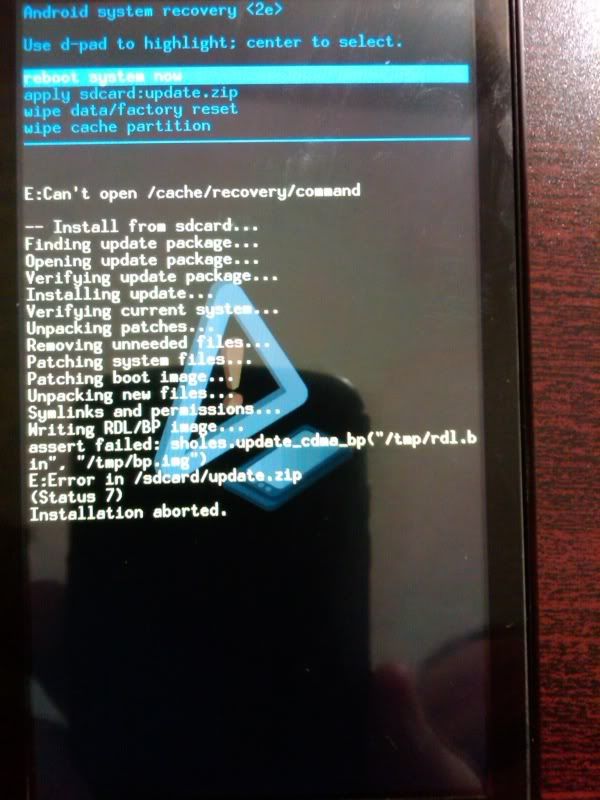
IMG00003-20091103-2120.jpg

oh, so im not the only other long islander on here!! also we got another islander fan! :)
 
oh, so im not the only other long islander on here!! also we got another islander fan! :)

The only reason for the Baseline version to change is if they make changes to your Radios... this is only done rarely ...
like only once for the G1...

So i dont think you have to worry about that ...
 
Wow. I just signed in and saw the update here. Really sweet. Nice clear instructions right on the first page too. Took all of 2 minutes to download and install. Thanks to all you wonderful folks who figured it out first and told us what worked and what went wrong.
 
Could some one help me with something, i understand everything but the root directory of sd card. where is the root dir or how do i find it?:confused:
 
Has anyone noticed degraded call quality since upgrading to 2.0.1? I ask because I have noticed it all day. I use my phone a lot for business and I had several calls today with awful call quality and even had a few dropped calls (I can probably count on one hand how many dropped calls I've had in the last year or so). Prior to today I had noticed no such issues with the phone or coverage aside from some minor echoing here and there.
 
how do i move the update file to my droid from my pc?

:confused: Plug in your phone to your computer using a USB cable, mount the Droid using the pull down notification menu, then open My Computer, enter the Removable Drive that appears, and copy the file there.
 
did that, but it shows whats on the sd card, but no root file. astro shows root file if you fo "up"

Root is another term for the first space you see. So, if you go into My Computer, double click on the "removable drive", you are now in the root folder.
------------------

Definition: The root folder of any partition is the "highest" folder in the hierarchy. The root folder contains all other folders and can also contain files.
For example, the root folder of the main partition on your computer is probably C:\. The root folder of your DVD or CD drive might be D:\.
 
One the things i mmissed about my blackberry was being able to go to crackberry and loas the new os before everyone else, and try hybrids etc....

This forum just filled that void for me :)

Thank you, thank you
 
anyone else use the multimedia cradle? Mine will no longer pull in the temperature. I tried to manually set the location too and it cant find anything searching with both zip code and city name.....

This is happening on both mine and my wife's droid, I updated them both to 2.0.1. Update seemed to go smooth, this is my only issue.

Anyone else having this problem?
 
Just went to email a photo to myself and noticed that only black squares were showing up in the thumbnails, rebooted the phone, gallery is now empty, checked the SD card and it's now back at full capacity, all music/ring tones/videos/pictures are gone, like if the SD card were formatted...
 
Back
Top Bottom