

One Beast
Android Enthusiast
So you hit mount R/W long pressed Build.prop and picked open in text editor. Nothing are you rooted all the way.
Nevermind didnt know about the long press...Robooting now

Thanks Aldo
Follow along with the video below to see how to install our site as a web app on your home screen.
Note: This feature may not be available in some browsers.
So you hit mount R/W long pressed Build.prop and picked open in text editor. Nothing are you rooted all the way.

I successfully changed it but when i reboot it goes back to 8000000
Im rooted with Unrevoked3 so im not fully rooted maybe thats why but i tried twice and also shot a vid and checked the details and it also said 8mbs

It's my Tweak hehe post 43. I'm working on Cyan 6 and his is 6mb bitrate for 720p. His H.264 is really low around 2mbps which i am working on oh how my head hurts. Bam.


HTC is not, why would they? They got there monies worth, unless we setup a mass complaint or revolt lol

That is beautiful!!!!!!!!!!!!!!!!!!!!!!!!!!!!!!!!!!!!!!!
- no motion blur
- no graining
- far more responsive to light changes
Can you take some indoors in lesser light?

I'm SERIOUS, no sarcasm here. That is awesome video. I will be rooted by the end of the week just because of this.
Yeah. I was totally blown away near the end watching the motion clarity and image stabily when the plants caught the breeze. And right when I was getting ready to rewind - you jiggled it for us.
Yeah. No sarcasm - VERY freaking nice.
Also another viewing tip - don't watch the embedded version - click on the title bar to go to the YouTube page, choose 480p as Aldo says - but also click the L-shaped expand button - not the full screen, but expand - that'll take it to actual 1:1 pixel mapping on your monitor. That's the next best thing to simply downloading it (which I'll be doing later).

I can increase brightness,contrast,sharpness,saturation and modes like Negative,aqua, you know those funky colors.
View attachment 8562
Right now this is what i got. Trying to increase the resolution but i have guest over so i can only do soo much. This is H.264 at 10 Mbps. I'm trying Earlymon and also we can use aac as a audio codec.
Here is a sample and i tried shaking it to cause stutter but i think it handle itself. Oh yes your eyes are not bad everything is brown why no raiiinnnnnnn!!!!!!!. Once i get this up all the way it should be muccch better but so far so good.
Remember youtube lowers the quality bad youtube. Try increasing it to 480p .
Actually, I've got some time to kill, so I'll be recording three versions of the same room with my Evo
1. Using the default MPEG4 codec, running Fresh 1.0.1, bit rate increased to 10 Mb/s.
2. Using the default MPEG4 codec, running Fresh 1.0.1, bit rate left at stock value, which is either 6 or 8 Mb/s.
3. Using the h.264 codec, running CyanogenMod 6 RC1, bit rate set to whatever Cyanogen set it to (I can't find those settings using this rom)
The video I'll be recording is in relatively poor lighting conditions, but I'm hoping it will at least be a little bit useful.
Edit: First video is up
Edit: Second video is up
Using the default MPEG4 codec, bit rate increased to 10 Mb/s
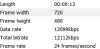
OK - is it just me, or doesn't the pan across the dresser and especially the bedspread and sheets seem considerably clearer on the 3rd one?
Help me out here gang - am I simply biased - or isn't that proof that the H.264 codec is motion optimized?
View attachment 8567
I am going to let your mind explode.
Only if my guests would leave i would have more time.
Sir, on behalf of all us HTC Evo owners, I demand you reveal your secrets! How do you manage to pull off such sorcery?! And in such high definition?!
I'm very glad I went for the Class 6 MicroSD card all of a sudden.
I can live the questionable video quality for now, but not the horrendous audio quality. Is this what we're stuck with due the limitations of the phone microphone, or is this something can be improved with a firmware update?
