
• After 15+ years, we've made a big change: Android Forums is now Early Bird Club. Learn more here.

Forget 30fps cap. Fix our video camera first.

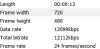
Im rooted with Unrevoked3 so im not fully rooted maybe thats why but i tried twice and also shot a vid and checked the details and it also said 8mbs

 
It's my Tweak hehe post 43. I'm working on Cyan 6 and his is 6mb bitrate for 720p. His H.264 is really low around 2mbps which i am working on oh how my head hurts. Bam.

Just for a point of reference, I have the DVD-equivalent digital copy of Star Trek (the latest movie) that came with my Blu-ray copy. It's the widescreen original aspect ratio format, IOW 853*352 pixel format, and it's in H.264 AVC video with a DRM'd audio track using the AAC codec.

And that, my friends, is at a 2 Mbps rate.

It's not the Blu-ray and this copy isn't as smooth/good - but it is DVD quality - and it indicates what H.264 is truly capable of.

FWIW - I have 720p (native) movie in H.264 whose bitrate is 6 Mbps.

There's lots of tweaks and profiles within H.264 that are implementable.

This mod is super new and (obviously) a work in progress.

But I'm terribly encouraged because we now know for a fact that the H.264 codec CAN be implemented within our existing hardware.

If the final work product made available to us, either via root or HTC (fingers crossed), is adjusted to give DVD quality/HD quality within the easily-supportable bitrates for our phones, then I don't see how we'll be poorly served at these bitrates.

Honestly - if we get to that with our codec, I won't be worrying about the sensor or the lens - I'll be worrying about my abilities and creativity to film what I want.


There's a desert saying that a camel gets into your tent by sticking his nose in first.

With this offering, I'd say the camel's nose is squarely in the tent. :)

BTW - Here's some interesting math regarding frame size, frame rate, color density and bit rates that some may find revealing. It give the hard numbers backing up what I said earlier - adding bitrate to MPEG4 is a losing game, you can't get there from here, it's all about the codec and how that's tweaked.

http://forum.xda-developers.com/showpost.php?p=6972389&postcount=18

Remember - ALL codecs are compressed, just some better than others.
 
Tease.PNG

Right now this is what i got. Trying to increase the resolution but i have guest over so i can only do soo much. This is H.264 at 10 Mbps. I'm trying Earlymon and also we can use aac as a audio codec.

http://www.youtube.com/watch?v=vdkbzp1prVk

Here is a sample and i tried shaking it to cause stutter but i think it handle itself. Oh yes your eyes are not bad everything is brown why no raiiinnnnnnn!!!!!!!. Once i get this up all the way it should be muccch better but so far so good.

Remember youtube lowers the quality bad youtube. Try increasing it to 480p .
 
That is beautiful!!!!!!!!!!!!!!!!!!!!!!!!!!!!!!!!!!!!!!!


- no motion blur
- no graining
- far more responsive to light changes
- commentary and finger/foot effects hilarious (LMAO @ 35 seconds)


Can you take some indoors in lesser light? I'm almost hesitant to believe that is an EVO.
 
I'm SERIOUS, no sarcasm here. That is awesome video. I will be rooted by the end of the week just because of this.


Maybe in my excitement I over exaggerated. There is some motion blur, but not nearly as bad as I'm getting and as good as any of the other phones I've seen. But for 480p that's darn good.

Is this readily available by root?
 
I'm SERIOUS, no sarcasm here. That is awesome video. I will be rooted by the end of the week just because of this.

Well Thanks i haven't used stock camcorder in sooo long i have no idea what it looks like or if its the same. I like to think i have the best video camera for Evo in the WORLD!!!! Only i know the secret hahahaha nobody will know.....ok maybe i will tell gosh i am nice. But still testing and getting it to a higher resolution also one test made my phone go pop pop pop so hence i rather test then say something and everyone gets mad at the ALDO.
 
Yeah. I was totally blown away near the end watching the motion clarity and image stabily when the plants caught the breeze. And right when I was getting ready to rewind - you jiggled it for us.

Yeah. No sarcasm - VERY freaking nice.

Also another viewing tip - don't watch the embedded version - click on the title bar to go to the YouTube page, choose 480p as Aldo says - but also click the L-shaped expand button - not the full screen, but expand - that'll take it to actual 1:1 pixel mapping on your monitor. That's the next best thing to simply downloading it (which I'll be doing later).

PS - Fatal error on download - maybe private vids are locked or I'm screwing up something.
 
Yeah. I was totally blown away near the end watching the motion clarity and image stabily when the plants caught the breeze. And right when I was getting ready to rewind - you jiggled it for us.

Yeah. No sarcasm - VERY freaking nice.

Also another viewing tip - don't watch the embedded version - click on the title bar to go to the YouTube page, choose 480p as Aldo says - but also click the L-shaped expand button - not the full screen, but expand - that'll take it to actual 1:1 pixel mapping on your monitor. That's the next best thing to simply downloading it (which I'll be doing later).

I jiggled like crazy to show it would not blur. Also i like that you can film in different modes . Can that be done in stock?. Please let me know i am soo confused as to what the stock did. I can increase brightness,contrast,sharpness,saturation and modes like Negative,aqua, you know those funky colors.
 
Holy crap, sorry guys. I had gotten sleepy and went to bed before I recorded the last video. Doing so now; as an added bonus, I'll also record the scene now, where it's relatively brighter inside my room under all three settings.

Edit: Just in case anybody forgets to scroll really high up, I'll put the vids up in this post as well. I mean, I'm not hurting anyone, am I? D:
Edit 2: For anybody who's interested, I'll be uploading the raw footage for download in case you don't trust Youtube or just want to see what the actual output looks like.

Using the default MPEG4 codec, bit rate increased to 10 Mb/s (Poor lighting conditions)
DOWNLOAD: http://www.mediafire.com/?wjdflhikdf2lfhr

Using the default MPEG4 codec, bit rate set to 6 Mb/s (Default bit rate for Evo) (Poor lighting conditions)
DOWNLOAD: http://www.mediafire.com/?lavt5dta4fcj7xh

Using the h.264 codec, bit rate set to 2 Mb/s this is what Cyanogen has it set to, for some reason (Medium lighting conditions)
DOWNLOAD: http://www.mediafire.com/?yz0faqyy7yi6i0k

Using the default MPEG4 codec, bit rate increased to 10Mb/s (Medium lighting conditions)
DOWNLOAD: http://www.mediafire.com/?h8co3jowsujyibo

Using the default MPEG4 codec, bit rate set to 6 Mb/s (Default bit rate for Evo) (Medium lighting conditions)
DOWNLOAD: http://www.mediafire.com/?nw40oy986gvnbrz

Using the default MPEG4 codec, bit rate increased to 10Mb/s (Excellent lighting conditions)
DOWNLOAD: http://www.mediafire.com/?8bp7pg8t8145gzg

Using the h.264 codec, bit rate set to 2 Mb/s (Excellent lighting conditions)
DOWNLOAD: http://www.mediafire.com/?bb673wqz182sgz6

Using the h.264 codec, bit rate set to 13 Mb/s (Moderate lighting conditions)
DOWNLOAD: http://www.mediafire.com/?v4a5z0850t3ef9d

Using the h.264 codec, bit rate set to 13 Mb/s (Excellent lighting conditions)
DOWNLOAD: http://www.mediafire.com/?cl6ivxnj7n727o8

Using the h.264 codec, bit rate set to 13 Mb/s (Excellent lighting conditions) Take Two!
DOWNLOAD: http://www.mediafire.com/?fty4o0dbuxc8j3t
 
View attachment 8562

Right now this is what i got. Trying to increase the resolution but i have guest over so i can only do soo much. This is H.264 at 10 Mbps. I'm trying Earlymon and also we can use aac as a audio codec.

Here is a sample and i tried shaking it to cause stutter but i think it handle itself. Oh yes your eyes are not bad everything is brown why no raiiinnnnnnn!!!!!!!. Once i get this up all the way it should be muccch better but so far so good.

Remember youtube lowers the quality bad youtube. Try increasing it to 480p .

Holy crap, dude! That looks great! How did you get it to record h.264 at 10 Mbps? My Evo has it set to 2 mbps under CyanogenMod, and I can't find a way to change it anywhere.
 
Actually, I've got some time to kill, so I'll be recording three versions of the same room with my Evo

1. Using the default MPEG4 codec, running Fresh 1.0.1, bit rate increased to 10 Mb/s.
2. Using the default MPEG4 codec, running Fresh 1.0.1, bit rate left at stock value, which is either 6 or 8 Mb/s.
3. Using the h.264 codec, running CyanogenMod 6 RC1, bit rate set to whatever Cyanogen set it to (I can't find those settings using this rom)

The video I'll be recording is in relatively poor lighting conditions, but I'm hoping it will at least be a little bit useful.

Edit: First video is up
Edit: Second video is up
Using the default MPEG4 codec, bit rate increased to 10 Mb/s
OK - is it just me, or doesn't the pan across the dresser and especially the bedspread and sheets seem considerably clearer on the 3rd one?

Help me out here gang - am I simply biased - or isn't that proof that the H.264 codec is motion optimized?
 
OK - is it just me, or doesn't the pan across the dresser and especially the bedspread and sheets seem considerably clearer on the 3rd one?

Help me out here gang - am I simply biased - or isn't that proof that the H.264 codec is motion optimized?

Totally agree with you
 
Sir, on behalf of all us HTC Evo owners, I demand you reveal your secrets! How do you manage to pull off such sorcery?! And in such high definition?!

I'm very glad I went for the Class 6 MicroSD card all of a sudden.

Close your eyes and rub your Evo and say i wish you went 12mbps and it will happen. Here's a video at this bitrate(12Mbps). A reminder our Video player can't handle the h.264 that well. I read somewhere of a video player that worked well with it.

Let me know is the 12 Mbps better or worse. Just cus its higher does not always mean it will be better. So 10 Mbps or 12 Mbps

YouTube - VID 20100728 151549
 
I can live the questionable video quality for now, but not the horrendous audio quality. Is this what we're stuck with due the limitations of the phone microphone, or is this something can be improved with a firmware update?
 
I can live the questionable video quality for now, but not the horrendous audio quality. Is this what we're stuck with due the limitations of the phone microphone, or is this something can be improved with a firmware update?

That can be improved just i need to switch the codec to aac. Anything can be improved you just have to have patience.
 
Back
Top Bottom