
Install the app
How to install the app on iOS
Follow along with the video below to see how to install our site as a web app on your home screen.
Note: This feature may not be available in some browsers.
-
After 15+ years, we've made a big change: Android Forums is now Early Bird Club. Learn more here.
You are using an out of date browser. It may not display this or other websites correctly.
You should upgrade or use an alternative browser.
You should upgrade or use an alternative browser.
Galaxy Nexus Watering Hole
- Thread starter BabyBlues
- Start date

Stigy
Some say...
Good morning everyone & Happy Hanukkah to those celebrating.
I went back to Staten Island to spend some time with my family for Hanukkah and got some really, really great gifts. I guess you know you are getting old when you are excited for dress clothes and ties, but its time to get rid of some of my old ones that don't fit me well anymore. Got some new awesome slippers too!
And I finally got one of those starter home-brew kits. The kit comes with a Classic American Light mix which I am going to start the brewing process tonight. Should take about 3-4 weeks from start to bottle & drink so I am really, really excited for it. Already bought their winter kit so when this is one is done I can start another one right away. Anyone have any tips / recommendations for someone just starting off? I know some people (maybe Pup?) did some homebrewing of their own.
I went back to Staten Island to spend some time with my family for Hanukkah and got some really, really great gifts. I guess you know you are getting old when you are excited for dress clothes and ties, but its time to get rid of some of my old ones that don't fit me well anymore. Got some new awesome slippers too!
And I finally got one of those starter home-brew kits. The kit comes with a Classic American Light mix which I am going to start the brewing process tonight. Should take about 3-4 weeks from start to bottle & drink so I am really, really excited for it. Already bought their winter kit so when this is one is done I can start another one right away. Anyone have any tips / recommendations for someone just starting off? I know some people (maybe Pup?) did some homebrewing of their own.
breadnatty08
pain rustique
TF300T for $250! Pretty good deal. 

ryancmatchett
Android Expert
I have done one batch of home brew and bought another... Will wait till after the move to finish it.
Best 2 suggestions I was given is if you don't already have bottles to make sure to collect ones that had a pop off top, not screw on. And to get yourself a topper clamp. The one I bought was about $35 and it sits on the counter but is really tall, so I can use whatever bottles I want in the future.
I am definitely excited to do my second batch the first one was great! Just have patience before drinking to make sure it has completely cured. It's definitely better to have a full glass of beer than of foam only!
Happy Hanakah! And happy Monday to all.... Lol
Best 2 suggestions I was given is if you don't already have bottles to make sure to collect ones that had a pop off top, not screw on. And to get yourself a topper clamp. The one I bought was about $35 and it sits on the counter but is really tall, so I can use whatever bottles I want in the future.
I am definitely excited to do my second batch the first one was great! Just have patience before drinking to make sure it has completely cured. It's definitely better to have a full glass of beer than of foam only!
Happy Hanakah! And happy Monday to all.... Lol
ryancmatchett
Android Expert
Hope you feel better Anti... And a great job to Isaac!

AntimonyER
CHANGED FROM AF ADDICT MIKESTONY
Morning folks! Looks like quite a few of you had a busy weekend!
Wish I could see what you posted Anti....stupid work filters.
Edit: WOOT-OFF!!!
Could be worse, work filter blocked AF entirely for me now.


MSUgEEk
Android Expert
Could be worse, work filter blocked AF entirely for me now.
Wow....I'd be sol if that happened. No signal at desk.
breadnatty08
pain rustique
Dumb question here. Trying to set up my new surround sound system and am a little lost. Connecting the front speakers, it's supposed to go in these enclosings:
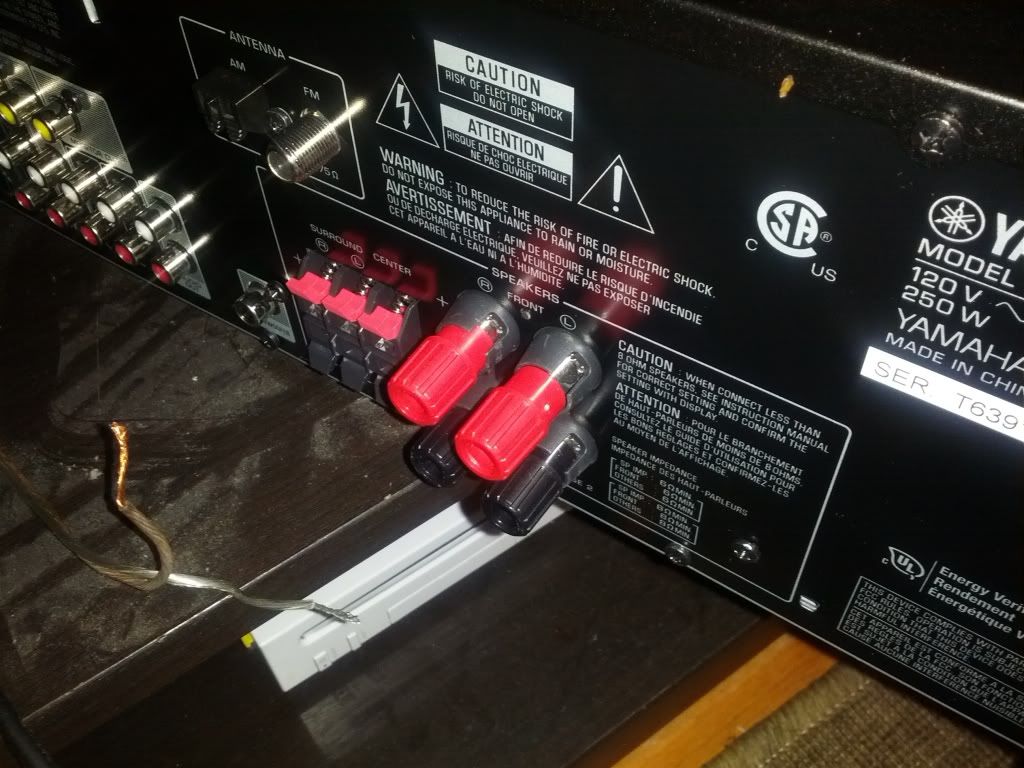
They're different from the regular speaker connectors you can see the the left. How do I connect it?
They're different from the regular speaker connectors you can see the the left. How do I connect it?

IHateMyTreo
Android Expert
Geek is right. Those are either screw-ons, or spring loaded. Pull them back to reveal the hole for the wires.
breadnatty08
pain rustique
Alright, now trying to get the damn thing to put out some sound! Have tried a couple different settings, but can't get anything. 

Dread, those red & black knobs should pull OUT a little, revealing a hole in the post underneath. Slide the speaker wire through the post hole and then let go
Ah, ninja'd at the last second AGAIN... story of my life...
Ah, ninja'd at the last second AGAIN... story of my life...
breadnatty08
pain rustique
Got that. Tried the optical in (for sound), from my TV, but get nothing. Tried a 3.5mm from my phone, and nothing also. 
My guess is the old speaker cable I had for the other sound system is a no go. Not sure why?
Edit: Wrong optical input. Working now. Sorta. Some speakers a no go. May have some cable issues.
Second edit: Okay, popped in a Blu ray and they're all working. Sweet.
My guess is the old speaker cable I had for the other sound system is a no go. Not sure why?
Edit: Wrong optical input. Working now. Sorta. Some speakers a no go. May have some cable issues.
Second edit: Okay, popped in a Blu ray and they're all working. Sweet.
breadnatty08
pain rustique
Alright, threw on some Andrew Bird via Youtube, and this system is friggin sweet. 
Nice to have a brand name sound system and not just a cheap Insignia.
This is the one btw:
Yamaha 5.1Ch. Home Theater System with Subwoofer YHT-497BL - Best Buy
I think really good for the cost. It's no Bose, but it's just fine for our tiny apartment.
Nice to have a brand name sound system and not just a cheap Insignia.
This is the one btw:
Yamaha 5.1Ch. Home Theater System with Subwoofer YHT-497BL - Best Buy
I think really good for the cost. It's no Bose, but it's just fine for our tiny apartment.

Checked the specs on that. It comes with a sound calibration microphone. Use it as it will make it much better. When I set up mine I set the microphone in my seat (the center of the seating area for the room) and it automatically balances the volume levels to each speaker for optimum effect.
It was a piece of cake for mine (Sony). Plug in the mike, set it down somewhere, and run calibration. Takes about ~60 seconds.
It was a piece of cake for mine (Sony). Plug in the mike, set it down somewhere, and run calibration. Takes about ~60 seconds.
breadnatty08
pain rustique
Thanks, Pup!
I'll have to check that out. Our living room is really tiny. I'm going through the different sound configs to see what's best. Problem is, I generally sit on the left side of the couch and I'm quite close the the rear left speaker.
Edit: Ran through it, and it really turned up the volume on the right side proportional to the left. Nice.
I'll have to check that out. Our living room is really tiny. I'm going through the different sound configs to see what's best. Problem is, I generally sit on the left side of the couch and I'm quite close the the rear left speaker.
Edit: Ran through it, and it really turned up the volume on the right side proportional to the left. Nice.
MSUgEEk
Android Expert
I did the same with my 7.1 Onkyo. Makes a pretty big difference as Pup said. It's a middle of the road system and the HDMI ports started going out last year but I love it. Couldn't see paying more for what we use it for. I just run my HDMI to TV and a single Optical over to the surround. Cleaner setup that way anyway for my situation.
Have noticed something strange this week with my new TV. The HDMI cables I have are apparently attrocious. Signal won't even cause tv to recognize a picture at all on some things and on others the picture and sound flickers constantly. I just notice it when watching 1080p content. After finding a good cable, I tested all devices and they all work with it on any port, but depending on other port and cable combos, I get nothing or constant flickering. Ordered a complete new set of 3 HDMI cables to see if it helps. If not, looks like the TV may be going to Panasonic for repair.
Have noticed something strange this week with my new TV. The HDMI cables I have are apparently attrocious. Signal won't even cause tv to recognize a picture at all on some things and on others the picture and sound flickers constantly. I just notice it when watching 1080p content. After finding a good cable, I tested all devices and they all work with it on any port, but depending on other port and cable combos, I get nothing or constant flickering. Ordered a complete new set of 3 HDMI cables to see if it helps. If not, looks like the TV may be going to Panasonic for repair.
breadnatty08
pain rustique
This is good for a laugh (outside of the fact the reporter uses that miserable DX ringtone)
Probably ninja'd on this, but Airdroid 2 is looking for beta testers. This time you can control your phone from anywhere, you don't have to be on the same wifi network. I don't have the link, but look for it and get your hat in the ring!
Sent from my Galaxy Nexus using SwiftKey Flow
Sent from my Galaxy Nexus using SwiftKey Flow

blkbeltkid17
Android Expert
Humm looks sketch and interesting at the same time

blkbeltkid17
Android Expert
I just watched last night's episode and have seen every one before and this final one is going to be more of a nail biter the last seasons.... Ahhhhhhhh

blkbeltkid17
Android Expert
Ahhh I know... And then the end when he is in cufs with that I am gonna destroy the world look on his face
NEWS FLASH:
JBSourcery 4.2.1 Pre-Release 5 in IRC right now
Okay, back to your regularly scheduled bean-dippin'
JBSourcery 4.2.1 Pre-Release 5 in IRC right now
Okay, back to your regularly scheduled bean-dippin'