
Install the app
How to install the app on iOS
Follow along with the video below to see how to install our site as a web app on your home screen.
Note: This feature may not be available in some browsers.
-
After 15+ years, we've made a big change: Android Forums is now Early Bird Club. Learn more here.
You are using an out of date browser. It may not display this or other websites correctly.
You should upgrade or use an alternative browser.
You should upgrade or use an alternative browser.
@Drew and @unimchu...Regarding installing the ROM on 1.2.3 instead. I do believe it should work ok for you. You are certainly able to try it, just make sure you create a nandroid backup first.
So I successfully flashed 1.2.3 (the flash_image step actually took 2-3 seconds instead of instantaneously) and my phone rebooted into recovery. I chose the second option which was "Create Nandroid Backup" but it immediately said "Error! Cannot create Nandroid backup." and that's as far as I could get. I rebooted the phone into regular mode, mounted it, deleted 1.2.3 and tried pushing/flashing the 1.5.2 img from the fresh pre-kitchen directory instead of the one linked to in your tutorial (started from step 13 of your instructions). It seemed to work again... took 2-3 seconds to flash the img which has never happened before with 1.5.2. But sure enough, when I adb rebooted into recovery, it froze up again on the HTC logo.
I am clueless. The fact that I was able to do everything with the 1.2.3 img and get into a recovery reboot makes me wonder what the problem is. I believe I am successfully pushing and flashing the img but it just won't boot for me. I am definitely rooted though because I can use the screenshot app and wireless tether. Don't want to push any custom ROMs until I have a good nandroid backup though, preferably with the latest img. Any other ideas?

diordnahero
Lurker
After rooting is it safe to delete the recovery img file from the sdcard? (As you mention is safe to delete the fresh 1.1 zip file after flashing. Great tutorial

mysticmead
Android Expert
once it's flashed it can be removed from the SD card.

uminchu
Android Enthusiast
Here's what worked for me: I was able to flash v1.2.3 and get a nandroid backup. With ccapasso's input, I went ahead and flashed fresh 1.1 and Gumbo Kernal beta from there.So I successfully flashed 1.2.3 (the flash_image step actually took 2-3 seconds instead of instantaneously) and my phone rebooted into recovery. I chose the second option which was "Create Nandroid Backup" but it immediately said "Error! Cannot create Nandroid backup." and that's as far as I could get. I rebooted the phone into regular mode, mounted it, deleted 1.2.3 and tried pushing/flashing the 1.5.2 img from the fresh pre-kitchen directory instead of the one linked to in your tutorial (started from step 13 of your instructions). It seemed to work again... took 2-3 seconds to flash the img which has never happened before with 1.5.2. But sure enough, when I adb rebooted into recovery, it froze up again on the HTC logo.
I am clueless. The fact that I was able to do everything with the 1.2.3 img and get into a recovery reboot makes me wonder what the problem is. I believe I am successfully pushing and flashing the img but it just won't boot for me. I am definitely rooted though because I can use the screenshot app and wireless tether. Don't want to push any custom ROMs until I have a good nandroid backup though, preferably with the latest img. Any other ideas?
This morning, I tried again and I was able to successfully flash the v1.5.2 recovery rom, and create another nandroid. The phone runs so smoothly and so much faster now; for me, it's definitely worth the glitches and confusion endured. Many thanks to ccapasso for all the patience and advice.
unminchu, congratulations! That's great to hear you got it working. I hope I can join the ranks soon. I won't give up easily. I wish I could follow your steps--unfortunately, I was not able to do the nandroid backup with 1.2.3 flashed, so I'm not comfortable flashing roms until I can do that. When I did successfully flash 1.2.3, I booted into recovery and selected the second option (I think it said "create Nandroid backup"). Is that all there is to it? When I selected that option, it immediately said "Error! Cannot create Nandroid backup" and that's as far as I could get. I really wish I knew what was going on with my phone. For some reason it just refuses to boot into recovery with the 1.5.2 img.
uminchu
Android Enthusiast
I concur with your choice to remain in pause mode until you can back your phone up. I also refused to skip the nandroid step, and I'm glad I went that route. I did observe two separate recovery menus: When you enter "reboot recovery" from the shell, it looks exactly as described in the tutorial. You go directly into a shorter, black screen menu with create and restore combined into a single option. If you use the volume rocker to force it into the white screen and select recovery with the home key, you then get another, longer, black screen menu, where create and restore are separate options.unminchu, congratulations! That's great to hear you got it working. I hope I can join the ranks soon. I won't give up easily. I wish I could follow your steps--unfortunately, I was not able to do the nandroid backup with 1.2.3 flashed, so I'm not comfortable flashing roms until I can do that. When I did successfully flash 1.2.3, I booted into recovery and selected the second option (I think it said "create Nandroid backup"). Is that all there is to it? When I selected that option, it immediately said "Error! Cannot create Nandroid backup" and that's as far as I could get. I really wish I knew what was going on with my phone. For some reason it just refuses to boot into recovery with the 1.5.2 img.
For all the issues and frustrations I experienced, I never saw the 'Cannot create Nandriod backup' error, so I'm sorry that I do not have an idea or a suggestion to offer for that (total noob here). You're 99% done with the pre flashing steps, and this has the sound of something fundamental that you'll figure out and deal with. If ccapasso's current suggestion doesn't apply, you might try floating your situation by the minds at GeekFor.Me or xda-developers.com.
Your experiences and ideas helped me out a great deal; they pretty much got me over the hump. Sorry I couldn't reciprocate.
*Edit: I just remembered, I did see a cannot create nandroid backup response, one time. I could not get it to reboot into recovery mode from the shell, so I used the volume rocker method. I noticed the menu varied from the tutorial, where create and restore were separated, and I mistakenly selected restore instead of create. I got the cannot create Nandroid backup response, but there some other syntax included, such as no backup present, or something like that. Does that sound familiar?
I woke up this morning and thought to myself, "What if my SD card is almost full and there's just not enough room to do the nandroid backup?" I logged onto androidforums, and sure enough, ccapasso suggested the same thing. I only had 5 MB free. I tried flashing 1.5.2 and still had the same error, but successfully flashed 1.2.3 and created a nandroid backup with no problems. I'm going to try flashing fresh 1.1 and the gumbo kernel and see if I am able to flash 1.5.2 after that like uminchu did. Thank you guys so much for the help. Will report back after I try the ROM and kernel.
uminchu
Android Enthusiast
Excellent! If you're able to flash the rom and/or kernal, don't forget to make a new nandroid prior to trying another 1.5.2 recovery. You can also automate the nandroid process using the tools section of pre-kitchen.I woke up this morning and thought to myself, "What if my SD card is almost full and there's just not enough room to do the nandroid backup?" I logged onto androidforums, and sure enough, ccapasso suggested the same thing. I only had 5 MB free. I tried flashing 1.5.2 and still had the same error, but successfully flashed 1.2.3 and created a nandroid backup with no problems. I'm going to try flashing fresh 1.1 and the gumbo kernel and see if I am able to flash 1.5.2 after that like uminchu did. Thank you guys so much for the help. Will report back after I try the ROM and kernel.
Guys, my phone is absolutely flying right now. It was definitely worth the effort to do this. Per uminchu's suggestion, I'll make sure to do another nandroid backup with my current recovery img before trying 1.5.2. Should I save both nandroid folders since the first one was with the stock ROM, or does it not matter?
I need to check out the pre-kitchen and figure out exactly how to use it.
Thanks again so much for all the help.
I need to check out the pre-kitchen and figure out exactly how to use it.
Thanks again so much for all the help.
Guys, my phone is absolutely flying right now. It was definitely worth the effort to do this. Per uminchu's suggestion, I'll make sure to do another nandroid backup with my current recovery img before trying 1.5.2. Should I save both nandroid folders since the first one was with the stock ROM, or does it not matter?
I need to check out the pre-kitchen and figure out exactly how to use it.
Thanks again so much for all the help.
I need to check out the pre-kitchen and figure out exactly how to use it.
Thanks again so much for all the help.
uminchu
Android Enthusiast
The nandroid folder contains a cryptically labled subfolder, which I suspect may be unique for each device (or is that the serial number?). Inside that subfolder are separate subfolders, labled for date and time, for each and every backup you create. Each time I backup, I recopy the phone's nandroid folder over the top of the one on my PC, and have it merge and replace the previous copy.Guys, my phone is absolutely flying right now. It was definitely worth the effort to do this. Per uminchu's suggestion, I'll make sure to do another nandroid backup with my current recovery img before trying 1.5.2. Should I save both nandroid folders since the first one was with the stock ROM, or does it not matter?
I need to check out the pre-kitchen and figure out exactly how to use it.
Thanks again so much for all the help.
When you start using the kitchen to create backups, it prefixes the lower level subfolder with "fresh-", so you can see immediately which ones were created manually or with the kitchen.

ccapasso
Android Expert
Guys, my phone is absolutely flying right now. It was definitely worth the effort to do this. Per uminchu's suggestion, I'll make sure to do another nandroid backup with my current recovery img before trying 1.5.2. Should I save both nandroid folders since the first one was with the stock ROM, or does it not matter?
I need to check out the pre-kitchen and figure out exactly how to use it.
Thanks again so much for all the help.
Glad to hear you got it working. Let us know if ya need anything else. Happy Rooting/ROM'ing !

gnarlyDUCK
Well-Known Member
Thanks! Rooted & ROMed gumbo
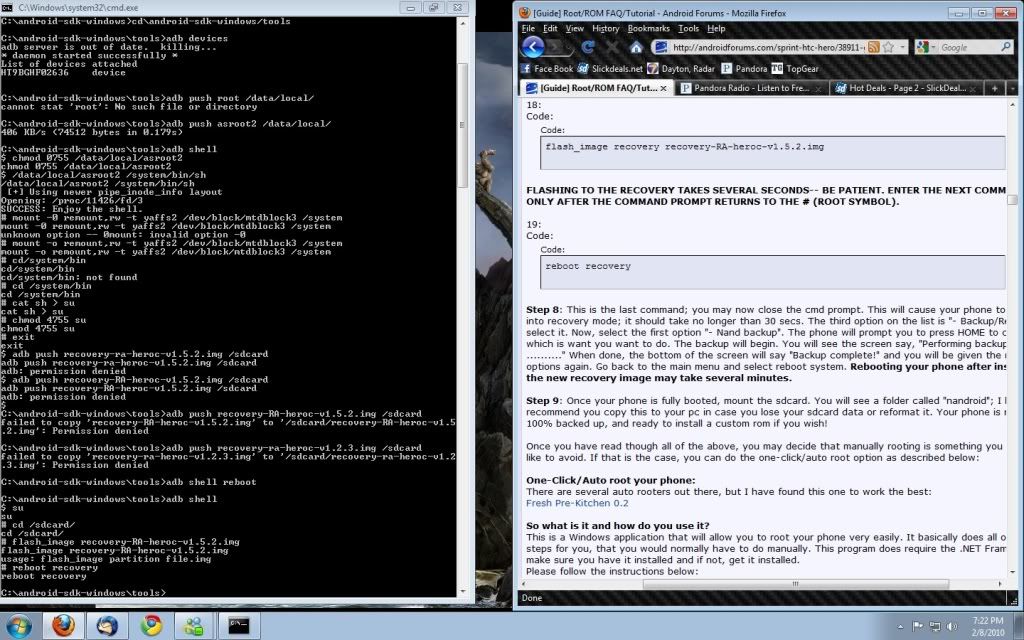
check and checkYou are getting permission denied when trying to push the RA img. Make sure your SD card is:
1. Not Full
2. Not Mounted
now what?
ccapasso
Android Expert
Have you read though this thread and tried some of the other suggestions for people that had similar problems?
Do you have USB Debugging Enabled (Make sure it is still enabled when your phone is connected via USB)?
Do you have the correct drivers installed?
Try doing this:
1. Plug your phone into your computer
2. When the prompt comes up on your phone, go ahead and mount your SD Card
3. Browse to your SD Card folder on your computer and put the 1.2.3 img on it
4. Slide down the notification bar and unmount your SD Card
5. Continue with manual instructions.
Also, looking at your screen shot I see another error, after step 10 (chmod 4755 su)
you only typed exit once, when it should have been typed twice. Please read through the steps several times and try again. I also recommend copying and pasting the code (if you don't know, you can right click in a cmd prompt and choose paste). This prevents typing errors, which we can see you made several. I would recommend going through the whole thing again, slowly, and see what happens.
Do you have USB Debugging Enabled (Make sure it is still enabled when your phone is connected via USB)?
Do you have the correct drivers installed?
Try doing this:
1. Plug your phone into your computer
2. When the prompt comes up on your phone, go ahead and mount your SD Card
3. Browse to your SD Card folder on your computer and put the 1.2.3 img on it
4. Slide down the notification bar and unmount your SD Card
5. Continue with manual instructions.
Also, looking at your screen shot I see another error, after step 10 (chmod 4755 su)
you only typed exit once, when it should have been typed twice. Please read through the steps several times and try again. I also recommend copying and pasting the code (if you don't know, you can right click in a cmd prompt and choose paste). This prevents typing errors, which we can see you made several. I would recommend going through the whole thing again, slowly, and see what happens.

Konikub
Well-Known Member
Hope this is not a dumb question, as I have looked for an answer in these many pages here...also in the first post of this thread but could not find one.
Can I go in manually and do changes via black screen and commands if I have used the "one click" kitchen method of rooting. I am only accustom to flashing new things into my rom or hero....but I have something I would like to add or change, that is not flashable, however what needs to be changed is written out.
So is it possible to do command line after auto root or am I stuck to flashing from here on out?
Thanks in advance and hope someone here knows the answer
Can I go in manually and do changes via black screen and commands if I have used the "one click" kitchen method of rooting. I am only accustom to flashing new things into my rom or hero....but I have something I would like to add or change, that is not flashable, however what needs to be changed is written out.
So is it possible to do command line after auto root or am I stuck to flashing from here on out?
Thanks in advance and hope someone here knows the answer
mysticmead
Android Expert
yes.. just make a nandroid backup before making any changes
Konikub
Well-Known Member
yes.. just make a nandroid backup before making any changes
Thank you for the heads up...now I'm headed back to the begining of this thread to see how to access the command file via USB mounting

Wish me luck!!!