• After 15+ years, we've made a big change: Android Forums is now Early Bird Club. Learn more here.

[Guide] Root/ROM FAQ/Tutorial (for 1.5)

Ok, here is the test from my command prompt showing what I didshowing what I did. I am putting the errors messages I got in red. Can anyone help???:

Microsoft Windows [Version 6.0.6002]
Copyright (c) 2006 Microsoft Corporation. All rights reserved.
C:\Users\rslonake>cd C:\android-sdk-windows\tools
C:\android-sdk-windows\tools>adb devices
adb server is out of date. killing...
* daemon started successfully *
List of devices attached
HT99NHF00092 device

C:\android-sdk-windows\tools>adb push asroot2 /data/local
518 KB/s (74512 bytes in 0.140s)
C:\android-sdk-windows\tools>adb shell
$ chmod 0755 /data/local/asroot2
chmod 0755 /data/local/asroot2
$ /data/local/asroot2 /system/bin/sh
/data/local/asroot2 /system/bin/sh
[+] Using newer pipe_inode_info layout
Opening: /proc/1210/fd/3
SUCCESS: Enjoy the shell.
# mount -o remount,rw -t yaffs2 /dev/block/mtdblock3 /system
mount -o remount,rw -t yaffs2 /dev/block/mtdblock3 /system
# cd /system/bin
cd /system/bin
# cat sh > su
cat sh > su
# chmod 4755 su
chmod 4755 su
# exit
exit
$ exit
exit
C:\android-sdk-windows\tools>adb push recovery-RA-heroc-v1.5.2.img /sdcard
failed to copy 'recovery-RA-heroc-v1.5.2.img' to '/sdcard/recovery-RA-heroc-v1.5
.2.img': Permission denied

C:\android-sdk-windows\tools>adb push recovery-RA-heroc-v1.5.2.img /sdcard
failed to copy 'recovery-RA-heroc-v1.5.2.img' to '/sdcard/recovery-RA-heroc-v1.5
.2.img': Permission denied

C:\android-sdk-windows\tools>adb shell reboot
C:\android-sdk-windows\tools>adb shell
$ su
su
# cd /sdcard/
cd /sdcard/
# flash_image recovery recovery-RA-heroc-v1.5.2.img
flash_image recovery recovery-RA-heroc-v1.5.2.img
error opening recovery-RA-heroc-v1.5.2.img: No such file or directory
# reboot recovery
reboot recovery
C:\android-sdk-windows\tools>

My phone reboots to a screen with a triangle and an explanation point. I get three options, the best one seems to be to reboot using previous settings, so that is the one Iselected. This is my second through this process and I got the same results both times.
 
Ok, here is the test from my command prompt showing what I didshowing what I did. I am putting the errors messages I got in red. Can anyone help???:

Microsoft Windows [Version 6.0.6002]
Copyright (c) 2006 Microsoft Corporation. All rights reserved.
C:\Users\rslonake>cd C:\android-sdk-windows\tools
C:\android-sdk-windows\tools>adb devices
adb server is out of date. killing...
* daemon started successfully *
List of devices attached
HT99NHF00092 device

C:\android-sdk-windows\tools>adb push asroot2 /data/local
518 KB/s (74512 bytes in 0.140s)
C:\android-sdk-windows\tools>adb shell
$ chmod 0755 /data/local/asroot2
chmod 0755 /data/local/asroot2
$ /data/local/asroot2 /system/bin/sh
/data/local/asroot2 /system/bin/sh
[+] Using newer pipe_inode_info layout
Opening: /proc/1210/fd/3
SUCCESS: Enjoy the shell.
# mount -o remount,rw -t yaffs2 /dev/block/mtdblock3 /system
mount -o remount,rw -t yaffs2 /dev/block/mtdblock3 /system
# cd /system/bin
cd /system/bin
# cat sh > su
cat sh > su
# chmod 4755 su
chmod 4755 su
# exit
exit
$ exit
exit
C:\android-sdk-windows\tools>adb push recovery-RA-heroc-v1.5.2.img /sdcard
failed to copy 'recovery-RA-heroc-v1.5.2.img' to '/sdcard/recovery-RA-heroc-v1.5
.2.img': Permission denied

C:\android-sdk-windows\tools>adb push recovery-RA-heroc-v1.5.2.img /sdcard
failed to copy 'recovery-RA-heroc-v1.5.2.img' to '/sdcard/recovery-RA-heroc-v1.5
.2.img': Permission denied

C:\android-sdk-windows\tools>adb shell reboot
C:\android-sdk-windows\tools>adb shell
$ su
su
# cd /sdcard/
cd /sdcard/
# flash_image recovery recovery-RA-heroc-v1.5.2.img
flash_image recovery recovery-RA-heroc-v1.5.2.img
error opening recovery-RA-heroc-v1.5.2.img: No such file or directory
# reboot recovery
reboot recovery
C:\android-sdk-windows\tools>

My phone reboots to a screen with a triangle and an explanation point. I get three options, the best one seems to be to reboot using previous settings, so that is the one Iselected. This is my second through this process and I got the same results both times.
 
when you got the error telling you permission denied you should have stopped right there.. at that point you had not transfered the recovery image to the SD card.

an option you have is to correct the permissions error (is the micro sdcard locked??) and try again or you can mount the card and copy the img file to the sdcard (not into a folder just to the root of the card) and then pickup at the point where you were trying to flash it to the phone.
 
As a follow up to what mysticmead mentioned, be sure if you mount the card and copy the img to the root folder, that you unmount the card before continuing once the img is on it.
 
If I was to follow these instructions.... (I "autorooted" all my Roms and flashes since, so I don't know how to do it.) Do I connect my phone to my computer and mount it..? I am trying to get this modification on my phone, but from what I am reading, following the instructions word for word....this only gets the commands to my 'tools' folder in my sdk folder. How would I get them to my phone?

Honestly guys, I checked and rechecked the first post in this thread and it only showed me way to ROOT my phone and I've already done that. I started to follow the intructions (in the first thread) but realized its soley for rooting the phone and not adding MODS to it. Anyone have a suggestion pa-lease :D:o:D

Oh yea...another question, do I copy and paste all commands at the same time in that backbox...or one at a time?


1. Download
2. Extract to Android SDK "tools" folder
3. Open Command Terminal
4. Change Directory to your Android SDK "tools" folder (ie: "cd c:\android-sdk-windows\tools")
5. Paste the following commands

adb remount
adb push Eclair\Browser.apk /system/app
adb push Eclair\Calculator.apk /system/app
adb push Eclair\Calendar.apk /system/app
adb push Eclair\Gmail.apk /system/app
adb push Eclair\HTCAlbum.apk /system/app
adb push Eclair\HTCCamera.apk /system/app
adb push Eclair\HtcContacts.apk /system/app
adb push Eclair\HtcMusic.apk /system/app
adb push Eclair\HtcSoundRecorder.apk /system/app
adb push Eclair\Launcher.apk /system/app
adb push Eclair\Mail.apk /system/app
adb push Eclair\Maps.apk /system/app
adb push Eclair\Mms.apk /system/app
adb push Eclair\Phone.apk /system/app
adb push Eclair\Settings.apk /system/app
adb push Eclair\Talk.apk /system/app
adb push Eclair\Vending.apk /system/app
adb push Eclair\VoiceDialer.apk /system/app
adb push Eclair\WorldClock.apk /system/app
adb push Eclair\YouTube.apk /system/app
adb reboot


6. After reboot, Goto Settings > Applications > Manage Applications
7. Scroll down to "HTC Sense" and select it
8. Press "Force Stop" and then "Clear Defaults"
9. Press your "Home" button
10. Select "Use by default for this action" and choose "Home"
 
Should i have PDAnet and/or HTC Sync running on my computer during this process. Will having either of them on affect the process?
 
mysticmead--How do I know if the sd card is locked? The file recovery-RA-heroc-v1.5.2.img is on the sd card, but my command prompt says "C:\android-sdk-windows\tools>adb push recovery-RA-heroc-v1.5.2.img /sdcard
failed to copy 'recovery-RA-heroc-v1.5.2.img' to '/sdcard/recovery-RA-heroc-v1.5
.2.img': Permission denied"


I mounted, copied the file, then unmounted and tried again... no luck. Now that I know the file is there should I start the whole process over? But I guess I need to determine if my sd card is locked, how do I check that?
 
SUCCESS!

Now for my next question, from page 1 of this forum:

Step 9: Once your phone is fully booted, mount the sdcard. You will see a folder called "nandroid"; I highly recommend you copy this to your pc in case you lose your sdcard data or reformat it. Your phone is rooted, 100% backed up, and ready to install a custom rom if you wish!

So, do I want to install a custom rom? What are the benefits? Do you have one that you recommend, and if so, where do I find it? Are directions provided?

And of course, thank you for all your help. I have been playing around with this for about 10 days.
 
when i hook up my sprint htc hero to my laptop running windows 7, it says driver not installed and when i try to have it search for the driver and have it installed it cannot be installed? does my phone need to be able to hook up to the laptop in order to root it? i just got the phone a few days ago and no cd's or anything came with the box... so i dont know how i can even make my laptop recognize the phone
 
when i hook up my sprint htc hero to my laptop running windows 7, it says driver not installed and when i try to have it search for the driver and have it installed it cannot be installed? does my phone need to be able to hook up to the laptop in order to root it? i just got the phone a few days ago and no cd's or anything came with the box... so i dont know how i can even make my laptop recognize the phone


Please read the tutorial. Your question is answered there. In fact, it is answered in step 5.
 
hi guys,

I have a htc hero unlocked but branded T-mobile.

read a few pages, but am a bit confused. things keep coming up and not explained properly. (for me anyway, I haven't a clue what I am doing! and am limited in computery phone stuff)

Will this guide help me with my hero?

Not sure what CDMA etc is? and if my phone is CDMA?

I don't know what a 'Sprint' hero is. but I don't think mine is?

Sorry for being a moron, but I keep reading and these things keep coming up. I cant quite grasp what to do. (Little things confusing me)

When the above questions are answered then I will get rooting :-) (Seems straight forward enough :-s)

I have done searches, but cant find anything to answer my questions for sure.
 
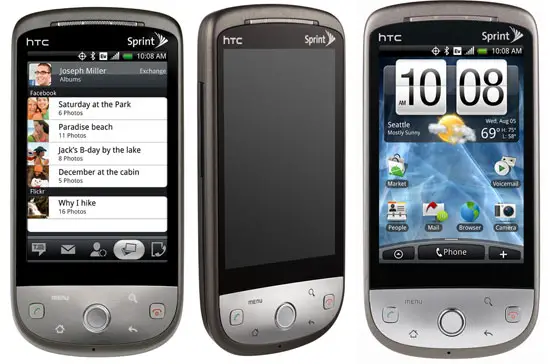
t-mobile is GSM.. so if you have the HTC Hero branded t-mobile then there's a good chance it's the GSM version.. the Sprint Hero is CDMA.. looking at your phone.. does it have the "chin" at the bottom (sort of bent towards you as you hold the phone to talk on it)? like this (HTC Hero GSM version...)
htc-hero-official8-1246560124.jpg


or does it look like this (sprint Hero CDMA version... )

sprint-htc-hero-all.jpg
 
****Update****

I have updated the FAQ Section of the tutorial with some questions that I have seen asked a lot lately. If anyone thinks of more that are often asked, please pm them to me and I will add them. This way we keep this Guide up-to-date and don't clutter it :).

Thanks.
 
ok, i finally got it. i copied the 1.5.2.img to the sd card using my card reader and it worked

i'm downloading fresh 1.1 right now
 
****Update****

I have updated the FAQ Section of the tutorial with some questions that I have seen asked a lot lately. If anyone thinks of more that are often asked, please pm them to me and I will add them. This way we keep this Guide up-to-date and don't clutter it :).

Thanks.

Awesome job. You added some great ones in there (I personally like #13 of the FAQ). Thank you for your hard work on this ccapasso.
 
edit: never mind! I had been lazy unzipping the SDK (dragged & dropped, rather than doing a proper extract). I did the same with pre-kitchen, and I need to revisit that as well. Surprised it even rooted for me.
 
I flashed an update .zip and my phone shut down and will not turn on. I have tried every button combination I can think of, but nothing happens. If I plug in the charger, the battery light is solid amber and turns off when I press and hold the power button; then if I press and hold again it turns back on, but the phone will do nothing. HELP
 
I flashed an update .zip and my phone shut down and will not turn on. I have tried every button combination I can think of, but nothing happens. If I plug in the charger, the battery light is solid amber and turns off when I press and hold the power button; then if I press and hold again it turns back on, but the phone will do nothing. HELP

Did you create a nandroid backup at some point?

Have you tried booting into recovery using the following:

ccapasso said:
17.How do I boot into Recover Mode from Power Off?
a.

1) Pull Battery (If necessary and stuck in a loop)
2) Press and hold the "Home" button
3) Continue holding "Home" while pressing and releasing the "Power" button

If you are able to boot into recovery, restore a working nandroid backup.
 
ccapasso

Yes I have a nandroid backup.

I tried your suggestion, but nothing happened. I think I "bricked" my phone, does that sound right to you? If so, do I have any options?
 
Back
Top Bottom