• After 15+ years, we've made a big change: Android Forums is now Early Bird Club. Learn more here.

Root [GUIDE] Setting Up your Android Environment

I'm trying to sync my repo with Mantera's source and I got an error on at least one of the groups.
Scratch that. My sync exited out due to fetch errors. What does this mean for me and would I be able to sync parts, or do I need to sync the whole thing?:confused:

And also, is there a log that I can refer to to see what may need refetching?

If you run repo sync again, it will just try to continue on where you left off.
 
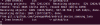
What do I do when I get this?

Also, Could I just build parts of the project? Sorry if I'm too newb.
And how do I tell the system what I want built? Weather I want CM7 or CM9?
 

Attachments

  • lock.png
    lock.png
    31.9 KB · Views: 64
What do I do when I get this?

Also, Could I just build parts of the project? Sorry if I'm too newb.
And how do I tell the system what I want built? Weather I want CM7 or CM9?

I don't see any problems in your given screenshot- it looks like it is syncing up just fine from those lines.

If you want to build CM7 then you have to repo sync from a gingerbread branch instead of the ics branch. So you could set up another directory, repo init it parameterized by gingerbread instead of ics and then repo sync from that branch. Then you can build each from their corresponding directories.
 
What do I do when I get this?

Also, Could I just build parts of the project? Sorry if I'm too newb.
And how do I tell the system what I want built? Weather I want CM7 or CM9?

If the repo sync is just stopping there and not moving after you've waited a long time, then it sounds like the sync is hung. Do this:

1. HIt CTRL+Z on your keyboard.
2. Type and then hit Enter: killall -9 repo
3. Type and then hit Enter: killall -9 python
4. After doing step 2 and/or 3 above, you will see a message about the process that was killed. If you still don't see a message about the python process getting killed, then repeat steps 2 and 3.
5. Restart the repo sync by typing: repo sync
 
I don't see any problems in your given screenshot- it looks like it is syncing up just fine from those lines.

If you want to build CM7 then you have to repo sync from a gingerbread branch instead of the ics branch. So you could set up another directory, repo init it parameterized by gingerbread instead of ics and then repo sync from that branch. Then you can build each from their corresponding directories.

In that picture, the curser just blinks. No more indication of progress after a couple of hours.

I've been reading this and other threads and I have been doing the copy and paste thing. I have noticed that under the part where I tell "repo" to sync it ends in ics. I would imagine that is for ICS Android. I also see that it pull everything from FroYo through ICS. That is unless I'm misunderstanding what I am seeing.

I've been able to change from mantera's repo to Whyzor's, but his seems to be incompleate. I guess he uses mantera's and his? I'm a little lost, just getting into programming. And like most people, I have a life too. Is there a guide where I can see what I am doing with "repo"? That way I can decode it to have a better understanding what to expect?

I'm not sure if it matters, but my system is running with with 2GB of RAM. More RAM on the way.
 
My repos aren't complete, I only published ones that I made changes to. Basically you have to sync with mantera's gingerbread branch, then add mine as remote, then pull from mine to merge into yours. Then in the future pull updates from Mantera & CyanogenMod & push to your own repo if you want publish it publicly (which I recommend).
 
My repos aren't complete, I only published ones that I made changes to. Basically you have to sync with mantera's gingerbread branch, then add mine as remote, then pull from mine to merge into yours. Then in the future pull updates from Mantera & CyanogenMod & push to your own repo if you want publish it publicly (which I recommend).

Yeah, that's what I figured. I plan on researching all of that soon, maybe friday. Been busy at work and home lately, wich makes it hard to learn big new things. But at least I'm able to inch along

Thanks to everyone who is willing to take their perscious time to move us noobs to (probably) ROMers then to Developers.

man that learning curve is steep.:D
 
Hey guise, new here to Triumph. I've attempted building a ROM for the Optimus V before but my main question is.. even if I build the ROM, how do I make changes internally? Does this require programming experience? What I mean is, sure I could build the ROM using someone else's files but how would one actually contribute to the ROM? For example, how would I begin to attempt a fix for the camera? Do I test different files which have worked for previous versions of the Triumph or maybe pull it from different devices? I don't want to just build it; I want to help improve it ^_^
 
guys what does this mean ? root@ubuntu:~/android# repo init -u https://github.com/mantera/android.git -b ics
/root/bin/repo: line 1: syntax error near unexpected token `newline'
/root/bin/repo: line 1: `<!DOCTYPE html>'
root@ubuntu:~/android# thats the error i keep getting when trying to get manteras repo what am i doing wrong ?

Looks like you don't have a good copy of repo. Make sure that you did this:

curl https://dl-ssl.google.com/dl/googlesource/git-repo/repo > ~/bin/repo

and that it downloaded correctly.

Edit: Oh and just so you know, the repo doesn't build correctly right at the moment. The last merge from CM broke something. I haven't had a chance to fix it yet.
 
Looks like you don't have a good copy of repo. Make sure that you did this:

curl https://dl-ssl.google.com/dl/googlesource/git-repo/repo > ~/bin/repo

and that it downloaded correctly.

Edit: Oh and just so you know, the repo doesn't build correctly right at the moment. The last merge from CM broke something. I haven't had a chance to fix it yet.

Mantera did u get to fix the repo yet i repo sync and when i go to pull proprietary files it says no such file or directory is that due to the repo not being good
 
Looks like you don't have a good copy of repo. Make sure that you did this:

curl https://dl-ssl.google.com/dl/googlesource/git-repo/repo > ~/bin/repo

and that it downloaded correctly.

Edit: Oh and just so you know, the repo doesn't build correctly right at the moment. The last merge from CM broke something. I haven't had a chance to fix it yet.

That would explain a lot! I'll rebuild "repo" or download or whatever I'm doing:)
 
I don't know if you want to add it, but sense "repo" runs out of ~/bin/ it may help others to know that if they get an error that "repo" doesn't exsist, then they could move their focus to the "~/bin/" directory or change the command beginning to "~/bin/repo".

I get that a lot because I keep leaving and coming back after rebooting the computer.
 
Mantera did u get to fix the repo yet i repo sync and when i go to pull proprietary files it says no such file or directory is that due to the repo not being good

No, it's not fixed yet. However, your error isn't because of that. Firstly, you can't pull the proprietary files unless you're using a FROYO rom which I assume you're not.

Secondly, you don't need to pull proprietary files anymore if you synced to my repos as that pulls the files down for you already.

even if I build the ROM, how do I make changes internally? Does this require programming experience? What I mean is, sure I could build the ROM using someone else's files but how would one actually contribute to the ROM? For example, how would I begin to attempt a fix for the camera? Do I test different files which have worked for previous versions of the Triumph or maybe pull it from different devices? I don't want to just build it; I want to help improve it ^_^

Having programming experience would help... At the very least, it is usually a good thing to be able to read the code and figure out what the code is trying to do which would help if you're trying to get code from other devices/developers and trying to use it.
 
I kept getting fetch errors so I found a switch "-f" to force the sync. I thought I would post it to find out what everyone thought.

Edit: nevermind, I still get the fetch error. I'm going to keep running "repo" and looking for solutions until I get it.
 
No, it's not fixed yet. However, your error isn't because of that. Firstly, you can't pull the proprietary files unless you're using a FROYO rom which I assume you're not.

Secondly, you don't need to pull proprietary files anymore if you synced to my repos as that pulls the files down for you already.


Having programming experience would help... At the very least, it is usually a good thing to be able to read the code and figure out what the code is trying to do which would help if you're trying to get code from other devices/developers and trying to use it.

OK thanks for your help and i was using a froyo rom when i tried it i read that part in the guide thanks again mantera
 
(java:4600): Gtk-WARNING **: Unable to locate theme engine in module_path: "pixmap",
cwhat s this means??
 
I install the repo + Java good and went sdk tools get that warning .now software updates is runnin maybe fix the warning still downloading thanks let you know wat up
 
ok guys what does this mean ? Traceback (most recent call last):
File "/root/bin/repo", line 690, in
main(sys.argv[1:])
File "/root/bin/repo", line 657, in main
_Init(args)
File "/root/bin/repo", line 189, in _Init
_CheckGitVersion()
File "/root/bin/repo", line 214, in _CheckGitVersion
proc = subprocess.Popen(cmd, stdout=subprocess.PIPE)
File "/usr/lib/python2.6/subprocess.py", line 633, in __init__
errread, errwrite)
File "/usr/lib/python2.6/subprocess.py", line 1139, in _execute_child
raise child_exception
OSError: [Errno 2] No such file or directory

Edit: nm I figured it out thanks anyways guys
 
keep getting this error when repo syncing. any ideas:Exception in thread Thread-77:908), 1.39 MiB | 57 KiB/s
Traceback (most recent call last):
File "/usr/lib/python2.6/threading.py", line 532, in __bootstrap_inner
self.run()
File "/usr/lib/python2.6/threading.py", line 484, in run
self.__target(*self.__args, **self.__kwargs)
File "/root/android/.repo/repo/subcmds/sync.py", line 200, in _FetchHelper
clone_bundle=not opt.no_clone_bundle)
File "/root/android/.repo/repo/project.py", line 934, in Sync_NetworkHalf
and self._ApplyCloneBundle(initial=is_new, quiet=quiet):
File "/root/android/.repo/repo/project.py", line 1475, in _ApplyCloneBundle
exist_dst = self._FetchBundle(bundle_url, bundle_tmp, bundle_dst, quiet)
File "/root/android/.repo/repo/project.py", line 1539, in _FetchBundle
raise DownloadError('%s: %s ' % (req.get_host(), str(e)))
DownloadError: android.googlesource.com: <urlopen error [Errno -2] Name or service not known>
then at end of sync says sync stopped due to fetch errors

 
When I do:sudo apt-get update

I see this at the end:
Code:
[COLOR=#202020][FONT=Ubuntu][/FONT][/COLOR]W: Failed to fetch http://ppa.launchpad.net/ferramroberto/java/ubuntu/dists/precise/main/source/Sources  404  Not Found

W: Failed to fetch http://ppa.launchpad.net/ferramroberto/java/ubuntu/dists/precise/main/binary-amd64/Packages  404  Not Found

W: Failed to fetch http://ppa.launchpad.net/ferramroberto/java/ubuntu/dists/precise/main/binary-i386/Packages  404  Not Found

E: Some index files failed to download. They have been ignored, or old ones used instead.[COLOR=#202020][FONT=Ubuntu][/FONT][/COLOR]

When I run:
sudo apt-get install sun-java6-jdk sun-java6-plugin

I get:
Code:
Reading package lists... Done
Building dependency tree       
Reading state information... Done
Package sun-java6-jdk is not available, but is referred to by another package.
This may mean that the package is missing, has been obsoleted, or
is only available from another source

E: Package 'sun-java6-jdk' has no installation candidate
E: Unable to locate package sun-java6-plugin
I'm running 12.04 beta2
 
Code:
piper@x1:~$ apt-cache policy sun-java6-jdk 
sun-java6-jdk:
  Installed: 6.26-2lucid1
  Candidate: 6.26-2lucid1
  Version table:
 *** 6.26-2lucid1 0
        100 /var/lib/dpkg/status
Code:
root@x1:/home/piper# apt-get install sun-java6-jdk 
Reading package lists... Done
Building dependency tree       
Reading state information... Done
The following extra packages will be installed:
  libodbc1 sun-java6-bin sun-java6-jre unixodbc
Suggested packages:
  libmyodbc odbc-postgresql tdsodbc unixodbc-bin binfmt-support sun-java6-demo default-jdk-doc sun-java6-source sun-java6-plugin ia32-sun-java6-plugin
  sun-java6-fonts ttf-baekmuk ttf-unfonts ttf-unfonts-core ttf-kochi-gothic ttf-sazanami-gothic ttf-kochi-mincho ttf-sazanami-mincho ttf-arphic-uming
Recommended packages:
  libnss-mdns gsfonts-x11
The following NEW packages will be installed:
  libodbc1 sun-java6-bin sun-java6-jdk sun-java6-jre unixodbc
0 upgraded, 5 newly installed, 0 to remove and 24 not upgraded.
Need to get 55.7 MB of archives.
After this operation, 164 MB of additional disk space will be used.
Do you want to continue [Y/n]?
I think I used this at the time

Code:
deb http://archive.canonical.com/ lucid partner
 
Back
Top Bottom