• After 15+ years, we've made a big change: Android Forums is now Early Bird Club. Learn more here.

How To: Custom Icons For Your Droid X

I figured it out after I replied. Awesome write up. My dock icons are now changed. Will work on my app icons when I get a chance.

Thanks Air!!!
 
Sorry to go off topic, but the wall papers with the green spheres and the one of the sun rising are amazing! Which ones are they?
 
Sorry to go off topic, but the wall papers with the green spheres and the one of the sun rising are amazing! Which ones are they?

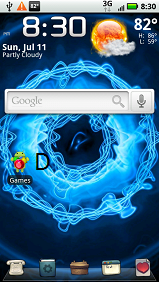
They're from the Flikie HD wallpaper app that you can get free from the Market. There are thousands of wallpapers you can choose from. I keep switching between a few different ones. Right now I'm really liking this one.

d.png
 
They're from the Flikie HD wallpaper app that you can get free from the Market. There are thousands of wallpapers you can choose from. I keep switching between a few different ones. Right now I'm really liking this one.

d.png

What clock/weather widget are you using? Is it a skin from Beautiful Widgets? I like the the Sun design
 
What clock/weather widget are you using? Is it a skin from Beautiful Widgets? I like the the Sun design

It is Beautiful Widgets Smaller Home. The weather skin is ANDRODena_Weather_Pack and the font is BeautifulGlass set with the transparent background.
 
ok... trying to access my droid from my computer... when I plug it up it recognizes a F: drive and has the following folders in it:

.doubletwist

logs

Lost DIR

tmp

I had a similar problem with my INcredible. My phone would not recognize my sd card as a place to store things. And then when I plug my phone into the usb it say no media card installed. But its in there... I checked.

IDEAS????
 
thank you Airmaxx for the thorough instructions....i can't wait to customize my icons when I get the phone tomorrow
 
I downloaded the icon pack, and so far I have changed the gmail, gchat, internet and setting icons and they work. Messages and people icon when I change it, it says the linked program is no longer installed on your phone; however, if I use the default icon for both they work. Can anyone help me out.

Thanks.
 
Back
Top Bottom