
• After 15+ years, we've made a big change: Android Forums is now Early Bird Club. Learn more here.

How to use LauncherPro

Get Widget Locker from the Marketplace -- insane amount of control over your lock screen, including custom sliders. My lock screen for example:
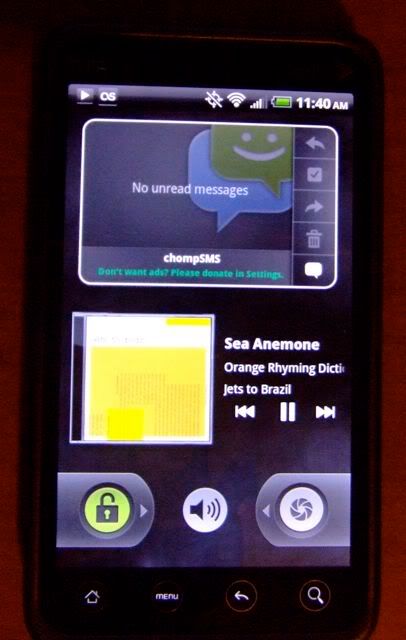
lockscreen.jpg

That's pretty cool. Does that work on Sense UI also?
 
What is that agenda widget?

And keep in mind that it can't use Sense widgets. Not a big deal for me, but something to keep in mind if you're thinking of placing one on the lock screen.
 
I have had launcher pro for a couple weeks and I only have 3 home screens. In the market it shows it having screens like sense. Do I need to get plus to get more home screens our am I missing something?
 
I have had launcher pro for a couple weeks and I only have 3 home screens. In the market it shows it having screens like sense. Do I need to get plus to get more home screens our am I missing something?

No. Pref > Homescreen Settings > Number of Screens
 
Fyi, for those using alternate widgets, I found out this morning that the toggle widgets I downloaded for launcher pro, run constantly in the background, even when not activated, so it was draining my battery. I'll have to find different ones, but wanted to share that info, in case people were noticing a drop in battery life.
Alternate widgets? Could you elaborate?
 
i made some icons in photoshop, got them added in, liked them very much.
now they have changed back to the default white ones, and I didnt reboot like the person that posted above, just unlocked he screen a few hours after changing the icons,
and there was the default ones.
 
Alternate widgets? Could you elaborate?

My bad. I downloaded 3 free toggle widgets from the app market made by Droidmania (bluetooth, wifi, and airplane mode) to use on Launcher Pro, since Launcher Pro can't use the HTC toggle widgets.

I meant "alternate," since the HTC widgets aren't accessible through Launcher Pro (free version).
 
Thinking of using LauncherPro, but like others I love my HTC widgets.

Where would I be able to find these particular widgets I could use with LauncherPro.....people-favorites, bookmarks (in grids), notes, calender, stocks.
 
Thinking of using LauncherPro, but like others I love my HTC widgets.

Where would I be able to find these particular widgets I could use with LauncherPro.....people-favorites, bookmarks (in grids), notes, calender, stocks.

People - I found a REALLY nice widget (best one I've seen) and it's free. It's called Scrollable ContactWidget BETA made by Florian Sundermann. The widget is available through AppBrain and The Market

Bookmarks - I only found one that was free and similar to the HTC Widget and it's designed to go with the Dolphin HD browser. Only problem is, it only has one size and it's kinda undersized for my liking.

Notes - ? I'm actually looking for a notes Widget still. Is there a HTC Notes widget available because I didn't see that?

Calendar - It really depends on what you're trying to do. The one I found, which is also pretty good and free, is called Android Agenda Widget and it's made by Everybody All The Time. It's avaialble through Appbrain and the Market. I prefer having a scrollable Agenda Widget vs. the full Calendar. Nontheless, this agenda widget works just as well as the HTC Agenda Widget.

Stocks - I never use this, so can't really help here.
 
I use Simple Notes. I prefer the HTC widget because you're not taken to a different screen to enter the note, but I always hated that it took up an entire screen. I've yet to find another note widget that just pops up a keyboard for a quick note without leaving the home screen or making you jump through other hoops -- sort of defeats the purpose. But Simple Notes seems to be the best one for me, plus it allows you to flip through notes on the widget like the HTC version.
 
I use Simple Notes. I prefer the HTC widget because you're not taken to a different screen to enter the note, but I always hated that it took up an entire screen. I've yet to find another note widget that just pops up a keyboard for a quick note without leaving the home screen or making you jump through other hoops -- sort of defeats the purpose. But Simple Notes seems to be the best one for me, plus it allows you to flip through notes on the widget like the HTC version.

Yeah, that's why I like the HTC note widget. Great for very fast notes.
 
Really? I'm using a custom ROM (EViO) but it's still an HTC widget.

OHHHH...Nevermind. I just figured out why I never saw it. I just realized that there's a drop down that says "Get More HTC Widgets." Notes is under that!...LOL.

Thanks for pointing this out, guys! I'm definitely gonna be using this.
 
I noticed an annoying lag swiping between home screens with LP, so I went into the Advanced Settings and changed the Memory Usage Preset to "High" ("Medium" also sped things up). Now it scrolls instantly. I haven't noticed any adverse effects on the rest of the phone by changing this, so if you're having the same problem, it's something to try.

Also, loving the swipe up feature in the dock. Phone -> People, Camera -> Video Camera, App Drawer -> Panel Thumbnails, SMS -> Quick SMS, GMail -> Exchange Mail ( -> is what it swipes to). Favorite hands down is the Quick SMS swipe :)
 
I noticed an annoying lag swiping between home screens with LP, so I went into the Advanced Settings and changed the Memory Usage Preset to "High" ("Medium" also sped things up). Now it scrolls instantly. I haven't noticed any adverse effects on the rest of the phone by changing this, so if you're having the same problem, it's something to try.

Also, loving the swipe up feature in the dock. Phone -> People, Camera -> Video Camera, App Drawer -> Panel Thumbnails, SMS -> Quick SMS, GMail -> Exchange Mail ( -> is what it swipes to). Favorite hands down is the Quick SMS swipe :)
hmm...Quick SMS? Quick Panel? what are these?
 
chompSMS has a Quick SMS function where it pops up a little window allowing you to create a new text without entering the app. I used to have it mapped to a long-press of the search button, but now I've got that mapped to pop up when I swipe the SMS icon in the dock, leaving the search button mapped to the new Voice Search.

The panels deal is that function that shows thumbnails of all your home screen panels -- I swipe up on the app drawer icon to activate that.
 
Press and hold the dock icon and choose "Swipe gesture action" from the menu. Choose "Launch shortcut..." then choose "Activities," scroll to chompSMS in the list of apps, expand it and choose the "Quick Compose" entry. Now when you swipe up on your SMS icon in the dock, the chompSMS quick compose window will pop up (assuming of course you have chompSMS installed!).

I've had an issue since I installed this where a couple of my widgets seem to just die if I am away from the launcher for a while (like if I am in the browser or another app), specifically the Android Agenda and Pure Messenger widgets. I don't have any task killers running. And now that I think about it, it can be a matter of minutes and it'll still cause those two to lose their data. I dunno if it's LP or if those widgets have that problem regardless.
 
Sweet thanks. Yeah I installed it just so I could do that. I use handcent as my main though for the UI and custom ringers.

i'll look out for any problems...
 
I don't have Handcent, but you might dig around its section in Activities to see if it also has a quick compose. It really is convenient -- pops up instantly with the keyboard activated.
 
Back
Top Bottom