brushrop03
Android Enthusiast
Yeah I just found it. I guess I didnt' dig deep enough. Convenient indeed.
Follow along with the video below to see how to install our site as a web app on your home screen.
Note: This feature may not be available in some browsers.

I just installed LP a couple days ago and love playing with the features and cusomization possibilities.
One question though. I really like the Scenes function that came with Sense UI. Is there any way to do something similar here?
For example, I really like having one for "Work" with work tools handy (and a more professional wallpaper & dock, clock, etc.) but switch to "Home" when I'm out of the office to have my social stuff handy.
Any way to request this type of feature from the developer if you can't do it as it stands?


I'm very close to ditching LP -- too many times, I'll hit the home button and have to wait while everything redraws. The developer said something to the effect that Android will kill the app if it needs it for memory and there's nothing he can do about that, so I don't blame him for it, but it doesn't keep it from being a pain in the ass.
I've tried several possible combinations of memory management in the settings, but nothing really seems to work. I do have several widgets, but they are all things I use almost daily (Simple Notes, Pandora, Music Mod, Agenda, Bookmarks, Pure Messenger, Beautiful Widgets, SwitchPro), so emptying my home screens of them would make the phone less-useful to me.
Ah well, gonna keep it a while longer, see if anything changes in development. Might ditch Pure Messenger to see if that helps too.

 Lots of cool things going on in it, just not really ready for prime time.
I posted this on the LP forum -- so far, it appears to have controlled the redraws (haven't had any since I applied these settings yesterday evening), so maybe they'll help anyone else having the same issue.
General Settings -> Keep in Memory -> Unchecked
Advanced Settings -> Memory Usage Settings:
Memory Usage Preset -> Very Low
Use Homescreen Caches -> Checked
Homescreen Cache Type -> Normal
Build Caches as Needed -> Unchecked
Clear Caches on Exit -> Unchecked
Prevent Force Closes -> Checked
I reduced my screens to 5, and the widgets I use are: Simple Notes, Pandora, Music Mod, LP Calendar, LP Bookmarks, Beautiful Widgets, SwitchPro.
When you come back to the launcher, either by unlocking the phone or exiting an app, it sometimes takes several seconds for home screens to render fully. In the meantime, you're left with a dock and not much else. This was happening to me almost any time I exited an app, but with those settings, the launcher screen pops up instantly.
The problem is that Android kills it when it needs the memory occupied by Launcher Pro. I don't know if those settings make the footprint small enough for Android not bother killing the app, or if it just makes for a much faster redraw, but whatever it is, it's working.
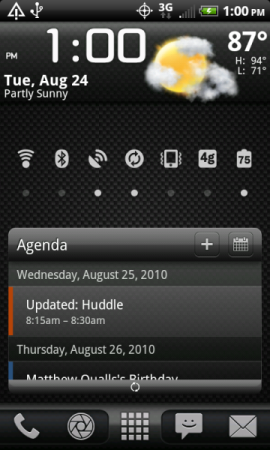
If you plunk down $2.99 for the Pro version, you get a full-screen calendar widget (actually it comes in 3 sizes). Here's my home screen (I have the mid-sized one on mine, resized to 4x2 using the widget resizing functionality) -- when you press the icon in the upper-right corner of the widget, it goes to calendar view. It will stay in whatever view you left it in. Pretty cool, much better than the HTC one, IMO.
I second that one!Android Agenda Widget app is free and works pretty well too.
hello. just a question. on adwlauncher you can set it to swipe down on the homescreen and it will close the notification bar. is there something like that on this? you can set the swipe up and down options. it is a nice thing. is it possible?