• After 15+ years, we've made a big change: Android Forums is now Early Bird Club. Learn more here.

Help HTC ONE battery discussion (usage, charging, etc.)

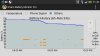
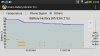
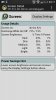
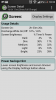
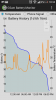
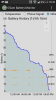
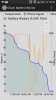
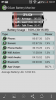
This is proof of carriers affecting battery life! If you browse my previous posts, you will see that I have been experiencing bad battery drain when on standby and I have postulated that my carrier choice (Airtel in Tanzania) and the constant switching between E, 3G & H and generally mediocre signal quality (not signal strength) was the reason my battery life was not more than 13/14 hours with 3 - 3.5 hours screen on time. Generally, even in standby it would drain annoyingly as you can see from the first three attached pics.
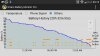
Well today I switched carriers to Vodacom (A subsidiary of Vodafone) and well, you can see the difference from the attached screen shots! The battery drain is significantly reduced and when I actually left the phone alone for long periods of time, it would drain only 1% per hour! I ended the day at 20+ hours of use with 4 hours of screen on time! I am extremely pleased as you can imagine!:smokingsomb:
 

Attachments

  • Screenshot_2013-07-11-11-42-06 (450x800).jpg
    Screenshot_2013-07-11-11-42-06 (450x800).jpg
    153.2 KB · Views: 100
  • Screenshot_2013-07-11-11-43-01 (800x450).jpg
    Screenshot_2013-07-11-11-43-01 (800x450).jpg
    106.5 KB · Views: 91
  • Screenshot_2013-07-11-11-51-03 (450x800).jpg
    Screenshot_2013-07-11-11-51-03 (450x800).jpg
    220.7 KB · Views: 84
  • Screenshot_2013-08-03-13-38-29 (450x800).jpg
    Screenshot_2013-08-03-13-38-29 (450x800).jpg
    153.6 KB · Views: 82
  • Screenshot_2013-08-03-13-39-00 (800x450).jpg
    Screenshot_2013-08-03-13-39-00 (800x450).jpg
    102.8 KB · Views: 111
  • Screenshot_2013-08-04-03-17-14 (450x800).jpg
    Screenshot_2013-08-04-03-17-14 (450x800).jpg
    150.5 KB · Views: 81
  • Screenshot_2013-08-04-03-17-25 (450x800).jpg
    Screenshot_2013-08-04-03-17-25 (450x800).jpg
    133.1 KB · Views: 126
  • Screenshot_2013-08-04-03-18-39 (800x450).jpg
    Screenshot_2013-08-04-03-18-39 (800x450).jpg
    117.3 KB · Views: 107
It's pretty commonly known that bad signal leads to shorter battery life. I get much worse battery at home, where I have 1 bar of LTE, then out and about with 3-4 bars of LTE
 
The way I use the phone, while being stock and unrooted, I can't get more than 3 hours screen on time with data connection.
 

Attachments

  • Screenshot_2013-08-05-18-33-59.png
    Screenshot_2013-08-05-18-33-59.png
    94.8 KB · Views: 142
  • Screenshot_2013-08-05-18-34-40.png
    Screenshot_2013-08-05-18-34-40.png
    105.3 KB · Views: 120
  • Screenshot_2013-08-05-18-36-20.png
    Screenshot_2013-08-05-18-36-20.png
    82.5 KB · Views: 99
  • Screenshot_2013-08-05-18-36-31.png
    Screenshot_2013-08-05-18-36-31.png
    103.1 KB · Views: 121
  • Screenshot_2013-08-05-18-37-11.png
    Screenshot_2013-08-05-18-37-11.png
    117.4 KB · Views: 86
  • Screenshot_2013-08-05-18-37-46.png
    Screenshot_2013-08-05-18-37-46.png
    131.7 KB · Views: 103
My battery life was pretty good at first, but seems to have gone down hill recently. No sign of any rogue app or process that I can see. I did change the screen brightness from Auto to somewhere in the middle - may have to revert back although I can't stand auto brightness setting.

Do you use the GSAM Monitor battery app to see what is using up most of your battery?
 
Beside the screen and the data connection, which consumes together around 60% of battery, the Google Services keeps my phone awake (last night it dropped 10% in 6 hours).
 
Beside the screen and the data connection, which consumes together around 60% of battery, the Google Services keeps my phone awake (last night it dropped 10% in 6 hours).

I have Google+, Gmail, and the music store disabled. I make sure location services is turned off as well. If there are apps waking up that I don't ever use they are disabled. When I need to use maps or check the weather I turn location services on. My phone has been unplugged for over 21 hours and Google Services has drained 1% of my battery.
 
Got a cheapo charger from eBay. Plugged it up to my HTC One (had about 19% battery). Checked on it several minutes later. Still at 19% & the LED was blinking orange (usually solid when I charge using the wall charger that came w/ the phone).

There were no errors on screen, and it wasn't hot to the touch, but just to be safe, I unplugged it and plugged it into the factory charger. I got the usual solid orange light & the battery percentage increased as it normally would.

I got that charger because it came with a car charger (I like the ones that have a removable USB cable so I can take it in & charge it on the work PC if I need to), but it's not worth it if it's going to give me charging/battery issues.

Anyone have an idea as to what the flashing light meant? Only thing I found via search was "overheating" and "won't turn on" issues which I don't have.

Also, is there a reputable charger that has a removable USB cable that I can used as described above?

Thank you!!
 
could have been a glitch when initially plugged in. that alternating lap sequence means the battery does not recognize the charger/charging circuit. removing and reinserting after a minute or two should correct things, unless the cable is damaged and/or the usb or wall circuit has issues.

not to get off topic but any charger will work. i use chargers from other gear on htc phones all the time.
 
Hi all, this is my 2nd week with the HTC one 64g and i am quite happy with it. Taking a look at these specs should this be the battery life im expecting? i took the phone off the charger at around 6am and went to the gym and had spotify playing for about an hour. Im thinking thats what the wakelocks are coming from? im not sure. Also should my on screen time be better? the radio might be killing my battery im not sure because when i worked from 12-830pm my job pretty much has crap reception so maybe thats why the radio is so high as well? any suggestions?


Hi all, this is my 2nd week with the HTC one 64g and i am quite happy with it. Taking a look at these specs should this be the battery life im expecting? i took the phone off the charger at around 6am and went to the gym and had spotify playing for about an hour. Im thinking thats what the wakelocks are coming from? im not sure. Also should my on screen time be better? the radio might be killing my battery im not sure because when i worked from 12-830pm my job pretty much has crap reception so maybe thats why the radio is so high as well? any suggestions?

When you have audio playing on your phone, your phone will be wake locked, and you can see that as the audio out wake lock.

Bad cell reception often does cause a decrease in battery life, as the phone will constantly search for a better/stronger signal.
 
When you have audio playing on your phone, your phone will be wake locked, and you can see that as the audio out wake lock.

Bad cell reception often does cause a decrease in battery life, as the phone will constantly search for a better/stronger signal.

ahh i see, is there anyway to stop the phone from searching for a signal in a area with crappy reception?

also isnt the on screen time pretty bad? i was expecting to get something like 3 to 4 hours.
 
ahh i see, is there anyway to stop the phone from searching for a signal in a area with crappy reception?

also isnt the on screen time pretty bad? i was expecting to get something like 3 to 4 hours.

I thought I read somewhere that the ONE will only search for some determined time (algorhythm) before giving it a rest & trying again,so to speak.

Mine actually does quite well,even in a weak signal area,unlike all my previous ANDROIDS.

 
I thought I read somewhere that the ONE will only search for some determined time (algorhythm) before giving it a rest & trying again,so to speak.

Mine actually does quite well,even in a weak signal area,unlike all my previous ANDROIDS.

My phone loses signal and roams inside my building. The battery doesn't seem to be impacted at all.
 
I've read up on a few different websites (here, HTC, and a few random blogs), and nobody seems to be able to explain EXACTLY how the power save function on the HTC One works.

Specifically, if I enable the option to "put data to sleep when screen is off", how exactly does that impact my notifications?

I have mail set to fetch/push every 15 minutes anyway - does it increase that time?

My main concern is with texts, though. If my wife texts me, I don't want to get it 10-15 minutes later - I want to get it when it's sent. If I enable that option, will emails/texts just periodically be pushed to me at some undetermined interval, or will I receive them normally while games/news apps have notifications pushed to me a little less frequently?

Thanks!
 
Texts will certainly not be affected - that's a function of the network that pre-dates mobile data, and will work perfectly well if you turn off data and WiFi.

Can't really say about email, because the one time I used the power saver mode the main effect was that it capped the screen brightness too low to be read comfortably in outdoor sunlight, so I turned it straight off again!
 
(speaking about my HTC One XL, which is one version of sense behind, but I doubt they removed functionality) you should be able to set what you want power saver mode to do, including but not limited to turning data off, decreasing screen brightness, and others. Should be accessible in settings (again, I'm not on this software but it should be similar) around where power saver mode is.
 
I've read up on a few different websites (here, HTC, and a few random blogs), and nobody seems to be able to explain EXACTLY how the power save function on the HTC One works.

Specifically, if I enable the option to "put data to sleep when screen is off", how exactly does that impact my notifications?

I have mail set to fetch/push every 15 minutes anyway - does it increase that time?

My main concern is with texts, though. If my wife texts me, I don't want to get it 10-15 minutes later - I want to get it when it's sent. If I enable that option, will emails/texts just periodically be pushed to me at some undetermined interval, or will I receive them normally while games/news apps have notifications pushed to me a little less frequently?

Thanks!

If Power Saver on, the wifi/data connection will turn off after 15 minutes of inactivity and it will turn on every 15 minutes to check for notifications.
Quote from HTC One manual:
"If power saver mode's Data connection option is selected, HTC One automatically
disconnects from the mobile network after 15 minutes when the screen is off and
the data connection is idle (no download activity, streaming, or data usage). It
reconnects and then disconnects periodically when the data connection is idle to
save battery power.
Keep in mind though that the Sleep mode option for the data connection in
Settings > Power, when enabled, overrides power saver mode."
"Sleep mode saves battery power by putting HTC One into a low power state while the
display is off. It also stops accidental button presses when HTC One is in your bag."
"If the Sleep mode option in Settings > Power is enabled, at low peak times, your
phone will turn off the data connection after the screen has been off for 15
minutes and there's no network activity (no downloads, streaming, or data
usage). The data connection resumes when you switch the screen back on."
 
Just got my One today and I'm trying to get it all set up, one thing I noticed many people suggested for prolonging battery life was to enable Power Saver mode and mess with the settings. However, I cannot find Power Saver mode anywhere on my phone. Every person I find talking about it acts as if it's already in the notification bar, but I cannot find it. How do I go about finding it?
 
search in this thread for "power save" and you will get the answers you seek.

what carrier are you on? I use sprint, and the power save icon is in the pull down drawer from the homescreen. i keep it off because i want the phone running for performance.

anyway, it has a little leaf in it and you can check it or uncheck it. when battery gets low, this "app" activities to help prolong battery life when the charge is on its last legs.. ;)
 
Hey everyone, I just bought a GS4 on Verizon, but realized that the HTC One just came out (after my purchase of course). Verizon only allows one exchange in the 14-day return period and I would personally rather use the one, but my biggest concern is battery life. I do really well with the battery on my GS4 and it has a removable battery, but I would be willing to switch still if the HTC One did well on battery life. Could anybody clue me in as to how the battery holds up on this phone? Thanks!
 
Hey everyone, I just bought a GS4 on Verizon, but realized that the HTC One just came out (after my purchase of course). Verizon only allows one exchange in the 14-day return period and I would personally rather use the one, but my biggest concern is battery life. I do really well with the battery on my GS4 and it has a removable battery, but I would be willing to switch still if the HTC One did well on battery life. Could anybody clue me in as to how the battery holds up on this phone? Thanks!

The Battery is fantastic ..I'm a lite user and get 2 days between charges.

on days with very heavy usage it last nearly 10hrs
 
I just got an HTC one yesterday and kinda new to android. I do have a quick question. I heard when you first get a new phone you are suppose to let the battery die before you charge it. Last night I was using my HTC one for the first time and I didn't let the battery die like I was suppose to (it was at 30%), and today I barely used my phone when I was at work and after my shift (8 hours) it was at 70%. Is that bad and would that ruin the battery?
 
Back
Top Bottom