

Sydney99
Android Expert
NE5 modem. :thumbup:
I concur
Follow along with the video below to see how to install our site as a web app on your home screen.
Note: This feature may not be available in some browsers.
NE5 modem. :thumbup:


I came across your info too late Hawker. Went from 4.2.2 to Golden Eye 4.4.2 and then updated the modem as off to World Cup in Brazil and wanted one to match their networks. I have no sound now but Wifi works. What needs to be done to get the sound back?Ever since day one on the S4, I've not found any REAL benefit in changing modem (I too am on EE UK). They all seem to be pretty much as good (or as bad) as each other.
The one you're on is the latest official EE UK modem, so that will be as good as any.
I however am on XXUGNE5, and finding it just as good.
Bear in mind modems are in 2 parts, GSM and LTE
If you are on the old pre-knox bootloader, you can only flash up to MH1 LTE modem, as flashing a knox-enabled LTE modem onto a handset with the old bootloader will lose your sound (and/or wifi)
As for GSM modems, its much better to flash one appropriate to your current firmware version (ie. 4.4.2) so stick to 4.4.2 GSM modems, or you will probably experience data/call drop-outs.
I came across your info too late Hawker. Went from 4.2.2 to Golden Eye 4.4.2 and then updated the modem as off to World Cup in Brazil and wanted one to match their networks. I have no sound now but Wifi works. What needs to be done to get the sound back?
Regards
Thanks for this, the case of being wiser after the fact! In the end I restored the nandroid backup I did and reflashed my original modem and then reflashed Golden Eye 33.3, then the MODEM ONLY VJUGNE2 (which is for South America and apparently used in Brazil on the network I'll be using).Sounds like you are still on a 4.2.2 bootloader, and flashed a 4.4.2 gsm+LTE modem. You should have flashed the GSM modem ONLY (modem.bin).
You need to find a 4.2.2 LTE modem (NON-HLOS.bin sometimes termed Wifi Fix), eg. MGA or MH1 from here
You can find all this on dejembeys thread

I9505XXUGNE8 modem is up!
Taken from the newly released Vodafone, Android 4.2.2, firmware for the GT-i9505, quad core.
Download
Thanks to Repulsa! :thumb:
Quick and dirty screenshots of NE5 and NE8 modems at my desk, on Vodafone, UK, network...
NE5 modem
NE8 modem
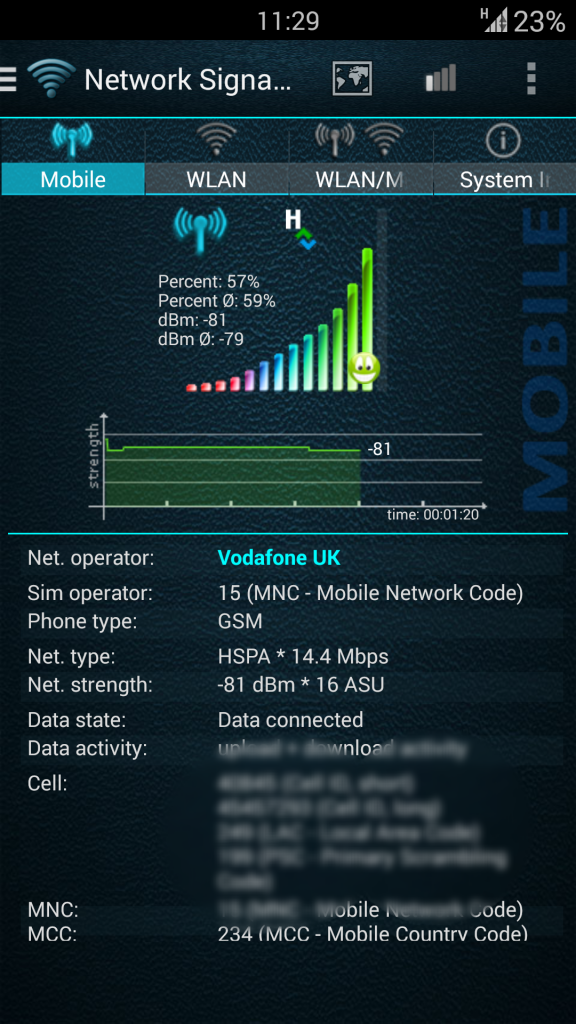
Is that version of android correct? Jelly bean modem?
He's senile....what do you expect!


@ironass
I`ve flashed the I9505XXUGNE8 baseband on my s4 the other day. Now, i`m not a tech guru and i might be wrong but does the baseband influences the quality on the voip calls sounds ? I`m reffering to the fact that i have low sound in viber and skype no matter how high the sound is on the system. If i make a call or get a call and answer, if i leave the viber/skype app by going back to tw home the sound drops by 50%. Other times is just drops by doing nothing. This "little bug" persists even in custom roms (cm11 m6, cm11 m7 and some 2-3 roms from xda). It could be an app bug but when i first got the phone 1 month ago it had 4.2.2 and then all was good. Seeing how many basebands there are and the fact that not all could be compatible with my carrier(Vodafone) and settings made for my country, i cant just go and flash all the modems in hope of getting the right one. OR could i? Any advice?
LE: I even tried Danvdh's google rom and had the same results, seeing that you have the same rom.
I have knox installed.
The modem came with the stock rom, downloaded it from sammobile. I assume it has to be gsm+lte.
I appologize if i was unclear at the start of the post. Should of said that i flashed the stock rom. Sorry
That's really wierd. We both have the same phone, carrier, modem and you can make voip without any issues.Could it be a kernel issue? The same stuff happens over wi-fi too.
Repulsa has posted up XXUGNF1, taken from German firmware with a high changelist number, 1854187
Repulsa's modem link


