
• After 15+ years, we've made a big change: Android Forums is now Early Bird Club. Learn more here.

Root [International] Latest modems

Perhaps I should point out that modems vary between different parts of the world and what may work in the UK may not be suitable for, say, India.

There is no such thing as, "the best modem". It depends entirely on your location, operator and signal strength. The latest modem may not be the best for you, as I have found out.

For instance, the I9505XXUGNE5 modem that I am currently on is suitable for global use with the exceptions mentioned below. That is not to say that it will not work in other areas but it is not designed for those parts of the world and may not function as well.

The key to determining if a modem is likely to be suitable for you or, if you are seeking an alternative modem, whether it is worth trying, is the 3 letters after the model number in the modem, (also known as the Baseband), details. In the above example, I9505XXUGNE5, those 3 letters are, "XXU".

To locate your current modem, (Baseband), see #1.3 of 23 Galaxy S4 models - know yours?

Below are a list of locations and their 3 letter designations for all Samsung phones...

XXU = Global
UBU = Latin/South America
VJU = South America
JKU = Israel
ZCU = China
ZHU = Hong Kong
DDU = Bangladesh, India, Sri Lanka, Nepal
DXU = Malaysia, Philippines, Singapore, Thailand, Vietnam, Indonesia


(N.B. The above list is not a full and exhaustive one and does not take into account any specialist network/carrier modems and should only be used as a rough guide.)

For a list of downloadable modems and instructions on how to flash them...

GALAXY S4 (I9500/I9505) GSM / NON-HLOS - MODEM'S Collection (Odin/CWM/TWRP)

more modem downloads in this post...

xda-developers - View Single Post - [REF] GALAXY S4 (I9500/I9505) GSM / NON-HLOS - MODEM'S Collection (Odin/CWM/TWRP)

TOP TIP: Modems are not changed when flashing custom ROM's via CWM/TWRP Recovery.

For more information on your phone's firmware and modem details, see, 23 Galaxy S4 models - know yours?
 
Anyone on EE UK and use a better modem to have improved signal? I am currently on and reception is a bit patchy, would like to improve, if anyone else is on the same network and use a different modem on their i9505, please give me a shout

my current one is I9505XXUFNC4

thanks
 
Ever since day one on the S4, I've not found any REAL benefit in changing modem (I too am on EE UK). They all seem to be pretty much as good (or as bad) as each other.

The one you're on is the latest official EE UK modem, so that will be as good as any.
I however am on XXUGNE5, and finding it just as good.

Bear in mind modems are in 2 parts, GSM and LTE
If you are on the old pre-knox bootloader, you can only flash up to MH1 LTE modem, as flashing a knox-enabled LTE modem onto a handset with the old bootloader will lose your sound (and/or wifi)
As for GSM modems, its much better to flash one appropriate to your current firmware version (ie. 4.4.2) so stick to 4.4.2 GSM modems, or you will probably experience data/call drop-outs.
 
Ever since day one on the S4, I've not found any REAL benefit in changing modem (I too am on EE UK). They all seem to be pretty much as good (or as bad) as each other.

The one you're on is the latest official EE UK modem, so that will be as good as any.
I however am on XXUGNE5, and finding it just as good.

Bear in mind modems are in 2 parts, GSM and LTE
If you are on the old pre-knox bootloader, you can only flash up to MH1 LTE modem, as flashing a knox-enabled LTE modem onto a handset with the old bootloader will lose your sound (and/or wifi)
As for GSM modems, its much better to flash one appropriate to your current firmware version (ie. 4.4.2) so stick to 4.4.2 GSM modems, or you will probably experience data/call drop-outs.
I came across your info too late Hawker. Went from 4.2.2 to Golden Eye 4.4.2 and then updated the modem as off to World Cup in Brazil and wanted one to match their networks. I have no sound now but Wifi works. What needs to be done to get the sound back?

Regards
 
I came across your info too late Hawker. Went from 4.2.2 to Golden Eye 4.4.2 and then updated the modem as off to World Cup in Brazil and wanted one to match their networks. I have no sound now but Wifi works. What needs to be done to get the sound back?

Regards

Sounds like you are still on a 4.2.2 bootloader, and flashed a 4.4.2 gsm+LTE modem. You should have flashed the GSM modem ONLY (modem.bin).

You need to find a 4.2.2 LTE modem (NON-HLOS.bin sometimes termed Wifi Fix), eg. MGA or MH1 from here

You can find all this on dejembeys thread
 
Sounds like you are still on a 4.2.2 bootloader, and flashed a 4.4.2 gsm+LTE modem. You should have flashed the GSM modem ONLY (modem.bin).

You need to find a 4.2.2 LTE modem (NON-HLOS.bin sometimes termed Wifi Fix), eg. MGA or MH1 from here

You can find all this on dejembeys thread
Thanks for this, the case of being wiser after the fact! In the end I restored the nandroid backup I did and reflashed my original modem and then reflashed Golden Eye 33.3, then the MODEM ONLY VJUGNE2 (which is for South America and apparently used in Brazil on the network I'll be using).
 
Glad you appear to be getting back on track.

You didnt need to nandroid restore. You could have stayed on GoldenEye 4.4.2, and just flash MH1 non-hlos.bin and you would have been good to go.

Just a small point though in case people are not aware, nandroid backups do not touch modems.
A restore will not bring the original modems that were on your system at the time of the backup.
 
I9505XXUGNE8 modem is up! :)

Taken from the newly released Vodafone, Android 4.4.2, firmware for the GT-i9505, quad core.


Download


Thanks to Repulsa! :thumb:

Quick and dirty screenshots of NE5 and NE8 modems at my desk, on Vodafone, UK, network...

NE5 modem


NE8 modem
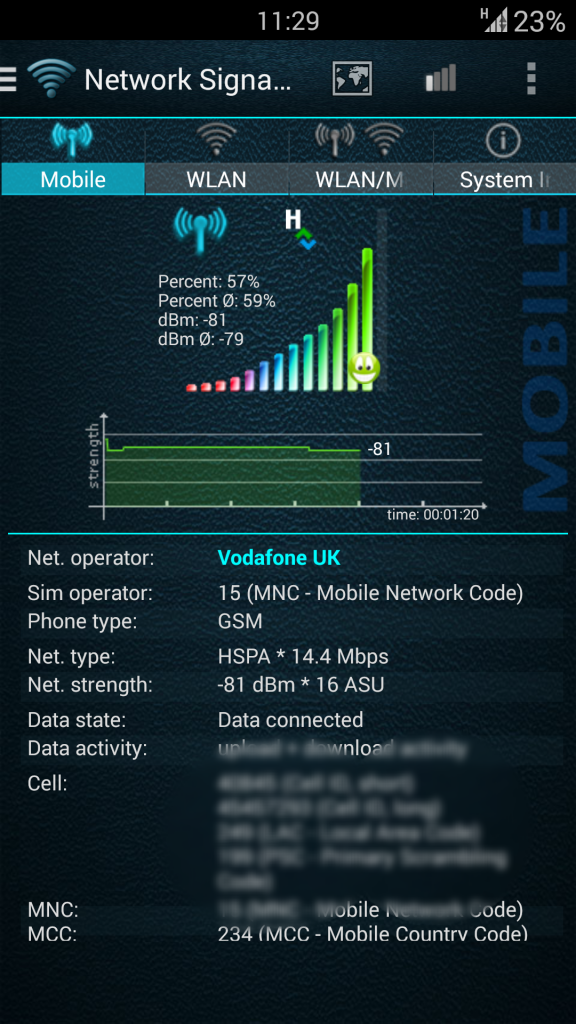
 
Currently on the whole NE8 shebang, so shall see how this fares.

Glad to see Repulsa took my advice to start posting up the bootloaders too.
:)
 
I9505XXUGNE8 modem is up! :)

Taken from the newly released Vodafone, Android 4.2.2, firmware for the GT-i9505, quad core.


Download


Thanks to Repulsa! :thumb:

Quick and dirty screenshots of NE5 and NE8 modems at my desk, on Vodafone, UK, network...

NE5 modem


NE8 modem


Is that version of android correct? Jelly bean modem?
 
@ironass
I`ve flashed the I9505XXUGNE8 baseband on my s4 the other day. Now, i`m not a tech guru and i might be wrong but does the baseband influences the quality on the voip calls sounds ? I`m reffering to the fact that i have low sound in viber and skype no matter how high the sound is on the system. If i make a call or get a call and answer, if i leave the viber/skype app by going back to tw home the sound drops by 50%. Other times is just drops by doing nothing. This "little bug" persists even in custom roms (cm11 m6, cm11 m7 and some 2-3 roms from xda). It could be an app bug but when i first got the phone 1 month ago it had 4.2.2 and then all was good. Seeing how many basebands there are and the fact that not all could be compatible with my carrier(Vodafone) and settings made for my country, i cant just go and flash all the modems in hope of getting the right one. OR could i? Any advice?

LE: I even tried Danvdh's google rom and had the same results, seeing that you have the same rom.
 
@ironass
I`ve flashed the I9505XXUGNE8 baseband on my s4 the other day. Now, i`m not a tech guru and i might be wrong but does the baseband influences the quality on the voip calls sounds ? I`m reffering to the fact that i have low sound in viber and skype no matter how high the sound is on the system. If i make a call or get a call and answer, if i leave the viber/skype app by going back to tw home the sound drops by 50%. Other times is just drops by doing nothing. This "little bug" persists even in custom roms (cm11 m6, cm11 m7 and some 2-3 roms from xda). It could be an app bug but when i first got the phone 1 month ago it had 4.2.2 and then all was good. Seeing how many basebands there are and the fact that not all could be compatible with my carrier(Vodafone) and settings made for my country, i cant just go and flash all the modems in hope of getting the right one. OR could i? Any advice?

LE: I even tried Danvdh's google rom and had the same results, seeing that you have the same rom.

The NE8 modem that you have flashed is the same one that has been released on 14 Vodafone firmwares, Europe wide, this week.

Just a couple of questions...

1. Are you on the old or new bootloader? (Knox or no Knox?)

2. Did you flash the GSM modem or the GSM+LTE combination modem?
 
I have knox installed.
The modem came with the stock rom, downloaded it from sammobile. I assume it has to be gsm+lte.
I appologize if i was unclear at the start of the post. Should of said that i flashed the stock rom. Sorry
 
I have knox installed.
The modem came with the stock rom, downloaded it from sammobile. I assume it has to be gsm+lte.
I appologize if i was unclear at the start of the post. Should of said that i flashed the stock rom. Sorry

So, you did not just change the modem but, rather, it was a whole, stock Samsung firmware update?

You could try downloading and re-flashing the stock Samsung firmware for your phone by following the instructions and links in #1.5 of 28 Galaxy S4 models - know yours?. Afterwards, you should wipe cache partition as per #1.2 of the Update Problems - Dummies Guide.

Flashing a stock firmware will un-root you and you will, if desired, need to re-root by using the Rooting Galaxy S4 - Dummies Guide.
 
Yes ironass, it was a full stock firmware flash. I was getting tired of the fact that i couldn't hear very well my friend via viber or skype so i decided to get back to stock hoping that the low sound would be fixed. It didn't.
The wierd part is that no matter what rom i used, it didnt fix it.
 
If you are on stock Samsung 4.4.2 firmware you could try flashing the modem from the previous Vodafone 4.4.2 firmware, which, I assume, did not have the sound problem. I have just made calls on both Skype and Viber and the sound is fine on the NE8 modem.
 
That's really wierd. We both have the same phone, carrier, modem and you can make voip without any issues.Could it be a kernel issue? The same stuff happens over wi-fi too.
 
That's really wierd. We both have the same phone, carrier, modem and you can make voip without any issues.Could it be a kernel issue? The same stuff happens over wi-fi too.

The kernel controls Wi-Fi the modem controls data. Since your problem is happening on both Wi-Fi, data and multiple ROMs and firmwares with stock and custom kernels you may need to look elsewhere for the solution. Try flashing your previous stock firmware, when you say you didn't have these issues and see if that resolves it and work from there.
 
Cheers Rusty me olde mate will probably try it out once I've settled in Brazil.


P.S. Will be looking out for you in Iron Man 4 as Tony Stark would like his ass back.
 
Back
Top Bottom

