• After 15+ years, we've made a big change: Android Forums is now Early Bird Club. Learn more here.

Root issue with bootstrap?

Bugly

Android Expert
I am new to this whole process, so bear with me. I am having trouble installing bootstrap. I downloaded the zip file to my SD card, then unzipped it, but it doesn't seem to be working. I am not sure if this is a procedural error on my part (very likely), or if I have a corrupted file, since I did the d/l to my mac and then transferred it to the SD card from there.
I am rooted, used Z4
Have rom manager, busybox, Ti backup and all my permissions have been set to me. I don't get it, is there something I haven't tried that is just plain obvious?
I won't claim to be a pro at this, funny, I can hack the living hell out of a blackberry...
 
just tried that, wouldn't install. I might have to delete and try again.
I'm pretty sure this is something I'm screwing up, I'll try some more. Thanks for the advice.
 
Nearly everyone here has .340 installed. It's the latest android version for the X.

Are you rooted (z4root)?
 
yup, sorry it took so long to respond. I even went through the re-rooting to see if there was an error in root.
 
The Mac connection might be a problem.

I wonder if you can download from your phone and save on the sdcard and install from there.

How about opening superuser app and check for updates (under settings)?
 
I thought so myself, and d/l the app with the device instead, still isn't working. might be a software conflict somewhere.
 
I went through a similar process with the blackberrys, then I became a help center poster afterward. It's all good, thanks for helping out.
 
Not yet, but I just wanted to thank you for helping out since it's one of those things people forget to do when help is being rendered.
 
Time to uninstall bootstrap/rom manager and reinstall (bootstrap first)?

Settings... applications...
 
ok, will do. gotta sign off for the night, wife is home and we're setting up a baby shower for her daughter. I should probably give that more attention for now. Thanks again!
 
Seriously, this is starting to make me lose my patience. I have d/l the bootstrap program several times, both on my mac and directly to the DX, and at no time has there been an option to install the software. Got the app directly from Koush's website on github.
is there a manual install for this, or do I have to go to the app store and (once again) download and hope it installs?
I have been through the directory (folder) where it downloaded, and all files say either they can not be opened, or they give me a choice of opening in browser or utorrent. WTF?
Am I missing some secret handshake, or am I just that lucky ba$**** that can't unlock his device?
Anyone else have this issue?
 
Seriously, this is starting to make me lose my patience. I have d/l the bootstrap program several times, both on my mac and directly to the DX, and at no time has there been an option to install the software. Got the app directly from Koush's website on github.
is there a manual install for this, or do I have to go to the app store and (once again) download and hope it installs?
I have been through the directory (folder) where it downloaded, and all files say either they can not be opened, or they give me a choice of opening in browser or utorrent. WTF?
Am I missing some secret handshake, or am I just that lucky ba$**** that can't unlock his device?
Anyone else have this issue?

It might have installed incorrectly.....make sure it is completely removed before trying to install again......try downloading astro file manager and install it through there....if it doesn't work, it might be a good idea to factory default your phone and start over.
 
I'm about to throw this thing out the window into traffic. Astro did absolutely nothing, and still gave no install option. This was with a complete delete of all instances of the file and a fresh download. Is there another program that can deodex the DX so I can load a simple ROM?
Apparently, the bootstrap won't work on this device, or I would have had some kind of luck by now.
 
I'm to the point where I may just say "F" Motorola and their locked-down B.S. and go with HTC. At least they understand that the customer is the boss.
 
I'm to the point where I may just say "F" Motorola and their locked-down B.S. and go with HTC. At least they understand that the customer is the boss.

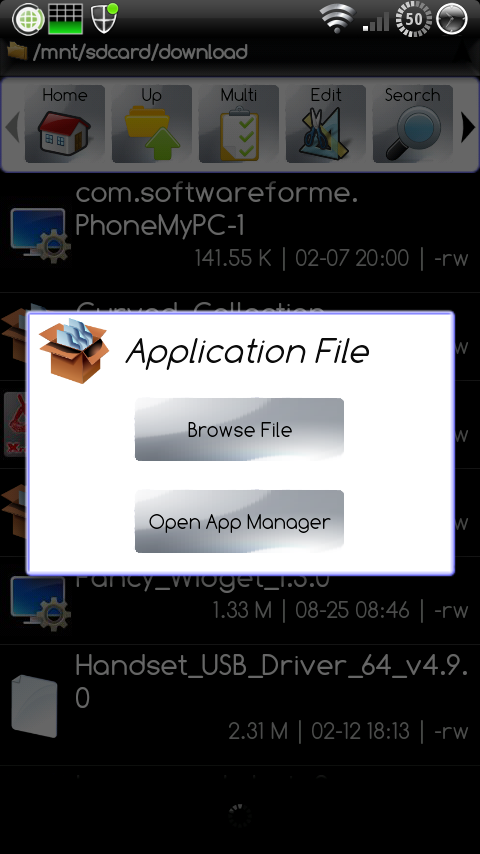
When in astro, you select the bootstrap file, do you get this popup:

snap20110213_220846.png


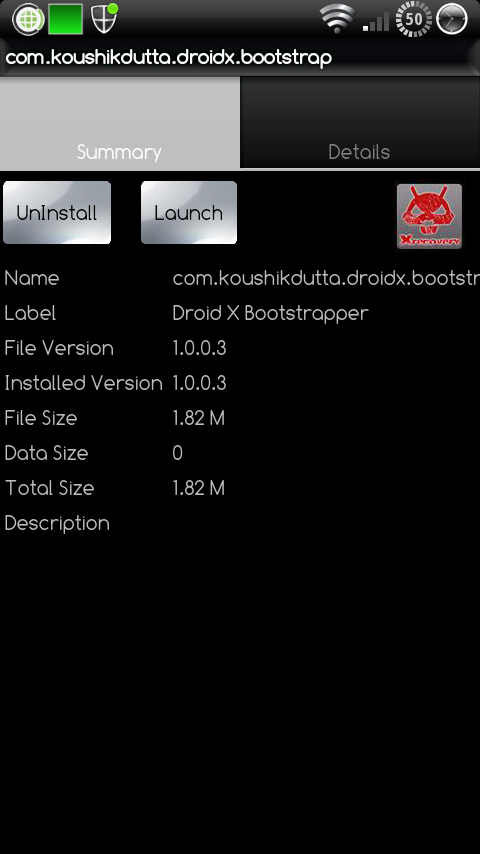
If you do, you have to select "Open App Manager", then you will get something like this (if it's not installed, the only option should be to "install"):

snap20110213_220900.png
 
on soft touch, i get a list of the files included in the package, as i got before.
On touch and hold, i get a box that asks how i want to open the file:
Details
open as
edit
send
extract

none of these will install, as I have tried them all to see if any work

open as gives the options of:
text
audio
image (picture)
video

WTF? these are all media settings.
There are no executable files in the koush download, I get the impression this is a broken file and am not willing to try an alternate download with bank information involved.
Again, is there an alternate app that will deodex this device? Or do I have to go to a different manufacturer and tell motorola they lost another customer for life?
 
A tap on a zip file vs a long-press, gives different options in root explorer. Do you get similar actions with Astro? BTW, off to work so don't have time to check for a reply.
 
or just download it from the market and let it install itself automatically. plus, it pays Khoush a marginal fee for his excellent work.
 
on soft touch, i get a list of the files included in the package, as i got before.
On touch and hold, i get a box that asks how i want to open the file:
Details
open as
edit
send
extract

none of these will install, as I have tried them all to see if any work

open as gives the options of:
text
audio
image (picture)
video

WTF? these are all media settings.
There are no executable files in the koush download, I get the impression this is a broken file and am not willing to try an alternate download with bank information involved.
Again, is there an alternate app that will deodex this device? Or do I have to go to a different manufacturer and tell motorola they lost another customer for life?
+1 on supporting the dev (koush) on this app as its the most important app that makes this all possible and its only $4 from the market, also this app has nothing to do with deodexing anything ....
 
Back
Top Bottom