
Install the app
How to install the app on iOS
Follow along with the video below to see how to install our site as a web app on your home screen.
Note: This feature may not be available in some browsers.
-
After 15+ years, we've made a big change: Android Forums is now Early Bird Club. Learn more here.
You are using an out of date browser. It may not display this or other websites correctly.
You should upgrade or use an alternative browser.
You should upgrade or use an alternative browser.
Latest i9100 modems
- Thread starter Shotgun84
- Start date
-
- Tags
- samsung galaxy s2


Sydney99
Android Expert
About time dear chap

Hawker
Android Expert
About time I say too, slacker!

Seems OK... of course, there's only one real way for me to test it!
Parking the barge at your reserved mooring again butty?

Sword Fish
Android Enthusiast
Sorry Shotgun, can't wait forever, here is XXLPQ Modem: modem_XXLPQ.zip
Sydney99
Android Expert
Sorry Shotgun, can't wait forever, here is XXLPQ Modem: modem_XXLPQ.zip
broken link. Just can't get the staff
Hawker
Android Expert
"Q"? That's ridiculous! I've only just flashed "J". What happened to K-P???
Your definitely slacking Shotty. Go to the back of the class and put on the dunces hat.
Edit:
Its saying file is deleted mate. Your position as modem maesto has been restored, at least for the time being Shotty!
Edit2: Ninja'd.
Just seen your working link butty. Normal service has been restored from the Shotmeister!
Your definitely slacking Shotty. Go to the back of the class and put on the dunces hat.
Sorry Shotgun, can't wait forever, here is XXLPQ Modem: modem_XXLPQ.zip
Edit:
Its saying file is deleted mate. Your position as modem maesto has been restored, at least for the time being Shotty!
Edit2: Ninja'd.
Just seen your working link butty. Normal service has been restored from the Shotmeister!

ironass
Extreme Android User
Seems OK... of course, there's only one real way for me to test it!
Ditto LPQ!

Hawker
Android Expert
ironass
Extreme Android User
See post #79!
Dirty old job eh butty?
At the moment, with the Cheltenham Gold Cup on, half the population of Ireland is in every pub and bar for miles around and with one single aim... drink the Cotswolds dry! 
On a serious note, just for a change, if you want to test your modem's performance against a previous version, then install something like Network Signal Info, free, from the Play Shop, this will also show you the location of the mobile mast/cell tower, you are connected to:-
https://play.google.com/store/apps/...t=W251bGwsMSwxLDEsImRlLmFuZHJvaWQudGVsbmV0Il0.
You can also get your dBM and ASU from...
Settings > About phone > Status > Signal strength
Try and take your readings at roughly the same time of day as signal strength can vary depending on overall network usage.
Try to take your readings in the same places. I do one indoors at my desk, one outdoors and one, reluctantly, at a local pub with a notoriously bad signal history.
The three factors that affect your signal strength are dBM, ASU and percent.
dBm is always measured as, "-". The lower the dBm the stronger the signal.
ASU, Active Set Update/Arbitrary Scale Unit/Android Signal Unit, whatever it's called... the higher the better.
Percent, again, the higher the better.
Contrary to popular belief, the modem does not affect your Wi-Fi signal, that is handled by the kernel.
For more details on mobile phone signals, see here:-
Mobile phone signal - Wikipedia, the free encyclopedia
Network Signal Info

Do not try and compare the signal strength bars on your SGSII with other makes of phones as the signal bars and the strength they measure are not industry standardised and completely arbitrary.

Sword Fish
Android Enthusiast
So I gues I'm fired? Honestly, the link used to work!!
Hawker
Android Expert
So I gues I'm fired? Honestly, the link used to work!!
Must try harder!

ironass
Extreme Android User
So I gues I'm fired? Honestly, the link used to work!!
Sorry Sword Fish, I think Shottie has already used that excuse before!
It's right up there with...
Of course I love you.
The cheque's in the post.
and... I promise not to co.... (well, you know that one I guess
 )
) Early indications are that it really isn't any different to LPJ and, "maybe", a -dBm and ASU or two better than LPH.
Sword Fish
Android Enthusiast
Sorry Sword Fish, I think Shottie has already used that excuse before!
It's right up there with...
Of course I love you.
The cheque's in the post.
and... I promise not to co.... (well, you know that one I guess
Early indications are that it really isn't any different to LPJ and, "maybe", a -dBm and ASU or two better than LPH.
Well it was a crappy job anyways. I don't know how you do it Shottie, the abuse that comes with the position is too much for me! I therefore relinquish any responsibilitiy that I thought I might have had back to you!
DeadBeginning
Member
I've tried the Network Signal Info and it tells me there is an error on samsung phones that causes the reading to be positive 85(it doesn't change at all), which i seem to be suffering with, is there an alternative to this app that i can use?
DeadBeginning
Member
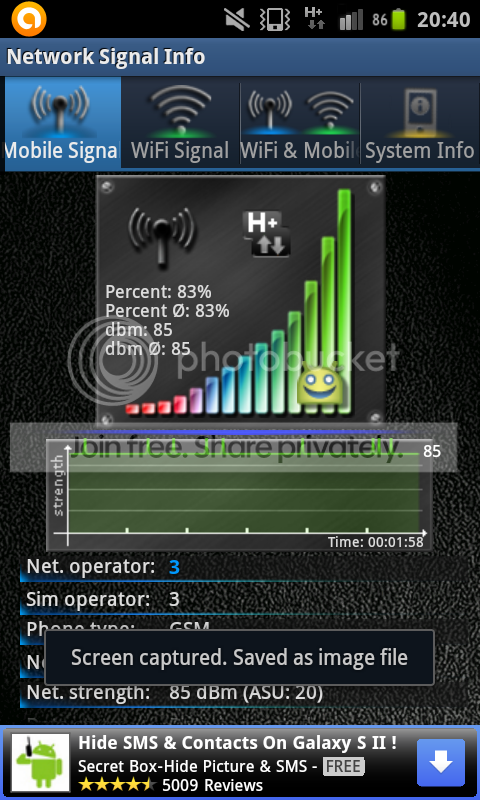
mine is literally stuck on 85, the only time it goes up is when the ASU changes, does that mean that it is constantly -85? or is this an error? I noticed in most of yours its stable, but in post #61 it is up and down. so wasnt sure which is normal / working
i just noticed the screen capture toast covering part of the picture, oops.
Hawker
Android Expert
The higher the ASU the better. As ASU increases so does dBm (the -ve number gets smaller)
Mine fluctuates up+down according to signal
Its strange as on your screenshot you are on 20 ASU.
ASU/dBm is calculated by the formula: dBm= -113+(2*ASU)
so 20ASU = -73 dBm
So its very odd that you are on +85.
Mine fluctuates up+down according to signal
Its strange as on your screenshot you are on 20 ASU.
ASU/dBm is calculated by the formula: dBm= -113+(2*ASU)
so 20ASU = -73 dBm
So its very odd that you are on +85.
ironass
Extreme Android User
As Hawker says, that does seem odd, DeadBeginning!
I do not know of another app similar to Network signal Info.
However you can obtain a report via...
Settings > About phone > Status > Signal strength... this will give you dBm and ASU.
(Looking at your screenie, I would say that your dBm should be reading -65 or -67 dBm... stonking! )
I do not know of another app similar to Network signal Info.
However you can obtain a report via...
Settings > About phone > Status > Signal strength... this will give you dBm and ASU.
(Looking at your screenie, I would say that your dBm should be reading -65 or -67 dBm... stonking!
)
DeadBeginning
Member
As Hawker says, that does seem odd, DeadBeginning!
I do not know of another app similar to Network signal Info.
However you can obtain a report via...
Settings > About phone > Status > Signal strength... this will give you dBm and ASU.
(Looking at your screenie, I would say that your dBm should be reading -65 or -67 dBm... stonking!
Settings > About phone > Status > Signal strength... i got a reading of -103 dBm 5 ASU... can i have my false reading back?
 lol
lolTry app called Open Signal Maps
strangely that doesnt appear to work either, i get an error saying it cant locate my cell tower(although it gives me a speedtest on my carriers connection) it says it may not be added to the database. i get a similar error when locating the tower on Network Signal Info too