• After 15+ years, we've made a big change: Android Forums is now Early Bird Club. Learn more here.

Help "Low on space" phone/application storage notification

I still get the message from time to time that my application space is low, and that I should delete apps to make room. Why should I have to delete apps? I've only had my phone for a month or so and I'm already out of space for apps? I do have over 200, but most of them I want to keep. There are thousands of apps available, I'm just getting started.

There should be somewhere I can store them. Is there any way I can install them somewhere else, like the 6GB of phone storage? I don't need that for music, that's what my SD card is for. I've moved some apps to the SD card, but some of them can't be moved.

When I get the low memory notification I often can't view my texts as well. Again, after a month I shouldn't be anywhere near out of space for texts. My last phone had over 1,400 texts on it and never ran out of space.

I have read some of the posts on here, but a lot of the causes are not what I'm dealing with. I don't use an email app on my phone, I use a browser to view my gmail on the web, so I don't have email saved on my phone. Anyway, none of the causes mentioned should have anything to do with app storage. When I delete some apps the message goes away, but if anything I want to download more apps, not get rid of what I already have.

I know the cause on my phone (no more room for apps). How do I make more room without removing apps I already have?
 
hmm... i think just try some of the tips from this thread, like, clearing facebook data, dialer storage, etc. app2sd has a feature that you can clear cache, that helps sometimes.
 
I had the same issue with the warning message. I had just downloaded a new app that replaced an old app (local news station) and had yet deleted the old app. Once I deleted the old app the alert disappeared as well. Glad mine was an easy fix ;-).
 
'application data space is low'

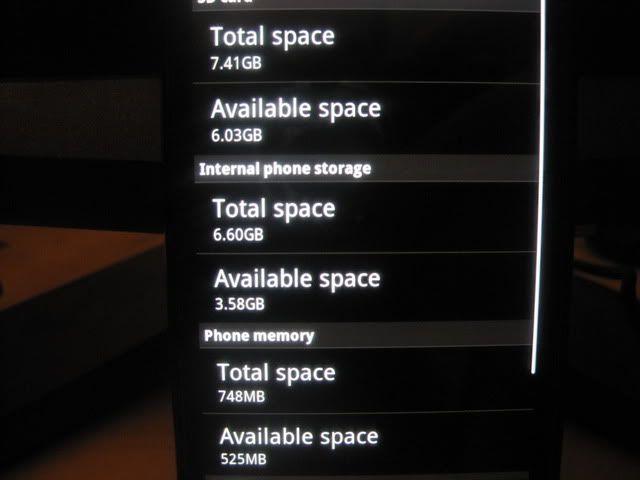
sd card, total- .92 gigs, free- 675megs
internal phone- total 6.6 gigs, free- 6.27 gigs
phone memory- total- 748 megs, free 334 megs.

so, where am i low? and what gives, i thought phne came with 8 gigs on storage, why is it so unevenly partitioned?
 
This thread still gets new posts every day it seems. Considering the mammoth it has become, plus the fact there are merged threads confusing the flow, I thought it may be prudent to repost once again, the single post that best explains the heart of the situation:

Here is what I found after some research on XDA forum and other sources. The DINC has a 150 Meg partition that contains program data. The location is /data/data. If this partition gets below 14 or 15 Megs you get the low space warning. What I've had to do is open my application manager and clear program and or cache data to free up space in this partition. The main culprits for space consumption in the data/data partition are Web Browsers, Barnes and Noble's Nook app stores a 10 Meg file (ridiculous if you ask me), Kindle (If you have a lot of books. Up to 2 to 3 Megs of data), Message app (If you store all your old text messages with image and movie attachments, this is a bigy.), The navigation app, and Double Twist just to name a few. Your mileage may vary but these are good starting points.

The /data/data folder is inaccessible by most file managers other than Root Explorer which obviously means you need to be rooted. So, if you aren't rooted, your best bet is to start deleting apps, cache and data in the Applications > Manage applications menu. If you are rooted, you can use higher powered cache cleaners and go straight to the data/data folder using Root Explorer and weed things out carefully while noting the filesize of the likely offenders.
 
Couple tips added to the above post...

If you use an alternate browser, be sure to delete the data/cache from the native browser.

Dolphin is a large data hog. Clear cache for sure and make the call on your data. Mine's showing just under 4 MB right now which is significant. There is also a "Manage Space" option for Dolphin (we're still talking Menu > Applications > Manage applications here) where you can ala carte delete some data items without affecting others.

Email is a big user of both data and cache if you use one or more pop3 or similar accounts on the phone.

Google Voice...do you have a ton of old messages?

Take the time to weed through all aps looking for the large data users. Good luck.
 
Thanks for sharing your research. My question is - why hasn't someone figured out how to make that app space larger with one of these recent custom ROMs? 150mb on a phone with 8gb built in is MORE than ridiculous.
 
Couple tips added to the above post...

If you use an alternate browser, be sure to delete the data/cache from the native browser.

Dolphin is a large data hog. Clear cache for sure and make the call on your data. Mine's showing just under 4 MB right now which is significant. There is also a "Manage Space" option for Dolphin (we're still talking Menu > Applications > Manage applications here) where you can ala carte delete some data items without affecting others.

Email is a big user of both data and cache if you use one or more pop3 or similar accounts on the phone.

Google Voice...do you have a ton of old messages?

Take the time to weed through all aps looking for the large data users. Good luck.

Dolphin allows you to cap your cache usage anywhere up to 6MB (6MB is the default), and allows you to move the cache to SD.
 
Thanks for sharing your research. My question is - why hasn't someone figured out how to make that app space larger with one of these recent custom ROMs? 150mb on a phone with 8gb built in is MORE than ridiculous.


i agree, and more so, why doesn't Google fix this, etc.

i just got the low storage again, used k9 mail, hopefully it would fix it, but i have been downloading a lot of apps, too. i just deleted my facebook data and it's gone away. so... we'll keep playing this game.
 
Thanks for sharing your research. My question is - why hasn't someone figured out how to make that app space larger with one of these recent custom ROMs? 150mb on a phone with 8gb built in is MORE than ridiculous.

Some of us have tried. We've learned a few things though. Deodexed versions of the stock ROM use up more of /data/data by default. Considerably more (as much as 50MB). So, if you're running a custom stock ROM (really, anything based on the Incredible framework), you're going to hit this cap faster.

I made a ROM called Nothing Special, with this in mind. Due to being stock, odexed, and only having bloat removed, you gain about 12MB over the stock ROM, and 46MB over comparable deodexed ROMs (about 75MB over custom stock ROMs). You will still eventually hit the cap, but it's much harder to do so.

http://androidforums.com/incredible...ain-peanut-well-stock-rom-htc-incredible.html
 
I've had the "low on space" message 4 a few months now. I cleared data and cache on a lot of apps and now it is gone.

Happy DINCing!
 
Is there any word if the Thunderbolt, Incredible 2, Evo, and other similar HTC models are afflicted with this ridiculously low REAL app data space problem?
 
Does anyone know if the gmail widget is safe to use? And is the gmail widget related to the htc mail program? I ask because they look so similar.

This is already my first full reset and I hope not to have to do ot again. My sympathies to all those so frustrated with this bug. I hope a solution can be found. It's been far to long.
 
This warning is so damned annoying. Even as annoying as it is to have that warning icon on my top bar, I can at least live with that, but when I can't access my text messages because of it (as has been the case for the last 18 hours,) it is interfering with my use of the phone. I got a text from Verizon last week telling me I was eligible for an early upgrade but I was so happy with my DInc at the time that I ignored it. The resurfacing of this problem (it had been months since this happened) has me thinking twice now.

I have tried all of the suggested remedies in this thread. I have deleted photos, data, caches, and even apps that I liked but didn't consider "necessary." Just now, I finally deleted the pop account for my Yahoo mail - I liked having it and my Exchange account (for work) both in the same place, but I guess I'm willing to just use the Yahoo app for my mail. Deleting that pop account at least let me see my text messages again, thank god. But I still have the annoying warning icon.

I have loved this phone overall, but when I go significant periods of time without being able to access my damned text messages, it really makes me consider an iPhone now that they are on Verizon.:mad:
 
I am having the Low on Space problem too, but omigosh I just can't wade through 559 posts to try to find the answer. Will a kind member please tell me what to do??

Thanks :-)
 
Having the same problem after downloading the Netflix app! I moved the app to the SD card but it didn't work! Wtf? That makes no sense ! IPhone is gonna happen for me too, I think
 
I am still getting the low on space warning, and I've had the phone less than 3 months. At one point I had 240 apps, but I've had to delete a bunch of them, so now I'm down to about 150, which may seem like a lot, but c'mon... there are thousands of apps available. We're supposed to just pick 100 that we want and that's it? There are so many little ones that just do one thing, it's not like each one is this big fancy program. I've mostly downloaded free apps, I haven't even started with the paid ones (I bought 2 or 3). Developers are losing money because I don't have any room for paid apps.

There has to be a way to fix this so we have more space available for apps. I've cleared caches, I removed all my kindle books (which I want), I don't use the email apps, everything I can think of, and the message is still there. I've uninstalled so many apps that I still want, and it hardly even helps. When I can't even access my text messages something is very wrong. I'm not about to delete my texts just because I'm out of room (I only have about 300, and my last phone had over 3,000 texts and never had a problem).
 
If I delete my program data for the "Internet" app, will it wipe out my bookmarks?

Anyone? I'm unable to access my text messages right now, but I don't want to delete internet data if it means I'll lose my bookmarks.

This really ticks me off. I may be looking forward to iPhone 5 now. Never thought I'd say that.
 
This is my Data Usage and I'm getting the low disk space warning.

MISC
IMG_2247.jpg
IMG_2247.jpg

MISC
 
My low app space notification came back.... doesn't seem to actually be app related, though not sure how I'd know for sure. Last time this happened, I just started nixing apps I didn't really use anyways. No change. Cleared all the data files, via app manager, for apps I didn't care about losing settings and such on... no change. Then I did those two steps for apps I did use, but could live without -- which makes me more mad every time I think about it. Still didn't fix the problem. In the past, it would eventually go away. This time, I just started to get a bunch of force closes, slow response for everything, minimal battery life, etc... I then rebooted, just to have a situation where the phone won't boot. It just loops the droid boot animation/sound. while I can't say it's stuck in an infinite loop... I let it go on for 10 attempts previous, to no apparent change. (I posted this with more details as a thread, too. Haven't seen anyone else withthis particular snafu.) If anybody has suggestions on how I might force it to start, I'm open to suggestions... Didn't really want to spend an evening at VerizonWireless store, or on the phone for customer support.
 
If I delete my program data for the "Internet" app, will it wipe out my bookmarks?

Unfortunately, clearing data will get rid of your bookmarks, cookies, stored passwords etc. Found out the hard way ;)
I think there are some apps out there which let you save/backup your bookmarks. I haven't tried any of them, but "Bookmark Tree Manager" has good ratings.
 
This warning is so damned annoying. Even as annoying as it is to have that warning icon on my top bar, I can at least live with that, but when I can't access my text messages because of it (as has been the case for the last 18 hours,) it is interfering with my use of the phone. I got a text from Verizon last week telling me I was eligible for an early upgrade but I was so happy with my DInc at the time that I ignored it. The resurfacing of this problem (it had been months since this happened) has me thinking twice now.

I have tried all of the suggested remedies in this thread. I have deleted photos, data, caches, and even apps that I liked but didn't consider "necessary." Just now, I finally deleted the pop account for my Yahoo mail - I liked having it and my Exchange account (for work) both in the same place, but I guess I'm willing to just use the Yahoo app for my mail. Deleting that pop account at least let me see my text messages again, thank god. But I still have the annoying warning icon.

I have loved this phone overall, but when I go significant periods of time without being able to access my damned text messages, it really makes me consider an iPhone now that they are on Verizon.:mad:

Have you tried reducing the amount of mail you can see from your exchange account? For whatever reason when I upped mine from 1 day to 7, I got the warning, and then when I went back to 1 day in my inbox it went away... Just in exchange inbox --> Menu > More > Settings > Send & Receive > Download Past Mail

Not sure how much space that actually takes up, but it seemed to help me get rid of the warning message.
 
I'm getting same annoying problem. I have ~550mb free space, and an extra 8gb sdcard. There's no reason why I should have low space.

Are we able to get a free upgrade to Incredible 2 or something similar with this problem? This prevents me from doing work on my phone. Does Verizon or warranty work with this problem?
 
Back
Top Bottom