
Install the app
How to install the app on iOS
Follow along with the video below to see how to install our site as a web app on your home screen.
Note: This feature may not be available in some browsers.
-
After 15+ years, we've made a big change: Android Forums is now Early Bird Club. Learn more here.
You are using an out of date browser. It may not display this or other websites correctly.
You should upgrade or use an alternative browser.
You should upgrade or use an alternative browser.

Fuzzy13
Extreme Android User
I'm having trouble getting a usable backup when going through the ROM manager app. Worked fine with the old recovery.
Honestly dont see why it would be any different.

LinuxLarry
Newbie
I install 6.0.1.1 when I made a backup with it took about 20 minutes.....my previous recovery, (I think v.5.0.4.8) only took about 5 minutes??? My question is, should it take this long with this touch version?
I noticed the same thing. i didnt really care tho.

divagirl
Android Enthusiast
mines is also like this???the menu is only half screen. so i have to scroll up and down to see all the options.
divagirl
Android Enthusiast
Well if this is normal for the touch version, I think I prefer speed over looks...But the touch is so much more convenient! 20 min. for backup!I noticed the same thing. i didnt really care tho.

Fuzzy13
Extreme Android User
I install 6.0.1.1 when I made a backup with it took about 20 minutes.....my previous recovery, (I think v.5.0.4.8) only took about 5 minutes??? My question is, should it take this long with this touch version?
No. The amount of time doesn't change. It's still the same program it's just got a different UI.
Fuzzy13
Extreme Android User
mines is also like this???
If I could take a picture I would but it's only supposed to cover about 3/4 of the screen. There should be no scrolling at all.
Fuzzy13
Extreme Android User
Guys if you dont like this then just go back and flash the other recovery. Dont sit here and complain about it because you dont like it. It happens to work perfectly for me and others. I've been using touch for almost a month and havent had any problems with it. I've made about 6-7 backups with it and the amount of time didn't change.
With that being said, I made the effort to make this convenient for yall. I can just delete the links and say do it yourself. At least show some appreciation for the work involved here.
With that being said, I made the effort to make this convenient for yall. I can just delete the links and say do it yourself. At least show some appreciation for the work involved here.

divagirl
Android Enthusiast
Guys if you dont like this then just go back and flash the other recovery. Dont sit here and complain about it because you dont like it. It happens to work perfectly for me and others. I've been using touch for almost a month and havent had any problems with it. I've made about 6-7 backups with it and the amount of time didn't change.
With that being said, I made the effort to make this convenient for yall. I can just delete the links and say do it yourself. At least show some appreciation for the work involved here.
WHOA!! I was just asking questions..... just trying to find out if maybe something was wrong on my end,,,,where did I state that I didnt like it???
I "KNOW" that I can reflash the earlier version!!! Just asking questions!!! Sorry if it sounded like I was complaining, that surely was not my intentions!
Fuzzy13
Extreme Android User
WHOA!! I was just asking questions..... just trying to find out if maybe something was wrong on my end,,,,where did I state that I didnt like it???
No need to apologize.
I'm the one that should apologize. Been a rough night.
My post was generalized and not directed towards you.

Fuzzy13
Extreme Android User
So I have to have a Computer to do this just Can flash it
Sent from my LG-MS910 using Tapatalk
Yes you have to have a computer.

horsecharles
Android Expert
I find it faster....takes a long time to push buttons(even when able to cycle up/down to save clicks).
Plus background color n larger fonts more convenient.
A winner.
I suppose an apk or flashable zip or update from within cwm or ROM Mgr woulda been ideal, but this is free.
Come to think of it, maybe such paid versions could be worked up, with the proceeds going to cwm, ROM, mod devs...the free version being the original & one could elect to pay for the more convenient version.
Plus background color n larger fonts more convenient.
A winner.
I suppose an apk or flashable zip or update from within cwm or ROM Mgr woulda been ideal, but this is free.
Come to think of it, maybe such paid versions could be worked up, with the proceeds going to cwm, ROM, mod devs...the free version being the original & one could elect to pay for the more convenient version.
Fuzzy13
Extreme Android User
I find it faster....takes a long time to push buttons(even when able to cycle up/down to save clicks).
Plus background color n larger fonts more convenient.
A winner.
I suppose an apk or flashable zip or update from within cwm or ROM Mgr woulda been ideal, but this is free.
Come to think of it, maybe such paid versions could be worked up, with the proceeds going to cwm, ROM, mod devs...the free version being the original & one could elect to pay for the more convenient version.
Once ROM manager gets their kinks worked out most people will flash it through there and pay the 1.99 to do so. That's what I did but didn't work. lol. Being that i gotta figure out everything in life, i download the free .img and made it for myself. Then decided to share
 lol
lolHopefully they get their bugs worked out though. Wonder if anyone has tried it lately?
ManlyParasite
Android Enthusiast
Isn't it possible to make these recoveries flashable? I think its the admire that has like 2 or 3 different versions of cwm that you can flash right in recovery like everything else.
Not trying to complain or make things harder for people, but I think it could be helpful for people that don't have access to a computer (or USB cords )
)
Not trying to complain or make things harder for people, but I think it could be helpful for people that don't have access to a computer (or USB cords
)
Fuzzy13
Extreme Android User
Works for me no problems....kinda threw me off till i found out i needed to scroll but i'd rather scroll than have the density changed and accidentally press the wrong option with my fat ass thumbs
That's so weird that people are having to scroll. I made a backup last night and I was checking every screen and the only place I had to scroll was the backup screen and it was about 4 lines that were not seen that I had to scroll to. But on the opening screen it's barely 3/4 of the screen .
But when I had 6.0 for the first time I had to scroll. Everything was a lot larger than it is now. I flashed 6.1 and didnt have to scroll. WELL I went back and flashed 6.0 after the fact and it was setup just like 6.1. So It has to be something with the install.
LinuxLarry
Newbie
That's so weird that people are having to scroll. I made a backup last night and I was checking every screen and the only place I had to scroll was the backup screen and it was about 4 lines that were not seen that I had to scroll to. But on the opening screen it's barely 3/4 of the screen .
But when I had 6.0 for the first time I had to scroll. Everything was a lot larger than it is now. I flashed 6.1 and didnt have to scroll. WELL I went back and flashed 6.0 after the fact and it was setup just like 6.1. So It has to be something with the install.
after looking at it in more detail. the places i find myself having to scroll is on the select a file menu. because you have to scroll through your folders and what not. and where you have to select yes to actually do the flash. other then that. it appears that as if the rest of the menus are as you say 3/4 of the screen... kinda wish there was the black background for the 6.0.1.1 version


hippiegang
Well-Known Member
Originally Posted by hippiegang
My PC is in the shop. So can I flash it or use root explorer or something?
Nope. Gotta have a PC to run the command. No way around it.
Unless you can get it to work through ROM manager you can flash the newest touch through there. Will cost 1.99 but it's up in the air whether or not it will flash. It says it flashes and it says its installed but it actually isnt. maybe they will fix it ?
Yuhh I tried rom manager it didn't flash. That's why I came here lol.
Thank yu tho

Bard
Android Expert
For those who have trouble with installing CWM from the computer, make sure you have 'good' connection between PC and Phone.
Open up Device Manager and make sure there's no unknown device or warning sign.

This is a bad example from my PC. My Lg Esteem is shown as unknown device.
CWM installing will fail or hang after '* daemon started successfully *' message.

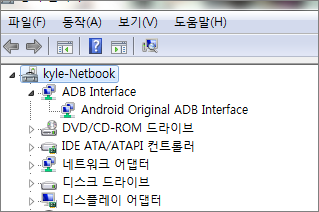
This is good example from my netbook (eh... my netbook has Korean Windows...)
As you can see there's no unknown device or warning sign on Device Manager. It's all clean connection PC recognized the phone correctly.
There are multiple causes on bad connection so try combination of below to clear device setting.
1) PC Driver Issues
2) Phone Driver Issues
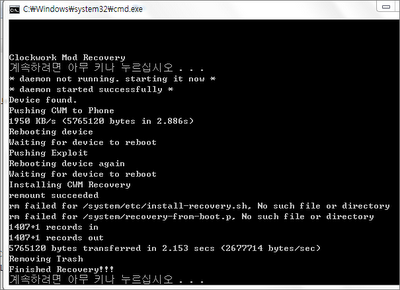
Once you have correct connection, CWM install will be done in a minute. There should be no hang during install.
Open up Device Manager and make sure there's no unknown device or warning sign.
This is a bad example from my PC. My Lg Esteem is shown as unknown device.
CWM installing will fail or hang after '* daemon started successfully *' message.
This is good example from my netbook (eh... my netbook has Korean Windows...)
As you can see there's no unknown device or warning sign on Device Manager. It's all clean connection PC recognized the phone correctly.
There are multiple causes on bad connection so try combination of below to clear device setting.
1) PC Driver Issues
- Download/update latest USB driver
- Download/update latest Chipset Driver
2) Phone Driver Issues
- Download correct LG Modem Driver
- Make sure you have internet connection mode on instead of Charge Mode or Mass Storage Mode
- Try to turn on/off USB Debugging
- Reboot phone
- Try to use original/different usb cable
Once you have correct connection, CWM install will be done in a minute. There should be no hang during install.
Fuzzy13
Extreme Android User
after looking at it in more detail. the places i find myself having to scroll is on the select a file menu. because you have to scroll through your folders and what not. and where you have to select yes to actually do the flash. other then that. it appears that as if the rest of the menus are as you say 3/4 of the screen... kinda wish there was the black background for the 6.0.1.1 version
Oh okay. So you dont have to scroll on the main menu?
Having to scroll when selecting a file would be the only way. I mean all the folders that are on both SD's, there's no way to fit all of that onto one screen.
And selecting yes. I think it's better that you have to scroll so that if your about to flash a wrong file, you wont accidentally hit yes. You have to scroll and then hit yes so there's really no accidents about it.
I did like the black screen on 6.0 but honestly I like the grey just as much because it makes the words pop out more. And it's cleaner looking IMO.

PRallday168
Android Enthusiast
just tried flashing through RM lol . guess it doesnt work still .they deserve the 2 bucks eitherway lol. says version 6.0.1.1 but when i boot to recovery it still says 5.5.0.4 . gunna try Mr.Fuzzy Wuzzys way wen iget homee x]. we shall see .! dom dom dom dom !!! lol