• After 15+ years, we've made a big change: Android Forums is now Early Bird Club. Learn more here.

Root New PRI Version 1.77 now available

Wake69, tsipa and everyone else in between, Thank you, Thank thou, Thank you! Followed everyones instructions and boy did I make a big deal out of nada. Updated to 1.77 and I definitely can tell a difference. I don't have 4g and probably won't in the foreseeable future. But the last couple of weeks my 3g has sucked! I rooted about that time with help which is well documented. Any who I wonder if I need to update the radio and wimax. I flashed DC 3.5 beta but I can't get ahold of the developer. I donated tho get on their update list. Anyone have any suggestions? Don't need a ROM with 4g like stock just want something that is stable, wifi tether, good video I guess I want the perfect rom.


Theoretically this shouldn't affect 4g at all, that is controlled by the wimax radio
 
Theoretically this shouldn't affect 4g at all, that is controlled by the wimax radio

Thank you wake69 do you know if the rom I am using has a radio update? Also this new OTA update is safe for rooted phones? Last if I have the black ninja in the app drawer how do I know if it safe to do an OTA?

Charles
 
Thank you wake69 do you know if the rom I am using has a radio update? Also this new OTA update is safe for rooted phones? Last if I have the black ninja in the app drawer how do I know if it safe to do an OTA?

Charles


1. Your radio version is in is in software info under settings, baseband version is your radio. if it is not 2.15.00.07.28 you should update
2. i would not run the ota update, a rooted version will be available in a few days.
I would not do an ota update if i was rooted bc with the 2.2 ota, people lost root for about a month until the root exploit was found. A update will usually be rooted before a root exploit is found. Theoretically unrevoked 3.21 is a forever root, but i would not chance losing root
 
so when i copy the file to my phone, and then try to copy and paste with astro in the root folder (pressed up til it wouldnt go any further) it wont let me paste the file. is that the right place for it and if so why wont it let me paste the file into there?

thanks in advance!!
 
Just updated. Now when I turn on 4G, it turns on, scans for less than a second, and turns itself off. Previously, I was able to (at least) pick up a poor signal after scanning for the better part of a minute.

Anyone else see anything similar?

[edit]
May be a false alarm... did a PRL update and rebooted. Now I'm getting the 'scanning....' message at least. Signal's pretty weak from here tho... doesn't always find it. I'll have to run a check from a stronger spot.
 
I took the plunge, here are my benchmarks. This is 3G, not 4G.

5zjxon.jpg
 
So confirmed from the office today...3g and 4g speeds are faster up and down...still inconsistent tho
phone signal seems to be much better inside my store...which is a huge improvement
 
Go down to the /sdcard dir/folder and paste it there. That is the root of the sdcard!

Mr kotches,

After we flash all of the radios should we delete the file or save it?
Does anyone know if the old Network app is still relevant since the froyo update?

Thank you

Charles
 
Downloaded, installed and my 4G speeds are better. Actually way better. :D

Using Fresh EVO 3.2

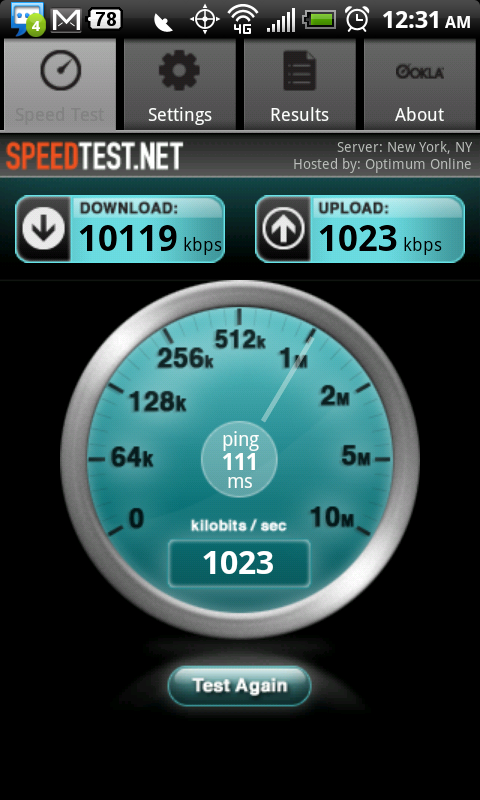
Edit: In basement went from 4562 download, 976 upload to 8399 download, 1000 upload.

Outside went from 7153 download, 992 upload to 10119 download, 1023 upload.

snap20100923_003154.png


TS out
 
Back
Top Bottom