• After 15+ years, we've made a big change: Android Forums is now Early Bird Club. Learn more here.

Root New to rooting

Hi. :)

Sorry to be late to the party - ocnbrze asked me to join in - if you want to know anything about using a Mac with an HTC, I'm probably your boy (rooted my first Evo with one back in June 2010, and a few times since).

I can get you as far as getting your bootloader unlocked, then you'll need to do the actual root.

I'm not current on today's root methods for the Evo, but between me and the other cats here, we'll probably have you squared away in no time.

You may have already done/tried some stuff - but let's please review my guide on this, ok? :)

Here's the overview of making the HTCdev process work on a Mac -

Please read all the way through once before starting, so you have a picture in your mind of the steps, and so that you can see that you have various options to follow on what might be easiest for you.

Download the Mini-SDK -

our forums' mini-sdk

Open two Finder windows -


  • Point the first one at your Home area (on left side, you'll see a home icon, named after your login name).
  • Point the second one to the same place, then go to Downloads from there.
  • Drag sdk-tools.zip from Downloads to your home area.
  • Double-click sdk-tools.zip - accept to open app downloaded from internet.
  • You'll now have a new folder under home -> sdk-tools
  • Move sdk-tools.zip to Trash, you're done with it.
  • In a Finder window, go to Applications, Utilities (folder), then double click to open Terminal
  • In the Terminal, enter (copy/paste): cd sdk-tools

The HTCdev process -


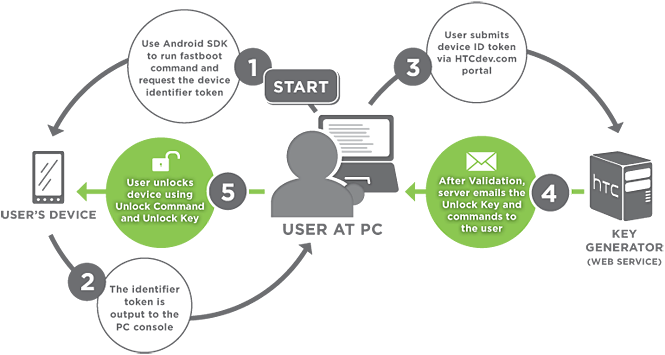
Unlock_Process.png


Here's the HTC dev unlock site - HTCdev - Unlock Bootloader

Scroll to the bottom of the drop-down and choose All Other Supported Models or choose your Evo, whichever applies here.

Wherever you see HTC ask you to enter the fastboot command, while in the sdk-tools folder, do: ./fastboot-mac


The "./" must preceed the command.

In step 1 of the diagram above, the command is:

./fastboot-mac oem get_identifier_token


In step 5 of the diagram above, drag and drop the Unlock_code.bin from Mail into your sdk-tools folder in the Finder and then the Terminal command to unlock is:

./fastboot-mac flash unlocktoken Unlock_code.bin


If you have questions about the precise steps, please also see -

Unlock Bootloader on Mac OS X - Rezound - xda-developers

-> but use our Mini-SDK and my instructions here to install and use that, it will make your life easier. ;)


Your bootloader is now unlocked, next comes getting a custom recovery installed and the actual rooting.


You may wish to keep the sdk-tools as it will come in handy in your rooting future. ;) :)


Remember the First Rule of Rooting - Don't Panic. Someone has always been in your shoes already, knows exactly how you feel and what you'll need. Panic causes mistakes. Going slow is better. ;) :)

Second Rule of Rooting - read, read, read some more and ask questions. Just like you have been. We hate broken phones, unhappy root experiences and love questions here. ;) :)

I'll be in and out of this thread as much as possible today and certainly will stand by you until you get there.

Cheers! :)

PS - not wanting to add to any confusion here, as I mentioned, ocnbrze asked me to pop in, see if I could help with the Mac bits. :)

 
Hi. :)

Sorry to be late to the party - ocnbrze asked me to join in - if you want to know anything about using a Mac with an HTC, I'm probably your boy (rooted my first Evo with one back in June 2010, and a few times since).

I can get you as far as getting your bootloader unlocked, then you'll need to do the actual root.

I'm not current on today's root methods for the Evo, but between me and the other cats here, we'll probably have you squared away in no time.

You may have already done/tried some stuff - but let's please review my guide on this, ok? :)

Here's the overview of making the HTCdev process work on a Mac -


Remember the First Rule of Rooting - Don't Panic. Someone has always been in your shoes already, knows exactly how you feel and what you'll need. Panic causes mistakes. Going slow is better. ;) :)

Second Rule of Rooting - read, read, read some more and ask questions. Just like you have been. We hate broken phones, unhappy root experiences and love questions here. ;) :)

I'll be in and out of this thread as much as possible today and certainly will stand by you until you get there.

Cheers! :)

PS - not wanting to add to any confusion here, as I mentioned, ocnbrze asked me to pop in, see if I could help with the Mac bits. :)

YES!! THANK YOU EARLYMON..!!!!
Too bad there isnt a hug button!
 
I think that's my problem....I dont know how to navigate to that folder from Terminal.

Sorry if my instructions might duplicate efforts for you - but please review them before proceeding.

If you're already very close, those will probably help you bridge the gap.

If you've made an innocent wrong turn at any point, they'll square you away in a jiffy.

Again - many honest apologies for any confusions - we'll get you home, compadre. :)
 
Hi. :)

Sorry to be late to the party - ocnbrze asked me to join in - if you want to know anything about using a Mac with an HTC, I'm probably your boy (rooted my first Evo with one back in June 2010, and a few times since).

I can get you as far as getting your bootloader unlocked, then you'll need to do the actual root.

I'm not current on today's root methods for the Evo, but between me and the other cats here, we'll probably have you squared away in no time.

You may have already done/tried some stuff - but let's please review my guide on this, ok? :)

Here's the overview of making the HTCdev process work on a Mac -


Remember the First Rule of Rooting - Don't Panic. Someone has always been in your shoes already, knows exactly how you feel and what you'll need. Panic causes mistakes. Going slow is better. ;) :)

Second Rule of Rooting - read, read, read some more and ask questions. Just like you have been. We hate broken phones, unhappy root experiences and love questions here. ;) :)

I'll be in and out of this thread as much as possible today and certainly will stand by you until you get there.

Cheers! :)

PS - not wanting to add to any confusion here, as I mentioned, ocnbrze asked me to pop in, see if I could help with the Mac bits. :)

Thanks. Gonna start at the top and see what happens.
 
Ok to give it a runthru in your mind or just by pretending with various windows open and asking about the steps. :)

Loving the questions, yeah. :)

PS - changed that quote to put commands in bold so easier to find.

I'm getting hung up on Step 5 from HTCdev. I installed the stuff with SDK manager. I'm not clear on what to do next.
 
I'm getting hung up on Step 5 from HTCdev. I installed the stuff with SDK manager. I'm not clear on what to do next.

Ugh...I wish the instructions were better related to the SDK manager thing. I figured out on my second root that I didn't need that at all and could just get the files from the help guide in this forum...that was faster... The first time around I sat and messed with that thing for a while...

For what it's worth...but I think I'm right...but I don't have a mac...so I'm not helpful at all here.
 
Ok I'm getting somewhere. I've got the long block of code that says "indentifier token start"....but when I submit it to the HTCdev site it says it failed.

Reasons for fail:

Error Code: Invalid Bootloader Token Length.
Error Reason: The submitted Token appears to be the wrong length and won't work.
 
Ok I'm getting somewhere. I've got the long block of code that says "indentifier token start"....but when I submit it to the HTCdev site it says it failed.

Reasons for fail:

Error Code: Invalid Bootloader Token Length.
Error Reason: The submitted Token appears to be the wrong length and won't work.
yay! you are getting somewhere....just make sure you copy it exactly as shown/listed on there..even the words "identifier token start" thru "identifier token end"

Edit: saw you gots it!!!!!!!!!
 
Ok I'm getting somewhere. I've got the long block of code that says "indentifier token start"....but when I submit it to the HTCdev site it says it failed.

Reasons for fail:

Error Code: Invalid Bootloader Token Length.
Error Reason: The submitted Token appears to be the wrong length and won't work.

Are you using copy/paste for that submit to them?

(Please don't mind what may sound like dumb questions. It's nothing personal - it's just how we roll - having learned from experience to go over every possible detail for best results. ;))


Ninja'd :)

Closer, closer and closerer.... :)
 
Are you using copy/paste for that submit to them?

(Please don't mind what may sound like dumb questions. It's nothing personal - it's just how we roll - having learned from experience to go over every possible detail for best results. ;))

Ya....I got that. Now, do I open the attachement HTC emailed me with my phone or the computer?
 
Ya....I got that. Now, do I open the attachement HTC emailed me with my phone or the computer?

You use it on your Mac - it should be a .bin file, don't open it.

Instead -

In step 5 of the diagram above, drag and drop the Unlock_code.bin from Mail into your sdk-tools folder in the Finder and then the Terminal command to unlock is:

./fastboot-mac flash unlocktoken Unlock_code.bin
 
Phone restarted. What's my next step? The recovery section of the guide?

VERY NICE!!
Yes, recovery is next.:)

:party:

OK - Mike, square me away here - you cats are using fastboot to flash recovery, yeah?

Marko - if he says yes then do this -


  • download the recovery file to your sdk-tools folder on your Mac
  • Then the command will be -
    • ./fastboot-mac flash recovery FileNameMikeHadYouDownload
 
Back
Top Bottom