• After 15+ years, we've made a big change: Android Forums is now Early Bird Club. Learn more here.

Nexus Battery

I am considering purchasing a Galaxy Nexus (CMDA) and I am wondering if it suffers from the same battery issues my current Dinc does with the charging overnight and it shutting off at a certain point, then continuing to drain the battery even though it is charging.
 
I've never had that problem with mine. There is a safety thing with the battery that if it is charging for to long, then it will go to 100% but drop to 98% if it is left on the charger for awhile after its hit 100%
 
I am considering purchasing a Galaxy Nexus (CMDA) and I am wondering if it suffers from the same battery issues my current Dinc does with the charging overnight and it shutting off at a certain point, then continuing to drain the battery even though it is charging.

Nope, no problem, I had the Dinc and know what you are talking about, and the GNex does not do that. Always at 100% when I pull it off in the morning. No bump charging required either.
 
While the USB cable connected to a laptop/PC will charge it faster than the phone drains (IF the screen's off), I have found that it will struggle to do so in a timely manner. HOWEVER: the WALL charger does a bang-up job of charging the Nexus quickly... whether the screen is on or not. So fear not: the Nexus will easily charge while you sleep, work, etc.

Just a power tip: using Juice Defender Plus allows that charge to last pretty much all day with moderate use.

So take heart: your Nexus will charge. Enjoy your future Nexus! :)
 
At worst, the "smart charging" stops it at 100%.....and then it may drop as low as 98% but will cycle back to 100%. So, at worst you might come back to 98%. Usually in the morning my phone is at 99%
 
Wow I had a Dinc since it came out and mine never did the wake up less charged thing... it was always 100% in the morning...

Also- my nexus is also 100%....
 
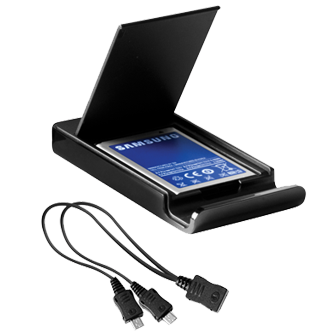
While on the topic of battery and your consideration for this phone, may I make a suggestion or two? First, the battery life is gonna absolutely suck and especially if you are in a 4G area and you leave 4G turned on. My suggestion. Go ahead and get the external battery charger with Y-adapter.
sam_stratosphere_std_bat_only_charger.png


I also purchased the $25 extended battery. So, I have three batteries in all and I rotate them in and out as the phone dies. In general, two of them have a charge at all times. And throwing in the next charged battery? It's as if Samsung realized how crappy the battery life would be so they put a cheap, thin plastic battery cover on the back of the phone so that you can quickly rip it off and have your phone going again within a couple of minutes. This has worked very well for me. I like not worrying about chargers or trying to use that annoying Juicedefender app. (No offense to the devs of this app. It really is great...just not what I prefer to use to enjoy my phone.)

 
While on the topic of battery and your consideration for this phone, may I make a suggestion or two? First, the battery life is gonna absolutely suck and especially if you are in a 4G area and you leave 4G turned on. My suggestion. Go ahead and get the external battery charger with Y-adapter.
sam_stratosphere_std_bat_only_charger.png


I also purchased the $25 extended battery. So, I have three batteries in all and I rotate them in and out as the phone dies. In general, two of them have a charge at all times. And throwing in the next charged battery? It's as if Samsung realized how crappy the battery life would be so they put a cheap, thin plastic battery cover on the back of the phone so that you can quickly rip it off and have your phone going again within a couple of minutes. This has worked very well for me. I like not worrying about chargers or trying to use that annoying Juicedefender app. (No offense to the devs of this app. It really is great...just not what I prefer to use to enjoy my phone.)

Have you seen any problems using NFC? I know there were talks of there being an issue with the secure element becuase it was in the battery and switching it would cause problems, but then someone said that only the antenna was in the battery. So...does Google Wallet work (if you have even tried it)?

Thanks,
Nkk
 
Have you seen any problems using NFC? I know there were talks of there being an issue with the secure element becuase it was in the battery and switching it would cause problems, but then someone said that only the antenna was in the battery. So...does Google Wallet work (if you have even tried it)?

Thanks,
Nkk

I haven't had any issues switching between a stock battery and VZW's offical extended battery...

AFIK, ONLY the antenna is in the battery and switching batteries should have no effect.

Now the disclaimer- This is one case where I would be VERY leery of off brand batteries from E-bay. If the price is too good, it very well may be that does not have the antenna in it...
 
I haven't had any issues switching between a stock battery and VZW's offical extended battery...

AFIK, ONLY the antenna is in the battery and switching batteries should have no effect.

Yes, I believe you're right- secure element is in the phone, only antenna is in the battery. I haven't had issues with GW and battery switching.

Now the disclaimer- This is one case where I would be VERY leery of off brand batteries from E-bay. If the price is too good, it very well may be that does not have the antenna in it...

Yeah, I think the new super-extended battery from Seidio is missing the antenna, as well.
 
no the nexus doesn't have the dinc charging "feature". when you pull the nexus off the charger and use it for a few minutes it goes from 100, to 99, to 98 just like you would expect.

for those wondering the op was asking about how the dinc would say 100% on the charger, you take it off and a few seconds later it would read 96% then 92%, after 92% it would drop normally. the only way to truely get the thing to 100 and use that top 8% was to do a "bump" charge which is the dumbest thing in the world to have to do. thats where you charge the phone all the way up, shut the phone down then charge it again for another 20minutes. then when you turn the phone on you will start at 100% and go down normally.

btw to the op, you will LOVE the way the nexus charges. with the included wall charger you can charge the nexus from 10% to 100% in about an hour. it will blow your mind when the phone has 30% battery left and you plug it in for 5 minutes and it charges up to 50%.
 
Back
Top Bottom