• After 15+ years, we've made a big change: Android Forums is now Early Bird Club. Learn more here.

Nexus S Battery Performance

sakibnaz

Lurker
Hi.

I am planning to buy Nexus S Phone very shortly but now getting very disappointed by reviewing some forum post regarding the Battery Life of Nexus S :(

I am expecting with all feature the Device should run at least 24 Hr from a 100% Charged Battery. Can anyone please share your comments regarding the Battery performance on Nexus S? Is the battery life depends on the Display Type, SAMOLED or SLCD?

Actually I want to use a Pure Google Device, as ADP have the feature for USB Boot-loading. So that I don't have any choice to other device (as Nexus One already out).

Please share with me your real experience about Nexus S Performance.

Thanks in advance.

Regards.
Sakibnaz.
 
Hi.

I am planning to buy Nexus S Phone very shortly but now getting very disappointed by reviewing some forum post regarding the Battery Life of Nexus S :(

I am expecting with all feature the Device should run at least 24 Hr from a 100% Charged Battery. Can anyone please share your comments regarding the Battery performance on Nexus S? Is the battery life depends on the Display Type, SAMOLED or SLCD?

Actually I want to use a Pure Google Device, as ADP have the feature for USB Boot-loading. So that I don't have any choice to other device (as Nexus One already out).

Please share with me your real experience about Nexus S Performance.

Thanks in advance.

Regards.
Sakibnaz.

It's not likely you will get 24 hours of battery use out of any smartphone these days. Unless you are a very light user. On my NS i get 16 hours with pretty heavy usage and still have about 30% left when i go to bed. And compared to any other android phone the NS has the best that i have experienced. If you were to buy a device like the Thunderbolt, Atrix, or G2X you can't really expect even close to that. My buddies G2X has only been getting him about 8 hours of heavy use everyday.
 
Battery performance on my NS has improved dramatically since the recent update to 2.3.4. Before I could get an average workday and evening at home with about 30% left. I charge overnight, so that was fine. Since this most recent update, I can go almost two days with light usage.

A lot depends on how you use your device and how you have it set up. I've found that leaving GPS active all day or night can drain your battery quickly. There are power managing apps that will greatly extend your daily battery life without your having to constantly be changing settings.

Like "B2L" said, the NS is one of the better smartphones out there right now. Some of the 4G phones require carrying an extra battery around with you at all times.

I definitely wouldn't rule out the NS based on battery concerns.

Good Luck in your decision, It's a great phone!

DH
 
The first week I had it the battery life was very bad, after the week battery life became very good. I am a heavy user, would finish my day with about 10% battery life. I would say the battery life is very good much better than the Captivate around the same as the Iphone4 I had prior.

It is the best phone I have ever owned
Good luck
 
It's not likely you will get 24 hours of battery use out of any smartphone these days. Unless you are a very light user. On my NS i get 16 hours with pretty heavy usage and still have about 30% left when i go to bed. And compared to any other android phone the NS has the best that i have experienced. If you were to buy a device like the Thunderbolt, Atrix, or G2X you can't really expect even close to that. My buddies G2X has only been getting him about 8 hours of heavy use everyday.

I disagree about the Atrix. The battery they put in that thing is huge (1880mAh). It easily lasts an entire day with heavy use. Over two days with light use (yes I own one).
 
I love my Nexus S but there are two things that have disappointed me: 1) wifi signal strength and 2) battery.

BestBuy Black Tie sent me an extra battery, so now I haul that around or keep it close by for when I'm in need of a switch.

I use Spotify, and I stream it to my stereo using bluetooth while browsing the web, so I'm probably one of the heavier duty users out there. But when I'm doing that I can maybe get only 2-3 hours of life.
 
I just switched from an iPhone 4 (GSM) and I've found the battery life to be vastly superior to any Android phone I've ever used and very similar to the iPhone.

I don't use any task killers, no live wallpaper, and only a handful of widgets. I leave everything except GPS on all the time and use BT for streaming music and calls in my car. I have my screen set to auto brightness and have the screen timeout set to 30 seconds.

Right now my phone has been on battery for 12h 36m and i'm at 65%. I find it to be pretty comparable to my iPhone 4, though I should point out that on both devices I don't really talk on the phone a whole lot.
 
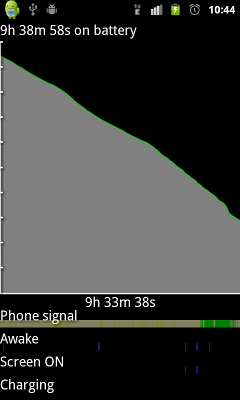
I am also having big problems with my Nexus S battery life. I have upgraded to 2.3.4 and still get at most 12 hours even when not using the phone. The graph below is overnight while I was asleep! The green phone signal is when I changed to 2G but the rate of battery use is still the same. Any ideas before I go back to the shop and change to a different phone?


nexus.png
 
I am also having big problems with my Nexus S battery life. I have upgraded to 2.3.4 and still get at most 12 hours even when not using the phone. The graph below is overnight while I was asleep! The green phone signal is when I changed to 2G but the rate of battery use is still the same. Any ideas before I go back to the shop and change to a different phone?


nexus.png

Maybe try uninstalling your Task Killer. It's possible 2.3.4 introduced some new system process that your task manager doesn't recognize as necessary and kills. Then the system notices that the process isn't running and actively has to start it again, just to have the task killer kill it, repeating the process indefinitely.
 
Maybe try uninstalling your Task Killer. It's possible 2.3.4 introduced some new system process that your task manager doesn't recognize as necessary and kills. Then the system notices that the process isn't running and actively has to start it again, just to have the task killer kill it, repeating the process indefinitely.

Never use a task killer.
 
Hi MartinS, Quantumrand,

I ditched the task killer but to no effect. I've moved on to rooting the device
and installing CM7 and Juicedefender. Hopefully will see some improvement
over the course of today!
 
I am also having big problems with my Nexus S battery life. I have upgraded to 2.3.4 and still get at most 12 hours even when not using the phone. The graph below is overnight while I was asleep! The green phone signal is when I changed to 2G but the rate of battery use is still the same. Any ideas before I go back to the shop and change to a different phone?


nexus.png
You didn't post what was draining your battery in the screen immediately prior to this one, but clearly you have a rogue app or ATK is eating the battery. Overnight with GPS and mobile data on, 2 email accounts, hourly weather updates, 3 stocks widgets, and news updates, all running in the background, I only lose a few percent. It's not the phone, it's a nasty app doing that.
 
You didn't post what was draining your battery in the screen immediately prior to this one, but clearly you have a rogue app or ATK is eating the battery. Overnight with GPS and mobile data on, 2 email accounts, hourly weather updates, 3 stocks widgets, and news updates, all running in the background, I only lose a few percent. It's not the phone, it's a nasty app doing that.

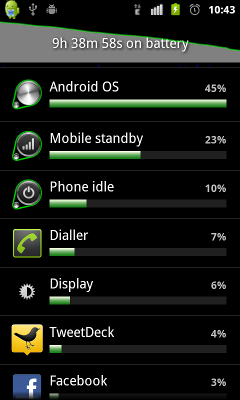
Here's the power usage by apps screen. Doesn't look like any obvious rogue processes. I don't think it's the particular handset as this is the 2nd one I've tried that has the same characteristics.


nexus3.png
 
Here's the power usage by apps screen. Doesn't look like any obvious rogue processes. I don't think it's the particular handset as this is the 2nd one I've tried that has the same characteristics.


nexus3.png
Geezes, look at the Android OS at 45%!! That's way too high...hang on whilst I get my Nexus S...ok right now I'm at 14h 13m 38s and the OS is only 3% on mine like I figured, with 75% battery. Your Mobile (cell) standby and Phone idle should both be a lot higher than the OS service.

I'd guess an app or ATK is causing the OS to constantly make changes or restart essential services and it's eating the battery under constant usage. Whatever you're installing, it's the cause of the problem.

I just noticed Facebook in there too...check to make sure the chat feature in Facebook is disabled as I hear it tends to eat up battery too when not in use and may be causing the OS to constantly refresh.
 
Hi bfksc,

I've gone back to a clean 2.3.4 (GRJ22) install and have not sync'd to my google account. So it is vanilla as can be. I'll leave it untouched for a few hours and see what happens.

Cheers!
 
I also had an atrix and let me say if they didn't have blur I would have kept it but the experience was no good for me, I am a light user and get good battery life on NS for my needs and atrix has a1930mha battery and I could get two days of a single charge
 
1h 13m on battery:

47% android OS
22% mobile standby
15% display
9% phone idle
4% dialler
3% android system

Battery charge down by 6%. This is with *nothing* installed except the 2.3.4 update.
 
I'm having battery issues too. I've had my phone for just over 2 months.

It's never really bothered me because I always had a computer/wall/car to charge during the day - but yesterday I went to Disneyland and by 7:30pm it had died.

I had it connected to the charger (in the car) until about 9am.

During the day I was using the phone for some light texting, quickly checking e-mail (deleting), looking at the Disney app's for ride wait times, and maybe two short calls (a couple of minutes each).

I tried reading some of these threads, but it all looks like gibberish - too many technical terms - haha (I can be slow at this phone stuff).

HELP!

I just put my phone to charge again, and usage wise:

Display: 40% (this is always my top usage area, but I have it at 0% screen light)
eBuddy: 18% (is there one that uses less?)
Android System: 9%
Maps: 8%

The rest are less than 6%.
 
This isn't an issue with your battery, it's a software issue, something is causing the OS to work overtime.

On my phone which regularly chugs on for 30+ hours (with everything bar wifi and gps on), the OS is only accounting for 4% of battery use. My biggest eater is the display (which I max) which is accounting for 50% of the battery.
 
This isn't an issue with your battery, it's a software issue, something is causing the OS to work overtime.
Exactly. With a clean install, something is still causing the OS to run too high. It might have to do with location and internet availability since Android depends heavily on having some sort of connection available. Or something else...I'm not sure what, but the OS should only be a few percent.
 
With my screen 90% of the time on 0% brightness, is it normal for the screen usage to be at 40%?
That depends on how much you use the phone, but typically the display is the highest drain on the battery. If you don't use the phone much, then the cell standby will often be the highest.

As for setting display to 0, I don't bother with it. I have it set at the default with auto brightness and it works fine without having much of an effect on battery (auto actually works too - brightness increases a lot when in daylight, and dims when used indoors with less light). I use my phone outdoors often enough that I can't set it at 0, but I have no complaints about battery life.
YMMV.
:)
 
Exactly. With a clean install, something is still causing the OS to run too high. It might have to do with location and internet availability since Android depends heavily on having some sort of connection available. Or something else...I'm not sure what, but the OS should only be a few percent.

Looking at the graphs the phone signal is hardly ever in green. I'll get in contact with the carrier to see if there's something up. But I'm in the middle of the capital city so you'd imagine it should have pretty good coverage.

Until I lost my Nexus-One I never had any of these sorts of problems though.
 
Looking at the graphs the phone signal is hardly ever in green. I'll get in contact with the carrier to see if there's something up. But I'm in the middle of the capital city so you'd imagine it should have pretty good coverage.
Until I lost my Nexus-One I never had any of these sorts of problems though.
That bar with green in it under the graph doesn't indicate the presence of a phone signal - it's a bit misleading. I believe it indicates when the phone makes a connection to Google services for specific tasks, like checking for firmware updates, etc. I live and work in areas where the 3G signal is fairly strong, so if it was signal strength related, I'd have a solid green bar or close to it. Mine is hardly green at all, with a few spatterings of green here and there. And if it was related to signal, then the graph above it should alter its slope accordingly, but it never matches from what I've seen.

Trying to find info on this topic is not easy...it's pretty sparse and I've yet to see anything from Google explaining EXACTLY what it means.
 
Until I lost my Nexus-One I never had any of these sorts of problems though.
The only thing you complained about was battery life, which is explained with something abusing the Android OS service. What other problems do you have?
 
Back
Top Bottom