
• After 15+ years, we've made a big change: Android Forums is now Early Bird Club. Learn more here.

Nexus S Battery Performance

nexus3.png
I just noticed something I missed before. Your phone is not connected to Google services (grey signal strength/data bars), you don't have a 3G connection (E=EDGE only), and although your battery icon shows it's charging (lightning bolt in battery icon), the graph is still on a downward slope.
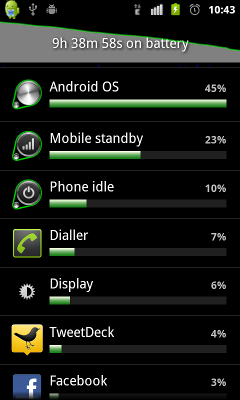
What's up with all that?
:confused:
 
I just noticed something I missed before. Your phone is not connected to Google services (grey signal strength/data bars), you don't have a 3G connection (E=EDGE only), and although your battery icon shows it's charging (lightning bolt in battery icon), the graph is still on a downward slope.

What's up with all that?
:confused:

The google services thing is a well documented "feature" of the Nexus S.
Nexus S Google connection on & off - Google Mobile Help

The connection moves between 3G and E. I'm guessing this is part of the problem that the phone keeps trying to reconnect at 3G and this is what is being clocked up as Android OS time. Whether that's network related or the phone I can't tell.

The phone was just plugged in to take the screenshot using ddms as I haven't come across an easier way to do them. I'm sure there's an app out there but I just know how to do it through ddms :)
 
The google services thing is a well documented "feature" of the Nexus S.
Nexus S Google connection on & off - Google Mobile Help
Yes I'm aware of that info, but it only talks about the icons turning grey and green, nothing about the battery graph and the long horizontal "phone signal" bar under it.
The connection moves between 3G and E. I'm guessing this is part of the problem that the phone keeps trying to reconnect at 3G and this is what is being clocked up as Android OS time. Whether that's network related or the phone I can't tell.
There's an easy way to find out...set your phone to 2G only for a while and see what happens to the OS usage.
The phone was just plugged in to take the screenshot using ddms as I haven't come across an easier way to do them. I'm sure there's an app out there but I just know how to do it through ddms :)
Ahh...that's why. Ok, I was starting to get paranoid about you doctoring an image to stir up poopoo.
:eek:
 
So my issue has been resolved. Turns out that after booting the rlid process was taking about 10% of CPU usage and now allowing the device to idle properly. Connecting via adb and killing the process starts up a new rlid that uses (almost) no CPU. Now overnight I loose about 3% of battery which I think is fairly acceptable!
 
As someone considering buying a Nexus S, this thread has really put me off. I was expecting much better battery than my original HTC Desire. Is this not the case? Is this a common problem?
 
As someone considering buying a Nexus S, this thread has really put me off. I was expecting much better battery than my original HTC Desire. Is this not the case? Is this a common problem?
Go read the various threads about battery life and you'll find the Nexus S does quite well. I had the HTC Desire too, and the Nexus S is roughtly another 50% better with battery life when used heavily.

And since I rarely see complaints about default processes eating battery, I can only presume that it's quite rare.
 
As someone considering buying a Nexus S, this thread has really put me off. I was expecting much better battery than my original HTC Desire. Is this not the case? Is this a common problem?

I've had an issue similar astarmain's once. For some reason my phone thought it was still charging, even though the charger was disconnected. After about 8 hours, I noticed my battery was nearly dead. Rebooting my phone fixed the problem and it has never happened since.

I typically get well over a full day's use out of my Nexus S. Right now, I have been away from the charger for 15 hours, and I still have 67% of my battery left. Today's use consisted of about 45 minutes of web browsing, a 21 minute episode on Netflix, a bit of Facebook/Twitter, and checking out the forums every few hours with the Phandroid app.

I have to say, I'm generally very happy with my Nexus S' battery life.
 
As someone considering buying a Nexus S, this thread has really put me off. I was expecting much better battery than my original HTC Desire. Is this not the case? Is this a common problem?

Now that I've gotten to the bottom of my problem I get two full days out of my phone with music while commuting, bluetooth in the car and plenty of twitter/web/facebook over 3G and wifi depending on location. I have no complaints or regrets about getting the Nexus S now.
 
hey guys, new to the forum. this is my second android phone (droid 2 global...yuck) and i definitely have fallen in love with my nexus s 4g with all it can do. my one gripe about it is, the battery life (just like others on this thread) and i can barely get 12 hours out of it. i've drained it twice and have the following settings:

-wifi off
-bluetooth off
-4G on
-auto brightness
-gps off
-maps on
-auto sync for twitter and facebook every 4 hours
-push for email

Judging from this, any tips? I'm debating whether to turn off WiMax even though cell standby is at 16%. But I hate not using 4G if I have it available...if they only had a toggle!
 
hey guys, new to the forum. this is my second android phone (droid 2 global...yuck) and i definitely have fallen in love with my nexus s 4g with all it can do. my one gripe about it is, the battery life (just like others on this thread) and i can barely get 12 hours out of it. i've drained it twice and have the following settings:

-wifi off
-bluetooth off
-4G on
-auto brightness
-gps off
-maps on
-auto sync for twitter and facebook every 4 hours
-push for email

Judging from this, any tips? I'm debating whether to turn off WiMax even though cell standby is at 16%. But I hate not using 4G if I have it available...if they only had a toggle!


Well this is the Nexus S (Non 4G) board, so we can't really tell you how Sprint's WiMAX affects battery life. General consensus is that WiMAX is incredibly hard on battery life regardless of the phone. Leaving 4G on could very well be your problem. Try it for a day or two with the 4G turned off and see if it helps.
 
So my issue has been resolved. Turns out that after booting the rlid process was taking about 10% of CPU usage and now allowing the device to idle properly. Connecting via adb and killing the process starts up a new rlid that uses (almost) no CPU. Now overnight I loose about 3% of battery which I think is fairly acceptable!

Does this mean that every time you reboot the phone, you connect it to PC and kill rlid through 'adb'?! Is there a easier workaround?
 
Back
Top Bottom