
Install the app
How to install the app on iOS
Follow along with the video below to see how to install our site as a web app on your home screen.
Note: This feature may not be available in some browsers.
-
After 15+ years, we've made a big change: Android Forums is now Early Bird Club. Learn more here.
You are using an out of date browser. It may not display this or other websites correctly.
You should upgrade or use an alternative browser.
You should upgrade or use an alternative browser.
Root Phone defaults to 4G after reboot...
- Thread starter bvbull200
- Start date
-
- Tags
- htc evo 4g

mecampo
Well-Known Member
What the hell does this mean?
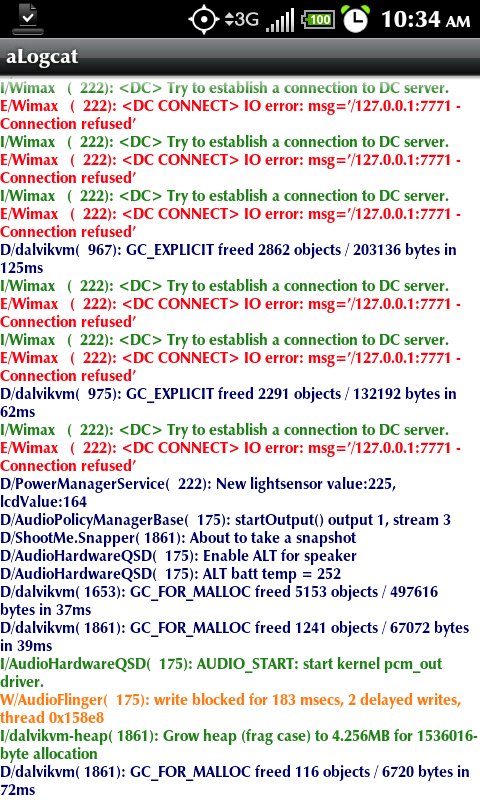
Looks like 4G is trying to connect, then disconnecting? This is after rebooting, 4G being on by default, then me turning 4G off.
doing the same on mine even after i turned it off manually
 , what can we do with this?
doing the same on mine even after i turned it off manually
No clue. Someone much smarter than I will have to chime in.
mecampo
Well-Known Member
No clue. Someone much smarter than I will have to chime in.
obviously this is not a rom/kernel issue since we have different setups, hope someone can help.

Mr. Ed
Extreme Android User
So far there is no fix. Other than a reboot. In the case that 4g is coming on at boot you are having a completely seperate issue. You need to start from scratch factory reset wipe all data dalvik and cache and verify the issue is gone. If not it is in your rom or kernel...try a new one. If it is gone add one app at a time app only no restored data. Reboot after each one. If the issue happens after a specific app is.added....there is your culprit. You will not fix it without following those steps.
Eh, the startup after every reboot is something I will just learn to live with. I followed those steps, got it to go away, then, without restoring anything additional, it started doing it again. So, there must be ANOTHER app that is causing it (I've added a few more since then), because I haven't added any more "old" data since resolving the issue the first time.
As for the connect/reconnect issue, I've never checked for that in that past and have been otherwise pleased with the function of the phone, including battery life, so I'm not too concerned with it right now. I will keep my eyes peeled for a solution, however.
As for the connect/reconnect issue, I've never checked for that in that past and have been otherwise pleased with the function of the phone, including battery life, so I'm not too concerned with it right now. I will keep my eyes peeled for a solution, however.
mecampo
Well-Known Member
So far there is no fix. Other than a reboot. In the case that 4g is coming on at boot you are having a completely seperate issue. You need to start from scratch factory reset wipe all data dalvik and cache and verify the issue is gone. If not it is in your rom or kernel...try a new one. If it is gone add one app at a time app only no restored data. Reboot after each one. If the issue happens after a specific app is.added....there is your culprit. You will not fix it without following those steps.
the data, dalvik, cache wipe (factory reset) wont remove any app or setup right?
pls advise. tnx
the data, dalvik, cache wipe (factory reset) wont remove any app or setup right?
pls advise. tnx
Wiping your data will remove your homescreen setups and all of your apps (that aren't included in the ROM). Titanium can back all of that up, but the suggested solution is to not use that method of restoring since, essentially, you will be putting the phone to the exact same state it was before the wipe. The goal is to eliminate the bad app/data that is causing the issue. Problem is, if you have 75 apps, that is 75 different reboots that you have to do if you are trying to go 1 at a time.
mecampo
Well-Known Member
Wiping your data will remove your homescreen setups and all of your apps (that aren't included in the ROM). Titanium can back all of that up, but the suggested solution is to not use that method of restoring since, essentially, you will be putting the phone to the exact same state it was before the wipe. The goal is to eliminate the bad app/data that is causing the issue. Problem is, if you have 75 apps, that is 75 different reboots that you have to do if you are trying to go 1 at a time.
ok, and u said it work for a while then came back. i'll just wait for the release of mik 4.5 before i do this steps, shooting 2 birds in one reset.
tnx y' all an will keep an eye on this maybe someone can find a better cure
Mr. Ed
Extreme Android User
Yes...that removes everything and is what I mean by start from scratch.
Create a nandroid
Back up apps with titanium
Factory reset wipe data in recovery
Check for issue issue gone...continue. not, flash new rom/kernel
Use titanium to manually add each app back individually
Reboot between each addition.
THIS SHOULD FIX/NARROW DOWN The default 4g at power up issue
This will not fix the fact that if you turn on 4g and turn it off it continues to run a connection sequence.
Currently there is no fix for that other than reboot after turning off 4g
Create a nandroid
Back up apps with titanium
Factory reset wipe data in recovery
Check for issue issue gone...continue. not, flash new rom/kernel
Use titanium to manually add each app back individually
Reboot between each addition.
THIS SHOULD FIX/NARROW DOWN The default 4g at power up issue
This will not fix the fact that if you turn on 4g and turn it off it continues to run a connection sequence.
Currently there is no fix for that other than reboot after turning off 4g
O1PewterWS6
Newbie
I have the same issue! I did not do a nandroid backup just wiped the phone and started from stratch, installed Warm and after using Titanium the 4G turns on after a reboot.
I just restored a nandroid that I did after "fixing" the issue in the first place. Before I tried any manual stuff, I did a batch restore of all of my apps, but WITHOUT data. I did not restore any system data either. As I notice apps that need the data restored, I will do so with Titanium. So far, Mobile Defense, Wordfeud, ShapeWriter, and Angry Birds are the only ones that I have come across. Since doing so, I have rebooted 4 different times and 4G has not automatically turned on, nor do I have any issues with 4G connecting/disconnecting on its own. I will try to get a few more things set up to my liking, then get another nandroid made. My last one is good, but not entirely complete.

Karl_in_Chicago
Well-Known Member
Crap, this just started on mine as well. Will be watching this thread in case anyone finds the cause/fix.
Crap, this just started on mine as well. Will be watching this thread in case anyone finds the cause/fix.
Have you tried anything in this thread that people have done to fix it?
Personally....I don't think it is an app. I think titanium is corrupting a settings file somewhere.
Agreed. It *could* be a widget, but restoring everything including settings is bound to cause issues like this. Also, if nobody has tried, try what I suggested a couple posts up. I've heard of that fixing problems like this.
Karl_in_Chicago
Well-Known Member
Have you tried anything in this thread that people have done to fix it?
I tried the turning 4G on - waiting to make sure it was ON and logged in - turning it off and waiting but no joy.
As I'm at the office I'm going to wait until I'm home for more drastic fixes. I have no ability to reload things from PC backups here as all writeable media, including USB devices, is blocked.
This weekend I may just use this as an excuse to load MikFroyo 4.5 beta - if I'm going to wipe everything I might as well try to get something out of the effort.

I tried the turning 4G on - waiting to make sure it was ON and logged in - turning it off and waiting but no joy.
As I'm at the office I'm going to wait until I'm home for more drastic fixes. I have no ability to reload things from PC backups here as all writeable media, including USB devices, is blocked.
This weekend I may just use this as an excuse to load MikFroyo 4.5 beta - if I'm going to wipe everything I might as well try to get something out of the effort.
Yeah, that's probably your next step. Sounds like a plan.
Karl_in_Chicago
Well-Known Member
OK, found the time to see if I could fix this.
Wiped cache, Dalvik cache, data and factory reset with Amon RA.
Flashed MikFroyo 4.5BV-test and in same Recovery session flashed netarchy-toastmod 4.3.2 nosbc HAVS more.
Booted into Android - 4G was not defaulting to "ON" anymore. Yay.
I intentionally did NOT load any of my Apps from backup at this point - other than giving my Google login info to the popup to allow that to synch, I left everything as vanilla as possible.
Downloaded aLogcat. Toggled 4G on, watched it connect. Waited for a bit then toggled it off. Sure enough I could see those same Wimax Connect error messages.
Rebooted. 4G not on by default - so I've got that issue licked, for now. I'm going to roll the dice and batch reload my Apps via TB. If the 4G-on-at-boot issue comes back I'll start over and load them one by one (ugh).
There definitely appears to be an issue in HTC's code how they handle 4G being toggled off, though.
Wiped cache, Dalvik cache, data and factory reset with Amon RA.
Flashed MikFroyo 4.5BV-test and in same Recovery session flashed netarchy-toastmod 4.3.2 nosbc HAVS more.
Booted into Android - 4G was not defaulting to "ON" anymore. Yay.
I intentionally did NOT load any of my Apps from backup at this point - other than giving my Google login info to the popup to allow that to synch, I left everything as vanilla as possible.
Downloaded aLogcat. Toggled 4G on, watched it connect. Waited for a bit then toggled it off. Sure enough I could see those same Wimax Connect error messages.
Rebooted. 4G not on by default - so I've got that issue licked, for now. I'm going to roll the dice and batch reload my Apps via TB. If the 4G-on-at-boot issue comes back I'll start over and load them one by one (ugh).
There definitely appears to be an issue in HTC's code how they handle 4G being toggled off, though.
Mine is continuing to do both issues and it seems to happen with no changes made from when the issue is absent and when it is present (at least with data that I load/restore). The only other process that happened was an automatic backup session being run by Titanium. I have some time right now, so I am going to wipe my phone, format my SD card, install a fresh download of Myn's RLS5, redownload Titanium (though not use it to restore anything), and redownload all of my apps via AppBrain.
With that said, what would YOU (speaking to everyone) save from your SD card before wiping it. I am not concerned about my music and am only really concerned about the pictures/videos right now. I would like my Angry Birds progress and the user dictionary for ShapeWriter, so I suppose I will look for those files. Anything else to be aware of?
Last question, I flashed the radio combo pack when I went to RLS5, as I understand it, a data wipe won't affect that?
With that said, what would YOU (speaking to everyone) save from your SD card before wiping it. I am not concerned about my music and am only really concerned about the pictures/videos right now. I would like my Angry Birds progress and the user dictionary for ShapeWriter, so I suppose I will look for those files. Anything else to be aware of?
Last question, I flashed the radio combo pack when I went to RLS5, as I understand it, a data wipe won't affect that?
Karl_in_Chicago
Well-Known Member
Update: Batch restore via TB of all my Apps and data and multiple reboots since and no recurrence of having 4G on by default at boot. So that's good - still have the "root" issue (pun intended) of the constant trying to connect after 4G is on and then turned off. I guess it's always been that way and I just didn't know until I got a log browser? Sometimes ignorance really is bless.
Mine is continuing to do both issues and it seems to happen with no changes made from when the issue is absent and when it is present (at least with data that I load/restore). The only other process that happened was an automatic backup session being run by Titanium. I have some time right now, so I am going to wipe my phone, format my SD card, install a fresh download of Myn's RLS5, redownload Titanium (though not use it to restore anything), and redownload all of my apps via AppBrain.
With that said, what would YOU (speaking to everyone) save from your SD card before wiping it. I am not concerned about my music and am only really concerned about the pictures/videos right now. I would like my Angry Birds progress and the user dictionary for ShapeWriter, so I suppose I will look for those files. Anything else to be aware of?
Last question, I flashed the radio combo pack when I went to RLS5, as I understand it, a data wipe won't affect that?
I saved my Nandroid backups to my computer desktop as well.
To save things like a user dictionary or game progress, the easiest method to restore them is to use titanium backup, unfortunately. Since you're basically trying to get a baseline without titanium backup, that makes it difficult. You can restore just those two apps with data if you want, and hope it doesn't affect anything. It *shouldn't*. Otherwise, the stuff I would backup would include nandroid backups (you've already got those), any other kinds of backups (contacts, sms, bookmarks, etc.), any flashable zips or apk files (but you've probably got them on your computer), specific directories for any apps that have separate downloads (Beautiful widgets, for example, stores downloaded skins on the card; I wouldn't want to redownload them all), and, just for good measure, titanium backup files. You never know when you might want them, even if you're not restoring from them now. As for the radios, once they're flashed, they're flashed. No amount of wiping will undo that. Nothing short of flashing different radios or flashing a RUU (which just flashes the radios) will change it.
Update: Batch restore via TB of all my Apps and data and multiple reboots since and no recurrence of having 4G on by default at boot. So that's good - still have the "root" issue (pun intended) of the constant trying to connect after 4G is on and then turned off. I guess it's always been that way and I just didn't know until I got a log browser? Sometimes ignorance really is bless.
Yep, it's always been that way, and there's nothing you can do about it other than reboot (and sometimes you need to clean stop/start it before the reboot). HTC will need to fix it.
Well...I wiped everything, including the SD card. Turned on 4G while I was downloading my apps again from the market, just turned 4G off and checked logcat and, sure enough, it is doing the connect/disconnect cycle again. I haven't restored ANYTHING from Titanium at all and used a fresh download of Myn's RLS5. I don't think it has played too big a role in the life of my battery so, for now, I will probably just live with it.