• After 15+ years, we've made a big change: Android Forums is now Early Bird Club. Learn more here.

POST YOUR SPEED 1X and 4G/LTE

Test Date: May 13, 2011 1:57:28 am
Connection Type: 1xRTT
Server: Fort Worth, TX
Download: 8776 kbps
Upload: 5861 kbps
Ping: 38 ms

A detailed image for this result can be found here:
http://www.speedtest.net/android/52998180.png

Test Date: May 12, 2011 12:57:05 am
Connection Type: 1xRTT
Server: Fort Worth, TX
Download: 1111.2 kB/s
Upload: 678.2 kB/s

52998180.png


This is what drives me nuts. I was paying the same per month and my download speed was no where near that. On "4g" I was lucky to get 1.5 down and my 1xrtt was slow as hell.

Metro in dallas is awesome... Outside and you slow down to a crawl... But still pay the same price...
 
This is what drives me nuts. I was paying the same per month and my download speed was no where near that. On "4g" I was lucky to get 1.5 down and my 1xrtt was slow as hell.

Metro in dallas is awesome... Outside and you slow down to a crawl... But still pay the same price...


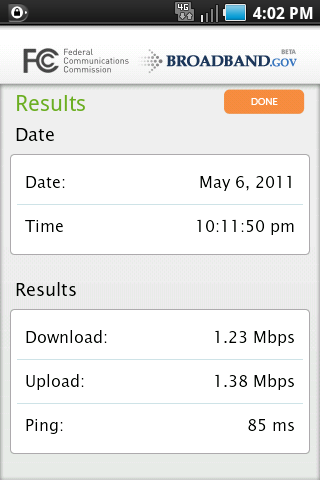
i have had it hit 9.6 download before ill try and get another to post it tonight but at home i dont get 4 g but everywhere else i do once i leave the house , but very rarely do i get it at home which is outside of city limits
 
I use Mobile Speed test and always get around these numbers...4000-6000kbps..rare times I would get more or less.

Just now I got 5479.452 kbps
Latency .22 secs
Transferred 2000kb in 1.46


Don't forget to scroll down to the bottom for recommendation to test your speed using different kb tests.
 
I took a trip from Florida to Los Angeles last week and I had a layover in Dallas TX.
snap20110516_160300.png

Texas is where Metro PCS originated and look at those latencies!!! 85 ms is phenomenal! The down/up speeds though slow on 4G, but pages were opening at lightning speed.

snap20110516_181041.png

This is the best I could get in Los Angeles which isn't so bad, but I would get 4G service only 25% of the time out there.

snap20110516_160218.png

This is what Texas looked like on the flight home.

snap20110516_160154.png

This is what Florida looked like.

1x speed crashes the app and for whatever reason it doesn't like Wifi. It tests it but runs at snail paced speed regardless of how fast pages and files load.
 
I ran a speed test on my Samsung Galaxy Indulge with the speedtest.com app. The results are:

Ping: 132: ms
Download: 8933 kbps (almost 9 mb/s)
Upload: 3034 kbps (3 mb/s)

I don't know what the Ping is but my phone is really fast.
 
Coral Springs, FL

4G outdoor
ping: 120 - 160ms
down: 4200 - 4400kbps
up: 2300 - 2500kbps

1x indoor
ping: about 600-700ms
down: 130 - 160kbps (little faster than 56k modem)

1x/4G indoor: signal dropped
 
I posted a while back, but wanted to give an update. When 4G first came to this market (Tampa Bay) I would get consistent 1300 kbps up/down just about everywhere. That is still true, although in more and more spots nowadays I am getting around 5000 kbps down and 2000-3000 kbps up. Using Speedtest.net app. So it looks like they continue to improve the network in my area. That's good.
 
Jacksonville Fl.
downlaoad 1358 kbps
upload 1348 kbps
ping 155ms

Metro needs to step up thier game in Florida.
 
Speedtest done from within the Dolphin browser seems to yeild better speed than the app.
Coral Springs, FL
ping: 106ms
down: 4.73mbps
up: 2.99mbps
 
I posted a while back, but wanted to give an update. When 4G first came to this market (Tampa Bay) I would get consistent 1300 kbps up/down just about everywhere. That is still true, although in more and more spots nowadays I am getting around 5000 kbps down and 2000-3000 kbps up. Using Speedtest.net app. So it looks like they continue to improve the network in my area. That's good.
not sure which area in tampa ur at but im in dale mabry and fletcher in area called south village part of carrollwood village and these are my results.

20110628202150.png


my recent results more or less around where i live

20110806104331.png
 
MetroPCS
Speedtest.net
4g
ping 111
download 992
upload 999

"Open Signal" speedtest shows
ping 129
download 42 kbps
upload 737 kbps

That is a big difference???
 
Oh wow.
Talk about a necro!

Well, there's no way to tell with the data you provided, since it's incomplete. But I'm gonna make the sin of assuming the speedtest data was in kbps. Then in that case, they're similar enough.
I also feel it worth noting that the measurement is likely to change, and is actually expected to increase slightly if done three times in a row, for example, the 3rd time having the advantage of a preconeived path to the destination.
 
Back
Top Bottom