
Install the app
How to install the app on iOS
Follow along with the video below to see how to install our site as a web app on your home screen.
Note: This feature may not be available in some browsers.
-
After 15+ years, we've made a big change: Android Forums is now Early Bird Club. Learn more here.
You are using an out of date browser. It may not display this or other websites correctly.
You should upgrade or use an alternative browser.
You should upgrade or use an alternative browser.
Root Proof: Jellybean upgrade
- Thread starter chevanlol360
- Start date
-
- Tags
- zte warp sequent

boricuakiller
Android Expert
i bet they will have no answer for us
boricuakiller
Android Expert
hate zte so much the update a dievice 512 mb to jelly bean and we here still waiting for the sequent to get 4.1 thanks zte

D34DBre4kr
Android Enthusiast
I won't be
boricuakiller
Android Expert
galaxy 4 still have the sequent around

As much as we all like to bad mouth zte...b09 is pretty damn good. Yes, they did sell our phones to us before they worked correctly, but they fixed most of the problems. Perhaps if/when we get JB it will work as well. Hopefully at least good enough for us to get cm10 fully functional 

money15
Android Enthusiast
I won't be
Lol what can u do...can't worry about something u have no control over


DimBulb
Android Enthusiast
Brace yourselves guy's, this is a slap up-side the head for Warp 2 owners.
The ZTE Warp,(1) the "Daddy" to the Warp Sequent. ... has CyanogenMOD 10, ( Jellybean 4.1.2 )
http://androidforums.com/boost-mobi...-10-jellybean-4-1-2-zte-warp-nightly-wip.html
The ZTE Warp,(1) the "Daddy" to the Warp Sequent. ... has CyanogenMOD 10, ( Jellybean 4.1.2 )
http://androidforums.com/boost-mobi...-10-jellybean-4-1-2-zte-warp-nightly-wip.html
boricuakiller
Android Expert
They have the same problem we have

chevanlol360
Android Expert
They pretty much have the same problems that we have, besides when we have everything working correctly is will be smoother for the Sequent than the original warp even if they have everything working correctly too. Specs can make a huge difference in performance, also Cant forget how long it took the Warp to finally get jb, just a little over a year when it only took the Sequent matter of months thanks to the junkie, playfulgod, hroak13 etc.
cough superr lolit only took the Sequent matter of months thanks to the junkie, playfulgod, hroak13 etc.
chevanlol360
Android Expert
D34DBre4kr
Android Enthusiast
Yea I'm in love with supers rom!
boricuakiller
Android Expert
Boost Mobile Care @BoostCare
@haze8129 The updates will be OTA, so when it is released to all devices, you will be notified. ^Soila G.
Alan Houston
Newbie
Some Boost Mobile phones HAVE received the update to Jelly Bean. I was eager to update my Boost Mobile LG Venice and I have been jealous of folks with newer phones that have Android Jelly Bean 4.1 or 4.2.
I was happy to read that Boost Mobile had begun an "Over The Air" update of the LG Venice to Jelly Bean 4.1.1, PLUS upgrading the Venice to Version 8 of the Venice firmware.
I did not want to wait for Boost to send me the update, so I Googled around to find out how to "force" an OTA update.
THIS is the process I followed to update my Venice:
1. Charged my Venice to 100%
2. Verified that I had more than 400 MB of open internal memory (moving all of my music to the SD card gave me 1.7 GB of open memory).
3. Connected to a fast wi-fi router.
4. Clicked "Settings".
5. Clicked "Apps"
6. Clicked "All"
7. Clicked "Google Services Framework"
8. Clicked "Force Stop"
9. Clicked "Settings"
10. Clicked "System Updates"
11. Clicked "Update Firmware"
12. Clicked "Update LG Software"
The 362 mb download began and continued for about 15 minutes. Next I was asked if I wanted to install the update. I "clicked" update. During the update process, the Venice was restarted and then a notice said "Updated 23 apps". Then the Venice restarted again. I was asked if I wanted to update "Google Search". I clicked "update". That update installed "Google Now" and after the install I was given a quick overview of how "Google Now" works.
I had 1.7 gb of open memory before the update and 1.5 gb after, with much of the 200 mb of memory being used for app updates and the new "Google Now" app.
The entire process took less than an hour and went smoothly. My Venice was also updated to V.8 of the LG firmware from the original V.5. My phone was never rooted.
I was happy to read that Boost Mobile had begun an "Over The Air" update of the LG Venice to Jelly Bean 4.1.1, PLUS upgrading the Venice to Version 8 of the Venice firmware.
I did not want to wait for Boost to send me the update, so I Googled around to find out how to "force" an OTA update.
THIS is the process I followed to update my Venice:
1. Charged my Venice to 100%
2. Verified that I had more than 400 MB of open internal memory (moving all of my music to the SD card gave me 1.7 GB of open memory).
3. Connected to a fast wi-fi router.
4. Clicked "Settings".
5. Clicked "Apps"
6. Clicked "All"
7. Clicked "Google Services Framework"
8. Clicked "Force Stop"
9. Clicked "Settings"
10. Clicked "System Updates"
11. Clicked "Update Firmware"
12. Clicked "Update LG Software"
The 362 mb download began and continued for about 15 minutes. Next I was asked if I wanted to install the update. I "clicked" update. During the update process, the Venice was restarted and then a notice said "Updated 23 apps". Then the Venice restarted again. I was asked if I wanted to update "Google Search". I clicked "update". That update installed "Google Now" and after the install I was given a quick overview of how "Google Now" works.
I had 1.7 gb of open memory before the update and 1.5 gb after, with much of the 200 mb of memory being used for app updates and the new "Google Now" app.
The entire process took less than an hour and went smoothly. My Venice was also updated to V.8 of the LG firmware from the original V.5. My phone was never rooted.
boricuakiller
Android Expert
dont work for the sequent
D34DBre4kr
Android Enthusiast
Who cares about that it's not for our phone so he posted that in the right spot we all know our update hasn't been realized
boricuakiller
Android Expert
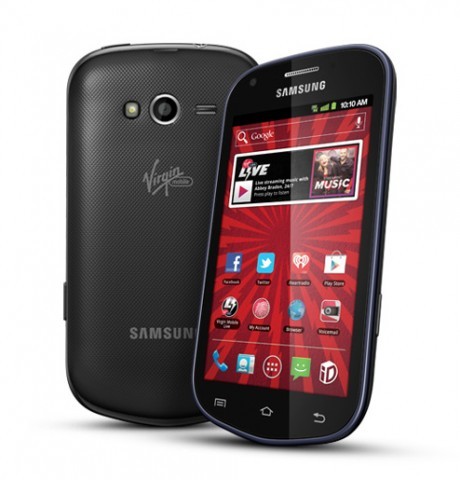
Now comes word from several AndroidForums users that their Virgin Mobile Samsung Galaxy Reverb has been updated to Jelly Bean. Like the Elite and Rush updates, this is an over the air update. Your phone will get a notification that a system update is available with a link or button to start the update. You can also manually check for the update by going to Settings > About phone > System updates.
JellyBean includes Project Butter, which is supposed to make the user interface smoother and faster, and Google Now an "intelligent personal assistant" that provides personalized notifications of things like traffic delays on your commute, upcoming restaurant reservations and stock price alerts.
boricuakiller
Android Expert
expect update may 23rd say by zte
money15
Android Enthusiast
expect update may 23rd say by zte
Good i need to mod something on my phone been satisfied on b09 but yet again unsatisfied bc i cant flash anything new lmao
expect update may 23rd say by zte
Got a link, email, twitter screenshot you can give us to verify?
You got me all excited, now lol.

Just a quick question. Do I have to be on unrooted stock ROM with stock kernel to get this jb update??
No, you need to have the stock recovery, not Clockwork Mod. Junkies AIO utility will put stock recovery back on if you are using CWM.