• After 15+ years, we've made a big change: Android Forums is now Early Bird Club. Learn more here.

Root [ROM] ApeX 1.3.1 for Droid X - Running, running, as fast as it can (12/16/10)

Im on 340 and my pics wont save when i snap a pic. just blank?

and whats the fix for the little GB keyboard its super small.

try a battery pull and reboot and see if that clears it up. Mine did that too before I pulled the batt after trying to use the camera. Haven't had that problem since
 
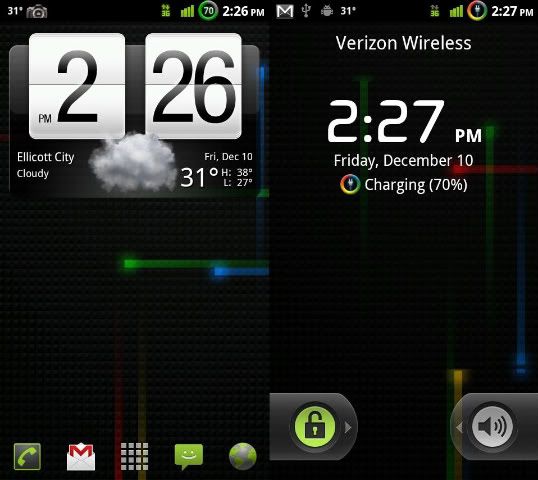
Circle Battery Mod steps for MetaMorph
Make a backup before you install this incase something goes wrong as I am not responsible for what you do to your phone. I have tested/installed this on my phone several times with no problems though.
Credit to TheLynxy on XDA for making the images
1)Install MetaMorph from the market if you dont already have it (its free)
2)Download the Circle_Battery.zip and place it in the "AndroidThemes" folder on your SD card. If you dont have that folder on your SD card, make it, and CAPS MATTER
3)Open MetaMorph app and press "start checks"
4)press "Unzip/Extract new theme" then press "Circle_Battery.zip"
the zip will extract then it will bump you out of metamorph (idk why, mines just doing it, but no biggie)
5)go back into metamorph and press start checks again if it pops up
6)press pick existing theme then press the "Circle_Battery" folder then press the next Circle_Battery folder
7)press Circle_Battery.xml (should have a metamorph symbol next to it) when the popup comes up that says Circle Battery v1 press the close button
8)Press "Apply all!" on the bottom right then press "Continue?"
Your phone will now install the circle battery charge and discharge images and will ask if you want to reboot now. Press yes.
Your phone should reboot and install the Circle Battery images that go from blue>green>yellow>orange>red
ApeX13.jpg

Enjoy :D
thanks for making this available, uploaded it with no problems. now I don't have to see two battery icons
 
Just wanted to confirm that to install Apex 1.3 on 2.3.340 I do not have to run the DeOdex from 928Droid?

I just rooted using Z4 and took a backup using Bootstrap. Now am deciding if I need to deodex, or can I just install this ROM directly from Bootstrap?
 
Did you reinstall Bootstrapper, give it root access, and rebootstrap it? I'm not going to get into the specifics why it keeps rebooting into recovery, but basically there's a file the bootstrapper uses to load recovery at boot each time, but once a full boot completes, the file is deleted by the bootstrapper app.

If you don't have the app, it doesn't delete the file.

Update: Fab - reinstalling/running Bootstrapper did the trick to stop the phone from going into BUR (BackUpRecovery) at every power-up. However, I believe Bootstrapper leaves the file behind all the time. I reinstalled, restarts now working as normal. I then uninstalled Bootstrapper, and the BUR starts happening again. Repeated Bootstrapper, uninstall, then unroot, and same thing happened but got into a little pickle since my root mechanism is Z4Root which was now deleted. Recovered from that and then did a full wipe data/cache/reinstall my original 2.3.15 Restore. All's working fine, but of course that included Z4Root and Bootstrapper so I could create the orig Restore image before I started doing ROM hacks... Phone is again working as it should so I uninstalled Bootstrapper, and, it's back to BUR on every power-up?????

I also had a Restore image of when I went back to plane-jane 2.3.15 and got the OTA upgrade to 2.3.340. So I went back to 2.3.15, then did a Restore of the plane-jane 2.3.340 image. That was working like it should, no BUR's on restarts. All I did was uninstall Bootstrapper, and its back to BUR on every restart. I had to root, install Bootstrapper, and then the BUR's stopped. I then hide the bootstrapper and SU apps inside of LauncherPro, and turned in my Droid X for a new one (I had a screen defect).

So, right now I'm at a stock 2.3.15 image from Verizon. Haven't done the OTA to 2.3.340 yet nor Rooted nor Bootstrapper nor any ROMs, etc. Is there a sequence I need to follow that I didn't do before, or does Bootstrapper have this BUR issue in all cases once you install/run it for the first time? Thanks again.
 
Tried it. Didnt work :(


Are you even on the 320 or 340 kernel? When media doesn't work, it's a surefire sign that you're not on the correct kernel. No amount of battery pulls or reboots will fix this.


As for the bootstrapper BUR, you need to have bootstrapper installed at all times or else this will happen. Also, I cannot see any reason a rooted user running a custom ROM would ever uninstall bootstrapper. Keep it installed!
 
Just wanted to confirm that to install Apex 1.3 on 2.3.340 I do not have to run the DeOdex from 928Droid?

I just rooted using Z4 and took a backup using Bootstrap. Now am deciding if I need to deodex, or can I just install this ROM directly from Bootstrap?

install without deodexing...Apex deodexes for you
 
Are you even on the 320 or 340 kernel? When media doesn't work, it's a surefire sign that you're not on the correct kernel. No amount of battery pulls or reboots will fix this.


As for the bootstrapper BUR, you need to have bootstrapper installed at all times or else this will happen. Also, I cannot see any reason a rooted user running a custom ROM would ever uninstall bootstrapper. Keep it installed!

http://img715.imageshack.us/f/snap20101215144625.png/

snap20101215144625.png


snap20101215144625.png


snap20101215144625.png


This is 340?
 
Are you even on the 320 or 340 kernel? When media doesn't work, it's a surefire sign that you're not on the correct kernel. No amount of battery pulls or reboots will fix this.


As for the bootstrapper BUR, you need to have bootstrapper installed at all times or else this will happen. Also, I cannot see any reason a rooted user running a custom ROM would ever uninstall bootstrapper. Keep it installed!

That's what I suspected Fab. I agree, I wouldn't uninstall Bootstrapper EXCEPT in this case where I was turning the phone back in for an exchange. I'll play with this phone for another day or so to make sure its a keeper and then jump back into your ROMs.

Hey - like your customized Jrummy Overclock tool - any way we'll be able to get that or something similar built into 1.3?

Cheers
 
Thanks! Just installed and it looks great.

BTW - Can I reformat my SD card? I already have a copy of my backups etc on my local computer. Does Apex store anything on the SD card?

It installs some scripts. You can always get them from the original ApeX 1.3 zip file though.

Any reason you want to format the card?
 
It installs some scripts. You can always get them from the original ApeX 1.3 zip file though.

Any reason you want to format the card?

Not really.. Now that I scanned the card, the only thing I really want to delete is the ".blockbuster" folder. I thought there might be other things but they all look harmless so I'll just leave it as is.

No harm in deleting the blockbuster folder is there?
 
has anyone else noticed that sometimes in the messaging app trying to click a texting thread will open up the bottom message thread?

Also does the goodies pack include having the hard buttons stay lit up while the screen is lit up?
 
Is there a reason videos from www.FilmOn.com won't work?

Was working fine on previous Apex and Stock ROM.

I even nandroid, wiped my device and clean installed Apex 1.3.0 AGAIN to see clear any doubts... nope, still no workie.
 
Can I load this ROM if I currently using GummyJAR 1.8.1?

I flashed the 2.3.320 sbf file and then loaded GummyJAR; but now my Android version says 2.2.1
 
Yes, you surely can. Just when you're loading the rom be sure to wipe data and cache and you're golden! :D
 
im not having any luck running the keyboard script. i put in, keyboard -wmt. i says using white mt bk. phone reboots, but ive put in every script option and they all look the same.. whats up?
 
So I installed this ROM the other day and I have been loving it. Thank you Fab for all your hard work. Just a quick question, I have been getting some reboots happening randomly. Sometimes its a full reboot, and sometimes the screen freezes, then I get the android boot screen and then the lock screen. So its like a hot reboot. Any ideas??
 
So I installed this ROM the other day and I have been loving it. Thank you Fab for all your hard work. Just a quick question, I have been getting some reboots happening randomly. Sometimes its a full reboot, and sometimes the screen freezes, then I get the android boot screen and then the lock screen. So its like a hot reboot. Any ideas??

are you overclocked ?
 
Back
Top Bottom