• After 15+ years, we've made a big change: Android Forums is now Early Bird Club. Learn more here.

Root Root + OverclockWidget = Insane Battery Life 40+ Hours

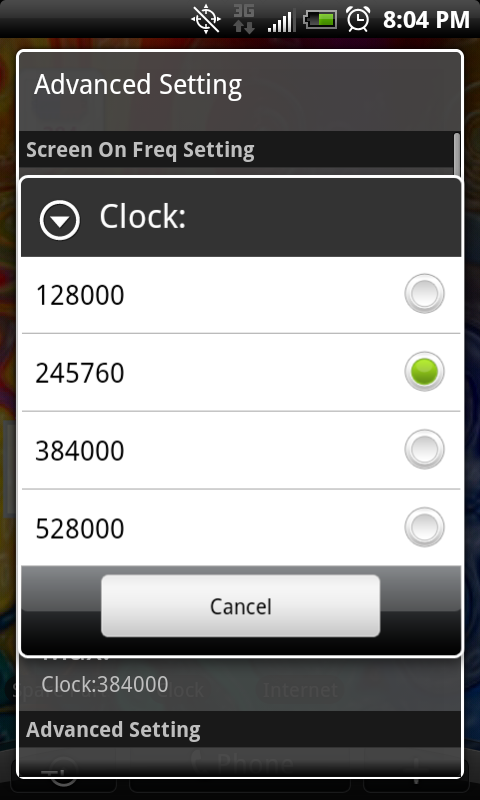
I have root and Overclock Widget. I have the CPU scale down to the 200 mhz range when screen off and 998 when screen on. Below is a screen shot after 21 hours off the charger at %49. This puts the phone at almost 2 days before a charge is needed.

Battery.png

I love you.
 
I pm'd nick but can anyone else tell me if they checked the box use your frequencies?

I appreciate the help fellas.
 
Didnt work for me so i uninstalled last night, i used the n1 preset and set everything to on demand and didnt see a improvement in battery life as i tested it for a 23 hour period.I also had 4g, wifi, auto update, live data, off so....

You were using SetCPU, not Overclock widget. I tested both of them out after reading the OP earlier today, and going from 20 minute-ish screen off tests and then coming back and checking the battery %, SetCPU wasn't doing anything for the Evo.

From what I've seen so far Overclock Widget is making a difference. I'm simply using the Unrevoked root, and in the 3 or so hours since I've been testing it there is a noticable difference in battery drain (or lack thereof) while the screen is off. On my way in to work I was playing music thru Mixzing. 20~ minute drive playing music the whole time and there was 0 dent on the battery, was still sitting at the same % as when I got in the car and hit play.
 
I've used unrevoked root and tried this out. For whatever reason it doesn't seem to be working for me. I put it to use 24500 (low and high) when the screen is on and the numbers in the widget still said 985. They seemed to randomly change throughout. I dunno.
 
I've used unrevoked root and tried this out. For whatever reason it doesn't seem to be working for me. I put it to use 24500 (low and high) when the screen is on and the numbers in the widget still said 985. They seemed to randomly change throughout. I dunno.

Ignore the widget, it comes back with random numbers for me too honestly, I'm just going off what the battery is showing and it seems to be doing it's job.
 
Ignore the widget, it comes back with random numbers for me too honestly, I'm just going off what the battery is showing and it seems to be doing it's job.

So then if I have the widget to be at 245 all the time, why is linpack showing the same result that I get when it's clocked at the 1ghz?
 
I am not using any cpu clocking app and my phone sleeps at 162.54.

So SnapDragon does downclock itself. Good to know, but I think the trick with the widget is it forces it.

I'm guessing if Android thinks some process (pick one) is important even though the screen is off it won't clock down properly?

So in this example the widget is forcing it, which we don't mind because we aren't using anything when the screen is off.
 
So SnapDragon does downclock itself. Good to know, but I think the trick with the widget is it forces it. I'm guessing if Android thinks some process (pick one) is important even though the screen is off it won't clock down properly. So in this example the widget is forcing it, which we don't mind because we aren't using anything when the screen is off.

Sound legit?

Interseting theory, because if you have like WIFI, 4G, etc. along with push email, facebook, yada yada yada on, Android might have the processor cranking at 1000 even when you're not using the phone.
 
So then if I have the widget to be at 245 all the time, why is linpack showing the same result that I get when it's clocked at the 1ghz?

Honestly, I'm not even gonna try to understand. I've noticed that telling it to downclock while the screen is on isn't having any effect, but at least from what I've seen the last few hours the battery is barely being touched while the phone is in sleep mode, which would seem to indicate to me that it's working as intended in that regard.
 
You did adjust the settings per Nick's screenshots right?

I thought I did....

I plugged my phone in to a USB connection about an hour ago for about 15 minutes which raised the battery level about 4%

I just checked the whats using my battery and it says:

Cell Standby 49%

Phone idle 37%

Android system 9%

Display 3%

Antivirus 2%

Obviously that doesn't tell me much right now so I'm going to put it on the charger, charge it to 100% and play with it until its about dead and then check again.
 
Can someone please post an idiot's guide to doing this?

I can't find the "Overclock Widget" in the market and don't know what else is required to make the battery last longer.

...I know I'm noooob ...first android phone. :(:)
 
I can confirm that I'm using less processor while sleeping. At the very worst, this can't be doing any harm.
 
I have root and Overclock Widget. I have the CPU scale down to the 200 mhz range when screen off and 998 when screen on. Below is a screen shot after 21 hours off the charger at %49. This puts the phone at almost 2 days before a charge is needed.

I'm testing this with your settings starting now. 100% and go!
I have normally been getting 12 hours battery on my EVO. Will report back.

I use an app called Juiceplotter to show battery. I will post some screen shots.
 
Back
Top Bottom