• After 15+ years, we've made a big change: Android Forums is now Early Bird Club. Learn more here.

Root Sd card class question?

I am trying to grab them using SDK. I can bring them up on my pc but when I copy and paste them, it doesn't show up here.
 
I always use shoot me app to take screen shots. Anyhow they have to be a particular size to post them in the thread, you may need to resize.
 
Well, haven't gotten the screen shots to post yet but found something interesting. I nandroided back to Mikfroyo 4.4 and got slower numbers.

Destroyer: (write/read)
12.8/24.4
9.8/20.4
10.1/22.6
8.8/34.1
9.7/136.5
9.5/129.7
10.1/20.2

Mikfroyo 4.4:
8.0/7.5
7.0/7.2
7.1/7.3
6.9/7.1
7.4/7.1

Nandroid back to Destroyer:
10.5/20.5
12.7/20.9
10.8/21.6
11.3/21.6

Seems that CM7 is tweaked a little more for sd speed then Mik is.
 
so it would seem, have you flashed akaza's sd read fix and tried it?

I think the important thing to take out of this is that the evo can totally r/w to the capability of a class 10 card. There are some limitations within roms that dont have sd tweaks, but if opened up it can handle it like a champ.

Im going home now and i had anticipated playing with this a little but turns out its st pattys day and its hard to mess with my phone when i see two of them...something for tomorrow...
 
so it would seem, have you flashed akaza's sd read fix and tried it?

I think the important thing to take out of this is that the evo can totally r/w to the capability of a class 10 card. There are some limitations within roms that dont have sd tweaks, but if opened up it can handle it like a champ.

Im going home now and i had anticipated playing with this a little but turns out its st pattys day and its hard to mess with my phone when i see two of them...something for tomorrow...

No, I have not tried the BOOM's sd read fix. I will have to look into it if I decide to go back to Mikfroyo.
 
Well, I still haven't gotten the hang of posting screen shots so I attached the 2 I had of the high end read numbers for my Class 10 card.
 

Attachments

  • device.jpg
    device.jpg
    127.5 KB · Views: 86
  • device1.jpg
    device1.jpg
    123.5 KB · Views: 94
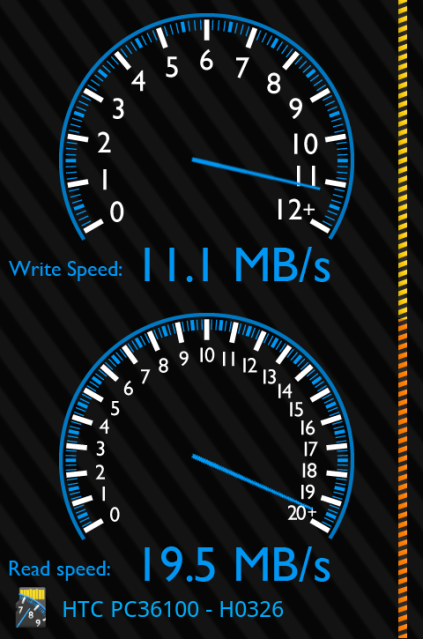
I used akazabam's sdreadahead zip and ended up with some pretty awesome results. This is about my average
htcpc361002011-03-1723-15-51.png


My roommate has the stock SD card and I had him run the test. He was averaging about 3-4 MB/s write, and 14-15 MB/s read speeds.
 
If you guys want an easier way to change the Evo's read ahead speed check out this app from Jim Weiler aka Vaelek the developer of the VaelPak ROM:

https://market.android.com/details?id=com.vaelek.sdspeedboost&feature=search_result

It will allow you to adjust the read ahead kb speed of the Evo (& most android devices) on the fly, & make the setting permanent on reboot. Minimum setting is the stock 4kb, & it will allow you to set it as high as 4096kb. BE CAREFUL!!! Setting it too high, & checking the "set on boot" checkbox can create instability, cause boot loops, etc.
FWIW, I have mine set to 1024 (I have a Patriot 32GB Class 10), which is also now the default speed set in the VaelPak rom when you apply the SD Speed Fix in VaelPak Settings. The Dev tested this extensively for about 2 weeks prior to pushing it to the Market, works flawlessly! :D
Attaching some screenies from SD Tools with my results testing different settings for SD read ahead. :D My speeds may have been limited by other stuff running in the backround, and all testing was done on the VaelPak ROM. I need to retest on CM7-EX Destroyer w/ Savaged-Zen-0.2.1-cfs.
 

Attachments

  • htc pc36100-1.png
    htc pc36100-1.png
    68.5 KB · Views: 96
  • htc pc36100-2.png
    htc pc36100-2.png
    68.6 KB · Views: 51
  • htc pc36100-3.png
    htc pc36100-3.png
    68.7 KB · Views: 76
Where would I notice the most difference in a class 10, would it write a nandroid faster, do videos look better and load faster, its only $10 more than the class 2 so I just want to know before I buy. Oh and does Akaza's read fix work on the stock card.
 
I would really like to know what all of these sd card speed fixes actually do, for instance if I flash akaza's fix, then run that app from vaelek what happens? Does my phone explode? OK thats an exaggeration but you get the idea. Akaza can you jump in here buddy? lol Give us a little more detail on your sd card fix and how it works...we are seeing good results from it just dunno why haha.
 
Where would I notice the most difference in a class 10, would it write a nandroid faster, do videos look better and load faster, its only $10 more than the class 2 so I just want to know before I buy. Oh and does Akaza's read fix work on the stock card.
Anything that runs from the SD card runs faster, nandroids, gallery, apps that are on the SD via the native apps2sd, or Dark Tremors a2sd run faster. All of the sd speed fixes modify a script in the sys/devices/virtual/bdi/179:0/ folder in /system. Akaza's script will set a "fixed" value, i.e. read ahead = 128kb instead of the stock 4kb. I'm not sure what value his script uses, because I haven't run it.
Most of the popular kernels already have some kind of value greater than 4kb baked into the kernel, most are 128kb. Savaged-zen is 128, so is Netarchy, etc.


I would really like to know what all of these sd card speed fixes actually do, for instance if I flash akaza's fix, then run that app from vaelek what happens? Does my phone explode? OK thats an exaggeration but you get the idea. Akaza can you jump in here buddy? lol Give us a little more detail on your sd card fix and how it works...we are seeing good results from it just dunno why haha.

Vaelek's app would overwrite the value installed by Akaza's script. The app just gives you the ability to change the value on the fly, & make the setting permanent if you so desire. It also lets you tweak it so you can use that class 10 card @ it's full potential.
FWIW, I did some more testing with different settings last night, I'm @ 3072kb now. Write speed in the mid 20MB's, & read speeds in the mid 70's to low 80's, with a high of 101MB/s !!! :D
 
Damn getting up there, I havent been able to play around yet :( drinking and working, yes in that order lol. Anyhow, what is your set up? Kernel and rom i mean.

Nevermind, looks like its in your profile there, is that the set up you were running when you got those speeds?
 
Damn getting up there, I havent been able to play around yet :( drinking and working, yes in that order lol. Anyhow, what is your set up? Kernel and rom i mean.

Nevermind, looks like its in your profile there, is that the set up you were running when you got those speeds?

That's my daily driver setup. I'm currently running CM7-EX DeStRoYeR on Savaged-Zen 0.2.1-cfs-wimax-gb-sbc overclocked @ 1152MHz. I'll post some screenies later.

Drinking>> Working. I want your job, lol.:D

Just F.Y.I. the directory we are modifying with the script, or Vaelek's app is here:

sys/devices/virtual/bdi/179:0/read_ahead_kb

You can view it in Root Explorer by long pressing on the "read_ahead_kb" file, then click "view as text" & it will show you what it's set at. Oops, I goofed :o, just opened mine & it's set to 2048, not 3072 like I stated in my last post. :rolleyes:
 
Here's some screen shots I made last night with the read ahead @ 2048kb/s. :D
 

Attachments

  • htc pc36100 2011-03-17 23-03-21.png
    htc pc36100 2011-03-17 23-03-21.png
    92.8 KB · Views: 100
  • htc pc36100 2011-03-17 23-28-25.png
    htc pc36100 2011-03-17 23-28-25.png
    75.1 KB · Views: 120
  • htc pc36100 2011-03-17 23-26-24.png
    htc pc36100 2011-03-17 23-26-24.png
    75.5 KB · Views: 71
Mine is set at 128...guess ill try that app you linked for us unless there is another way to change that
You can edit the file manually, but you'd have to redo the edit every time you rebooted the phone. With the SD speed boost app the setting sticks on reboot once you tick the "apply on boot" checkbox.

wow ok dl'ed vaeleks speed booster and tacked the thing out lol. getting 12's write and 50's read now, yup.
Yeah, works great & is so simple to use. :D
 
first, how does everyone get their pics so big? second, here are my results with stock sd card...

EDIT - also, how do you know what class your card is? any way of checking it thru the phone? is it written on the card? just wonderin...
 

Attachments

  • snap20110406_200728.jpg
    snap20110406_200728.jpg
    272.7 KB · Views: 83
Back
Top Bottom