
Install the app
How to install the app on iOS
Follow along with the video below to see how to install our site as a web app on your home screen.
Note: This feature may not be available in some browsers.
-
After 15+ years, we've made a big change: Android Forums is now Early Bird Club. Learn more here.
You are using an out of date browser. It may not display this or other websites correctly.
You should upgrade or use an alternative browser.
You should upgrade or use an alternative browser.
Help SG2 Battery dies in 10 hours?
- Thread starter hidehide
- Start date
-
- Tags
- samsung galaxy s2
did u check latitude? and skype runs in the background even when its not signed in, which is a bug or something..u can force close it when ur not using it
No not using lattitude. I did terminate skype, and IM+ and anything else that was running. After another full day, I get 7 hours with Android OS consuming 85%
it seems this phone is determined to die in 7 hours. If it isn't an app, then it will be the OS.

After another full day, I get 7 hours with Android OS consuming 85%
The longer the handset lies idle the higher the Android OS percentage will be, as the majority of tasks/processes running are those requested by the OS itself.
Are you still seeing a high wake percentage? If so then you've got a wakelock issue with a particular app; something like Better Battery Stats or Spare Parts will allow you to work out which one is preventing the handset sleeping.
The longer the handset lies idle the higher the Android OS percentage will be, as the majority of tasks/processes running are those requested by the OS itself.
Are you still seeing a high wake percentage? If so then you've got a wakelock issue with a particular app; something like Better Battery Stats or Spare Parts will allow you to work out which one is preventing the handset sleeping.
Here are the latest stats for the next day. As you can see, the awake/sleep is much better. I have killed most apps that would want to poll or keep a full time internet connection going. Nothing keeps the phone awake anymore.
This usage has 3 very short phone calls, and mainly waking the phone from time to time to view the battery stats and a few sessions of angry birds. Screen brightness is set as low as it will go. No email apps checking email. Usage has been cut back WAY below normal and still less than 8 hours..
Total time that the display was on was 3 hours 1 minute.


if your awake and screen on match, i dont see you would have a problem. some poor guys n gals have awake when the screen ISNT on.
playing games will drain. period. i can show you good life span with a massive drop when firing up a game for 10 mins. its like a cliff face.
i had a dud battery. got a new one...all good. take it to samsung and get it tested if your not happy, its the faster way with problem solving.
1)make sure there is nothing wrong with the HARDWARE.
2)...THEN look at the software.
playing games will drain. period. i can show you good life span with a massive drop when firing up a game for 10 mins. its like a cliff face.
i had a similar bad battery life. did a hard factory reset, through some short test with bugger all apps on it seemed the same. took it to the samsung center - techie did a quick test to find a "higher than normal" voltage drain. its in the shop...waiting for outcome.
i had a dud battery. got a new one...all good. take it to samsung and get it tested if your not happy, its the faster way with problem solving.
1)make sure there is nothing wrong with the HARDWARE.
2)...THEN look at the software.
I searched google and came to this thread with the same exact problem. I have a Galaxy S2 with the KE4 firmware. I really dont have much installed, and dont use the phone all that much, but my battery dies fast as heck. Today for example I unplugged it around 10am and by 2pm the phone was dead. I made ZERO phone calls today. I probably used the phone for a maximum of one hour.
Other days with similar or even more use, the phone will last me till 10pm no problem and still have half the battery left. The problem is sometimes my phone is super hot, even after sitting for a few hours. I know its trying to process something, almost like playing a game or something. As soon as I touch the phone and its hot like that, I know the battery is drained.
I am not a heavy user, not do I have a lot of widgets. Not sure exactly why this is happening but I am getting fed up with this phone. I came over from having an iPhone, and while I really like the android OS, it seems like iOS is much more reliable so far
Other days with similar or even more use, the phone will last me till 10pm no problem and still have half the battery left. The problem is sometimes my phone is super hot, even after sitting for a few hours. I know its trying to process something, almost like playing a game or something. As soon as I touch the phone and its hot like that, I know the battery is drained.
I am not a heavy user, not do I have a lot of widgets. Not sure exactly why this is happening but I am getting fed up with this phone. I came over from having an iPhone, and while I really like the android OS, it seems like iOS is much more reliable so far
Guys, My phone is just a few weeks old, im still experimenting on how to extend the juice on this device, in the process i observed something odd,
Power saving mode is set to activate when 50%, before going to bed, batt is at 72%, in the morning however batt is 30%. A 42% drop while idling!
I suspect the cause to be the power saving notification, which keeps the CPU and display awake. The battery usage indicator shows a solid line for - Display & Awake right about the time the PSM is activated.
Juice defender didnt really help, though its the basic version on balanced.
Cheers max
Power saving mode is set to activate when 50%, before going to bed, batt is at 72%, in the morning however batt is 30%. A 42% drop while idling!
I suspect the cause to be the power saving notification, which keeps the CPU and display awake. The battery usage indicator shows a solid line for - Display & Awake right about the time the PSM is activated.
Juice defender didnt really help, though its the basic version on balanced.
Cheers max
god this is the worst forum i've been on to try to make a 1st post on. nothing seems to go through.
as to the battery and battery life question. I've tried to make a seprate post in order that it is not lost.
check out a site called battery university, lots of good info on batterys.
love the sg2. had it about (or "a boat" canadian eh) 1 1/2 weeks. my 1st smart phone. dont know how it did without it.
cheers.
as to the battery and battery life question. I've tried to make a seprate post in order that it is not lost.
check out a site called battery university, lots of good info on batterys.
love the sg2. had it about (or "a boat" canadian eh) 1 1/2 weeks. my 1st smart phone. dont know how it did without it.
cheers.
I suspect the cause to be the power saving notification, which keeps the CPU and display awake. The battery usage indicator shows a solid line for - Display & Awake right about the time the PSM is activated.
ive been sus about the power saver too, but always thought maybe its a setting im missing, i might do some tests on this and post in my thread.
Burner2004
Member
Hello guys, I feel like I need to post something of my own experience with this phone.
I used to have serious problems with my battery life and overheating, all that is in the past. I would like to write several clues of how to extend your battery life to the max without sacrificing speed. I will not suggest or advise, but I will simply state that from 7h battery life now I go 24h (minimum), considering that I have played and still playing games at least 2h a day. My favorite of course is PES 2011, almost completed all leagues & challenges+paradise island. If I do not play games which is rarely (Sat-Sun) my phone goes solid 2 days.
Also see clue N: 4 , with SetCPU my background and Android OS processes simply do not drain any power. i.e. today my phone is already used 2h 37min , 3 calls + 2 Pes games (95%-slow morning).
I did the following:
1) I use XXKG 6 / Android 2.3.4
2) Root the phone
3) Advanced task killer program
4) Set CPU program - profiles (On demand - "screen off" 500max 200min) + At night from 01-07.00 same settings. Didn't change any other settings, in other modes phone works at max.
5) Auto-brightness
6) Fast reboot program- I use it once a day to free memory.
7) Titanium Back up- all samsung and google malware and spam programs out. I use alternatives like K9 mail (really works for 5 corporate and 3 personal mails).
My latest achievement was the SetCPU, which really increased the life of the phone when "Screen is off". The only negative for the Set Cpu is that for the past 2 weeks the phone froze 2 times but I can live with that for double the battery and it cut the Android OS battery drain to minimum.
That is all I can think of. I hope these tips help people save battery. Enjoy.
I used to have serious problems with my battery life and overheating, all that is in the past. I would like to write several clues of how to extend your battery life to the max without sacrificing speed. I will not suggest or advise, but I will simply state that from 7h battery life now I go 24h (minimum), considering that I have played and still playing games at least 2h a day. My favorite of course is PES 2011, almost completed all leagues & challenges+paradise island. If I do not play games which is rarely (Sat-Sun) my phone goes solid 2 days.
Also see clue N: 4 , with SetCPU my background and Android OS processes simply do not drain any power. i.e. today my phone is already used 2h 37min , 3 calls + 2 Pes games (95%-slow morning).
I did the following:
1) I use XXKG 6 / Android 2.3.4
2) Root the phone
3) Advanced task killer program
4) Set CPU program - profiles (On demand - "screen off" 500max 200min) + At night from 01-07.00 same settings. Didn't change any other settings, in other modes phone works at max.
5) Auto-brightness
6) Fast reboot program- I use it once a day to free memory.
7) Titanium Back up- all samsung and google malware and spam programs out. I use alternatives like K9 mail (really works for 5 corporate and 3 personal mails).
My latest achievement was the SetCPU, which really increased the life of the phone when "Screen is off". The only negative for the Set Cpu is that for the past 2 weeks the phone froze 2 times but I can live with that for double the battery and it cut the Android OS battery drain to minimum.
That is all I can think of. I hope these tips help people save battery. Enjoy.
Hi All,
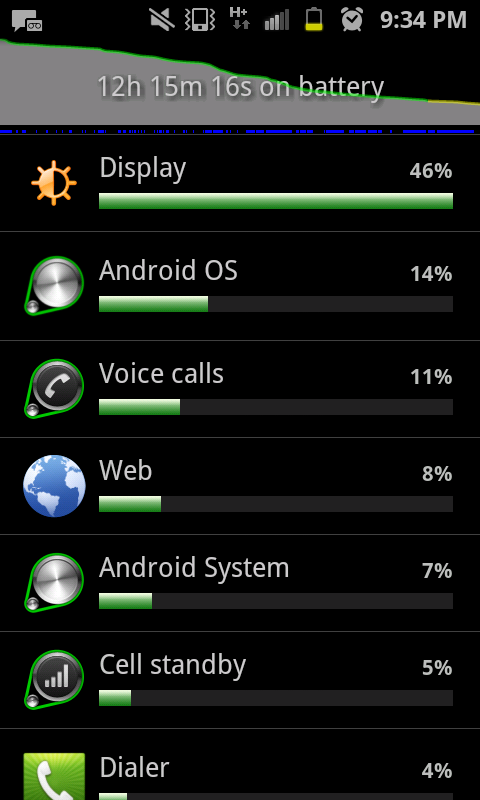
I have been using the Samsung Galaxy S II for 2 weeks now and am getting very poor battery life. On an average of 16 hrs max is the time before the battery drains.
I dont have a live wallpaper ( have a black one), have juiceDefender installed, and have brightness set as 0.
My Battery Usage is as follows,
Display - 50%
Android OS - 3%
Android System -4%
I use task killer regularly.
Is there any suggestion to reduce the display power consumption and to increase the battery life.
I have been using the Samsung Galaxy S II for 2 weeks now and am getting very poor battery life. On an average of 16 hrs max is the time before the battery drains.
I dont have a live wallpaper ( have a black one), have juiceDefender installed, and have brightness set as 0.
My Battery Usage is as follows,
Display - 50%
Android OS - 3%
Android System -4%
I use task killer regularly.
Is there any suggestion to reduce the display power consumption and to increase the battery life.
D
Deleted User
Guest
OP What carrier are u on? Cos i noticed u had "H+" (Sorry to go off topic)

Baldilocks
Android Expert
Hi All,
I have been using the Samsung Galaxy S II for 2 weeks now and am getting very poor battery life. On an average of 16 hrs max is the time before the battery drains.
I dont have a live wallpaper ( have a black one), have juiceDefender installed, and have brightness set as 0.
My Battery Usage is as follows,
Display - 50%
Android OS - 3%
Android System -4%
I use task killer regularly.
Is there any suggestion to reduce the display power consumption and to increase the battery life.
Don't use task killers. They kill battery life more than they help.
I was at 50% battery and I had actively saving energy ..... thus reaching the 50% I asked to be activated .... it active, and then I go into settings and see that the setting (which should enter the energy savings) is set to 30% battery!!
maybe I am wrong to read 30 %!!!! I think it was wrong .... strange ... bu ... cmq
what is the default entry of the energy savings?? I had 30 %....... without ever touching the setting ....
version 2.3.4 original
sorry for my English!
maybe I am wrong to read 30 %!!!! I think it was wrong .... strange ... bu ... cmq
what is the default entry of the energy savings?? I had 30 %....... without ever touching the setting ....
version 2.3.4 original
sorry for my English!

ironass
Extreme Android User
There is a thread over on, "All Things Root", that contains a lot of useful battery saving tips and tricks, as well as explanations, for both rooted and un-rooted phones.
These cover a wide range of do's and don't's that you may not have come across before.
See here:-
http://androidforums.com/galaxy-s2-.../491113-battery-saving-tips-rooted-sgsii.html
These cover a wide range of do's and don't's that you may not have come across before.
See here:-
http://androidforums.com/galaxy-s2-.../491113-battery-saving-tips-rooted-sgsii.html