• After 15+ years, we've made a big change: Android Forums is now Early Bird Club. Learn more here.

Share your Huawei Ascend Desktop!

Prepare to be blown away by my screenshots. They will showcase many things you never thought were possible to achieve on any Android device. In fact, in order to properly show my homescreens, screenshots will not suffice, and I will be creating a video. Stay tuned.
 
Prepare to be blown away by my screenshots. They will showcase many things you never thought were possible to achieve on any Android device. In fact, in order to properly show my homescreens, screenshots will not suffice, and I will be creating a video. Stay tuned.

Attaboy Joser! I'm anxious to see them! I was hoping you would get involved in this thread. Be sure to tell us how you did it too. Will you have that in your video I hope?

:D
 
oops just realized i deleted the original pic lol :rolleyes:
here it is again
screenshot.png


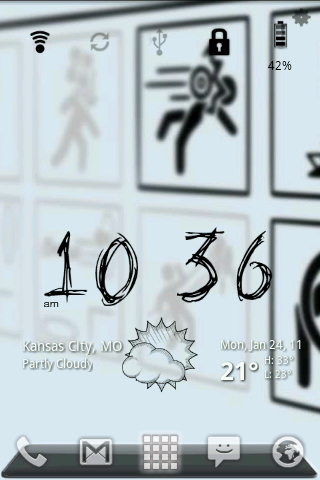
Joser, theres no much of a tut. to do this. Its just Widgetsoid for the control panel and Weather and toggle widget with the dirty paper theme :). Im prety sure i got the dock from the Launcher pro web site.


heres the background
1283279009604.jpg


heres what it looks like with all the screens
screenshot.png

screenshot_1.png


screenshot_2.png

screenshot_11.png


nope, no effects for the wallpaper thats just what it looks like. Its for the the video game Portal :cool:, its a great game. Every one should play it:)
What is that clock? Thats cool!
 
Weather and toggle widget.
Thanks for the heads up on the weather and toggle widget. Its awesome! There are so many skins I could download clocks all day! Lol. I wish I could download a pic of my home screen, but I don't have a computer right now. Its lookin sweet though
 
My Basics
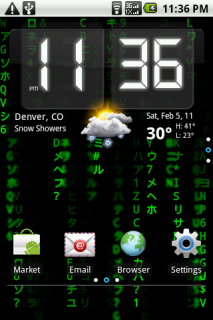
- Using Canvass (for now)
- Wallpaper is the Matrix Live Wallpaper (find in Market)

a625c3c1.png

My Main Screen
- Beautiful Widgets (Weather & Clock)

1806edde.png

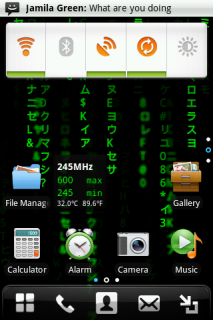
Left Center Screen
- The Huawei Ascend Power Bar

f273f25b.png

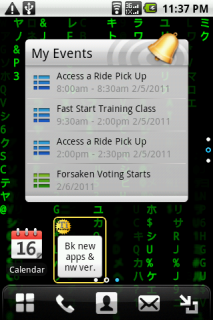
Right Center Screen
- Huawei Ascend Events Widget

a7248b4f.png

Left Bottom Screen
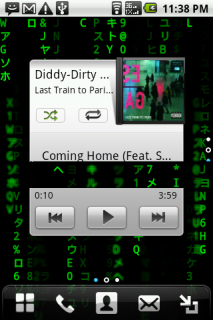
- Huawei Ascend Music Widget

e0297447.png

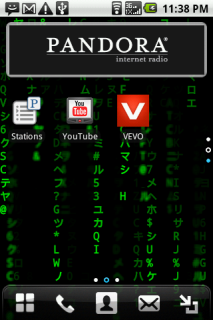
Left Middle Screen
- Pandora Widget

3c54687b.png

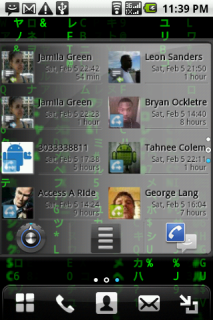
Left Right Screen
- Smart Contacts Widget

036457f3.png

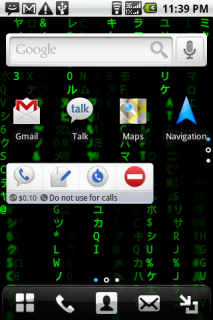
Left Top Screen
- Google Voice Widget

58aa6581.png

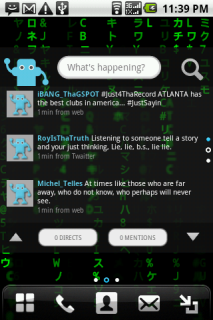
Middle Top Screen
- Twidroyd Widget

e5e79789.png

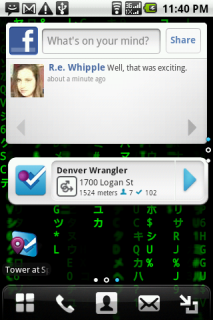
Right Middle Screen
- Facebook Widget
- Foursquare Widget
 
Thanks for the heads up on the weather and toggle widget. Its awesome! There are so many skins I could download clocks all day! Lol. I wish I could download a pic of my home screen, but I don't have a computer right now. Its lookin sweet though

You can do it with Photobucket. :)
 
Hiya Kgreen!

Excellent presentation! You did a really great job using Canvas too. I love the widgets you have chosen. I haven't seen some of those before.

Great job and thanks so much for sharing!

:D
 
My Basics
- Using Canvass (for now)
- Wallpaper is the Matrix Live Wallpaper (find in Market)

a625c3c1.png

My Main Screen
- Beautiful Widgets (Weather & Clock)

1806edde.png

Left Center Screen
- The Huawei Ascend Power Bar

f273f25b.png

Right Center Screen
- Huawei Ascend Events Widget

a7248b4f.png

Left Bottom Screen
- Huawei Ascend Music Widget

e0297447.png

Left Middle Screen
- Pandora Widget

3c54687b.png

Left Right Screen
- Smart Contacts Widget

036457f3.png

Left Top Screen
- Google Voice Widget

58aa6581.png

Middle Top Screen
- Twidroyd Widget

e5e79789.png

Right Middle Screen
- Facebook Widget
- Foursquare Widget

Kgreen....you did a super great job of showing us how you created each screen.

This is a really good example for anyone who shares their desktops.

Thanks again! GREAT...really GREAT job!

:)
 
The weather is Weather & Toggle Widgets, Steampunk skin for the weather.

The Icons along the bottom are from an app called Launcher Pro Icons, which give a bunch of different color and color accented Icons. Browse through, save the ones you like and then switch them on your homescreen. Glad you like it :)
 
The weather is Weather & Toggle Widgets, Steampunk skin for the weather.

The Icons along the bottom are from an app called Launcher Pro Icons, which give a bunch of different color and color accented Icons. Browse through, save the ones you like and then switch them on your homescreen. Glad you like it :)

I like that weather skin. You don't see it too often and it goes really well with your theme. On the icons...yeah I love LauncherPro Icons. I've spent hours customizing different ones to use. Amazing the choices you have and style and colors. It's the best icon app out there IMO. And it works well with LauncherPro, GO Launcher and I think....ADW Launcher too.

Thanks for the info! :)
 
Back
Top Bottom