
Install the app
How to install the app on iOS
Follow along with the video below to see how to install our site as a web app on your home screen.
Note: This feature may not be available in some browsers.
-
After 15+ years, we've made a big change: Android Forums is now Early Bird Club. Learn more here.
You are using an out of date browser. It may not display this or other websites correctly.
You should upgrade or use an alternative browser.
You should upgrade or use an alternative browser.
Share your Huawei Ascend Desktop!
- Thread starter Jazziette
- Start date
-
- Tags
- huawei ascend

Jazziette
Android Expert
5 minutes with ADW. I love this phone now since the root
(forgot to hide the dock)

WOW Tazz!!! That sure didn't take you long! Fun, huh?
Very nice layout! Love the clock widget!

What else did you use?
Share!!!

Jazziette
Android Expert
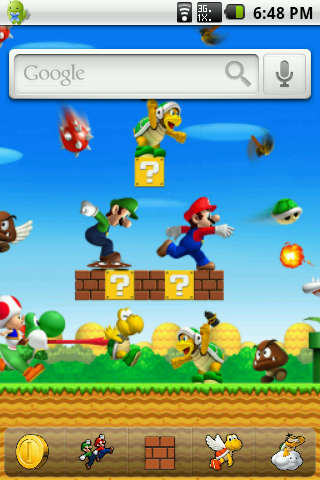

A couple of "themes" i made using Photoshop and LauncherPro.
I have 5 home screens and the wallpaper is panoramic with my default being the center (3) screen. Really simple stuff!
Very very nice, Sevens!!! Great photoshop work on your wallpaper!
What do you mean by it is panoramic? does that mean you get a different view with each screen?
Or is it a new feature that LP has I'm not familiar with?
Love it!
J
joser116
Guest
Well, I am posting these screenshots to let people know that folder app organization similar to iOS is possible in the launcher, not just the Homescreen (by launcher I mean app drawer). I have a total of 52 apps and was able to fit them all in one screen. And this is the actual launcher, in case people think that these are my Homescreens. That's for later:
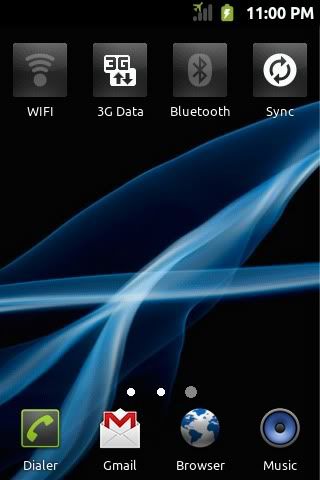
This looks like one of my homescreens but this is actually my launcher. I call these icons "live" icons. These kind of icons are in a class of their own, they are a whole different class of icons. They are not widgets or shortcuts to the Settings like some people might think. They are working functional icons inside the Launcher. For example, pressing the wifi icon toggles wifi, and this icon is inside the actual launcher, these are not widgets. Can your launcher do that? The 3G Data "live icon" is a switch to disable 3G data and use only 2G data, instead of disabling data as a whole. This is an option not available in stock Settings or Icarus settings. This way you can still get messages, e-mails, and MMS. I just enable it when I use the Browser or for Market downloads. This saves like 3 hours of battery life.
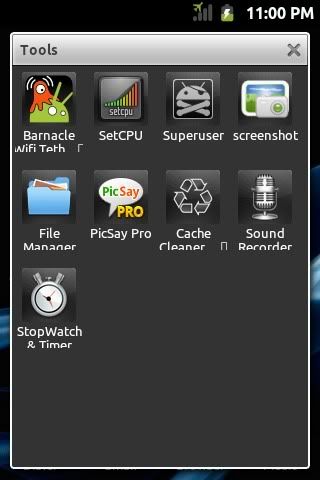
My Tools app folder. Icons can be arranged anywhere. Rememberthis is inside the launcher.
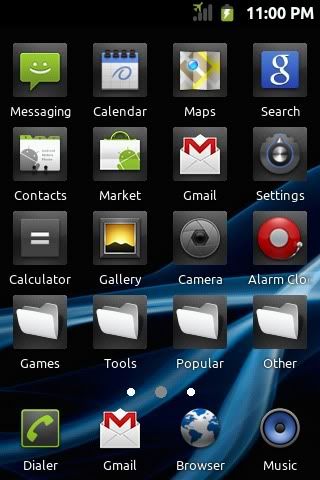
My only app screen. Thanks to the customizable folders, there are a total of 52 apps in here. The iPhonesque stationary dock at the bottom can be customized. Again, this dock is inside the launcher. This dock also allows for the iPhone like multi-tasking. Long press End key and this "dock" changes to show the currently running apps, where you can conveniently switch between apps along with an X icon over the apps icon to easily stop the app from running. Again, this is directly from the launcher itself.
Just trying to get my point across: This is my launcher. I call this launcher on steroids a "live" launcher. Basically it is a launcher with Homescreen like capabilities. You can even add widgets to this launcher. Shots of my homescreens will come later.
PM me for instructions.
This looks like one of my homescreens but this is actually my launcher. I call these icons "live" icons. These kind of icons are in a class of their own, they are a whole different class of icons. They are not widgets or shortcuts to the Settings like some people might think. They are working functional icons inside the Launcher. For example, pressing the wifi icon toggles wifi, and this icon is inside the actual launcher, these are not widgets. Can your launcher do that? The 3G Data "live icon" is a switch to disable 3G data and use only 2G data, instead of disabling data as a whole. This is an option not available in stock Settings or Icarus settings. This way you can still get messages, e-mails, and MMS. I just enable it when I use the Browser or for Market downloads. This saves like 3 hours of battery life.
My Tools app folder. Icons can be arranged anywhere. Rememberthis is inside the launcher.
My only app screen. Thanks to the customizable folders, there are a total of 52 apps in here. The iPhonesque stationary dock at the bottom can be customized. Again, this dock is inside the launcher. This dock also allows for the iPhone like multi-tasking. Long press End key and this "dock" changes to show the currently running apps, where you can conveniently switch between apps along with an X icon over the apps icon to easily stop the app from running. Again, this is directly from the launcher itself.
Just trying to get my point across: This is my launcher. I call this launcher on steroids a "live" launcher. Basically it is a launcher with Homescreen like capabilities. You can even add widgets to this launcher. Shots of my homescreens will come later.
PM me for instructions.
J
joser116
Guest
I'm confused. What is the difference between the "launcher" and the home screens? Sorry if I sound stupid.
The launcher is where all your apps are. In your phone, it is probably vertically scrollable if you have stock Canvas or Laucher Pro. I will edit my post to make it more clear anyways.
Jazziette
Android Expert
My latest just fooling around. LOL
I'm into simplicity lately!
GO Launcher, but it could be any launcher at all...stock or LPP or ADW or
Panda...doesn't matter, as it's the widgets and the custom wallpaper. LOL
GO Launcher Horiz and Vert set to 5 X 5
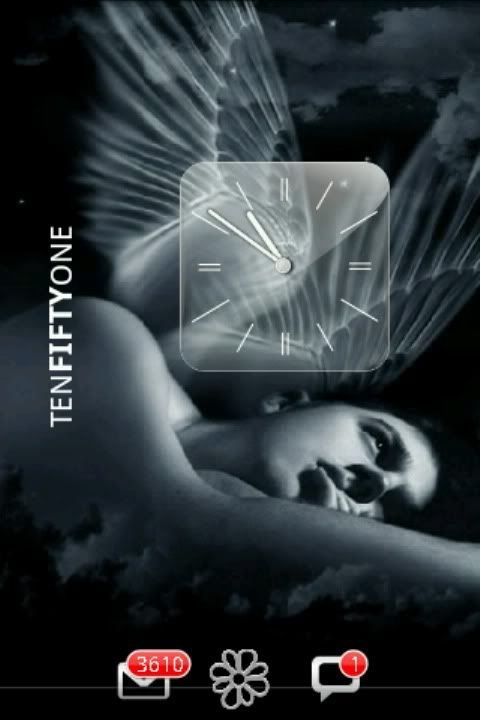
This one features the Glass Analog Clock widget (regular size)
Minimalistic Text widget 4X1 Vertical - white
Dock is hidden with only 3 dock shortcuts showing (other 2 are hidden) and
YES I have over 3,000 unread emails. LOL
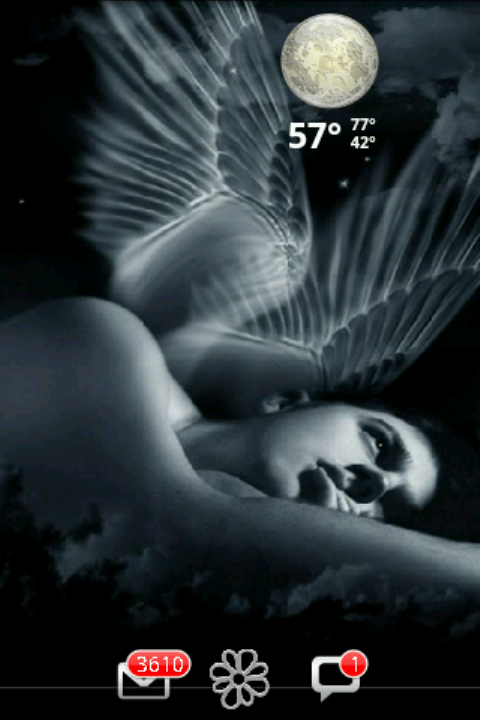
This next one features Beautiful Widgets Weather 1 X 1 with
AndrodEna_Glass_Weatherskin.
Next featured is the Daily Quotes widget, which I love because you can
customize it to have your favorite authors, etc. Mine just happens to be
Anais Nin.

Although I am rooted, fluted and diluted....you really don't have to be to
do this kind of customizing. You can customize to your hearts content
without even being rooted.
So don't be afraid to try!
I'm into simplicity lately!
GO Launcher, but it could be any launcher at all...stock or LPP or ADW or
Panda...doesn't matter, as it's the widgets and the custom wallpaper. LOL
GO Launcher Horiz and Vert set to 5 X 5
This one features the Glass Analog Clock widget (regular size)
Minimalistic Text widget 4X1 Vertical - white
Dock is hidden with only 3 dock shortcuts showing (other 2 are hidden) and
YES I have over 3,000 unread emails. LOL
This next one features Beautiful Widgets Weather 1 X 1 with
AndrodEna_Glass_Weatherskin.
Next featured is the Daily Quotes widget, which I love because you can
customize it to have your favorite authors, etc. Mine just happens to be
Anais Nin.
Although I am rooted, fluted and diluted....you really don't have to be to
do this kind of customizing. You can customize to your hearts content
without even being rooted.
So don't be afraid to try!
J
joser116
Guest
Those are very nice Joser.
Thanks so much for sharing.
Well Jazz, they aren't that visually mind blowing like the others, but that's acceptable because, c'mon, this is the launcher. What more can you do besides view and open apps with it? Well, apparently a lot more than that. I think that comparing my screenshots with the screenshots of other people that have been posted here will be unfair since my shots are about my launcher, which is not that customizable, and other's screenshots are about their homescreens, which are easily highly customizable. I have yet to show my homescreens. If my launcher can do that, imagine my homecreen. (not trying to show off if that is what you are thinking lol)
J
joser116
Guest
My latest just fooling around. LOL
I'm into simplicity lately!
GO Launcher, but it could be any launcher at all...stock or LPP or ADW or
Panda...doesn't matter, as it's the widgets and the custom wallpaper. LOL
This one features the Glass Analog Clock widget (regular size)
Minimalistic Text widget 4X1 Vertical - white
Dock is hidden with only 3 dock shortcuts showing (other 2 are hidden) and
YES I have over 3,000 unread emails. LOL
This next one features Beautiful Widgets with
AndrodEna_Glass_Weatherskin.
Next featured is the Daily Quotes widget, which I love because you can
customize it to have your favorite authors, etc. Mine just happens to be
Anais Nin.
Although I am rooted, fluted and diluted....you really don't have to be to
do this kind of customizing. You can customize to your hearts content
without even being rooted.
So don't be afraid to try!
Nice, can you show me your launcher? LOL just kidding. Either you have a bunch of spam, or have never deleted you Emails?
Jazziette
Android Expert
Nice, can you show me your launcher? LOL just kidding. Either you have a bunch of spam, or have never deleted you Emails?
I have a lot of spam from my friends. LOL
Jazziette
Android Expert
Well Jazz, they aren't that visually mind blowing like the others, but that's acceptable because, c'mon, this is the launcher. What more can you do besides view and open apps with it? Well, apparently a lot more than that. I think that comparing my screenshots with the screenshots of other people that have been posted here will be unfair since my shots are about my launcher, which is not that customizable, and other's screenshots are about their homescreens, which are easily highly customizable. I have yet to show my homescreens. If my launcher can do that, imagine my homecreen. (not trying to show off if that is what you are thinking lol)
I wouldn't compare your screen shots with anyone elses. Each screenshot posted is as individual as the personality that posted it.
Creativity is never subjective. It is incomparable, just as each mind is a wondrous work of art with all of it's countless and brilliant facets of many colors, sizes and shapes and unique in that there is no other in the world exactly like it.
I am seriously happy you posted these here and I am really looking forward to seeing more from you.

Relax Jazz, I am and have already done it. Just wanted to leave it up long enough for people to see it. I have posted a link instead, a much better alternative to keep this thread undistorted.
FYI if you use the 'hide' tab in advanced options you can post whatever and it will say 'show' in your post, members can hit show, see image(or whatever) then hit hide when their done
Looks like this
It is pretty easy and very convient
Essentially all your doing is putting 'tags' around it.
and [ / hide] (i put spaces in 2nd one so it doesn't show the button again)
Jazziette
Android Expert
FYI if you use the 'hide' tab in advanced options you can post whatever and it will say 'show' in your post, members can hit show, see image(or whatever) then hit hide when their done
Looks like this
It is pretty easy and very convient
Essentially all your doing is putting 'tags' around it.
and [ / hide] (i put spaces in 2nd one so it doesn't show the button again)
You are so cool! 
You are so cool!
Prove it by hitting the thanks button (i'm thanks whore. i tried to get help but finally just embraced that was who i am)
(i'm thanks whore. i tried to get help but finally just embraced that was who i am)
Jazziette
Android Expert
Prove it by hitting the thanks button
Dang you're high maintenance! LMAO!!!

Gmash
Extreme Android User
Thanks for the clarification. I've just always heard that referred to as the app drawer. I guess I got confused because the home screen apps are called "launcher pro" "go launcher", etc. Thats why I keep coming back here, because I keep learning new things. Besides, your "launcher" looks as good as most peoples home screens! It never occurred to me that that was your app drawer. Now I hope your gonna teach us all how to do that!The launcher is where all your apps are. In your phone, it is probably vertically scrollable if you have stock Canvas or Laucher Pro. I will edit my post to make it more clear anyways.
Gmash
Extreme Android User
I have some screenshots on my card. Can you tell me how to put them on here using my phone? I will have to "defrost" my photobucket. Thanks!You can do it with Photobucket.
I have some screenshots on my card. Can you tell me how to put them on here using my phone? I will have to "defrost" my photobucket. Thanks!
Not sure if this will work using phone. (regular browser not phan app right?)
In advanced reply use the attachment button(looks like a paper clip) a separate window will pop up showing what the size requirements for the different file types are. Click browse, find the pic, then click upload. After it uploads you can close window. In reply box click the arrow next to the paperclip to insert

TazZDroiD
Member
WOW Tazz!!! That sure didn't take you long! Fun, huh?
Very nice layout! Love the clock widget!
What else did you use?
Share!!!
Thanks. All I used was ADW, (to hide the dock and notification bar, which i forgot to hide the dock in that pic), and the clock is ED Hardy, from the market. I have 4 different ones. Stock ADW background.
Is there a way I can make each screen a different background?
Jazziette
Android Expert
Thanks. All I used was ADW, (to hide the dock and notification bar, which i forgot to hide the dock in that pic), and the clock is ED Hardy, from the market. I have 4 different ones. Stock ADW background.
Is there a way I can make each screen a different background?
No there isn't a way to make each screen have a different background. In essence, the wallpaper you choose is your 'desktop' and your desktop is organized into however many screens you choose to have, depending on how many you CAN have (depending on your launcher). The only screen that can have a different background is the app drawer, which you can normally choose another picture or wallpaper for.
But with all the available customization toys to play with, it is possible to make each screen look very different.
The possibilities are really endless.
You can also create your own wallpaper from favorite photos or photos you find online. All you have to do is make sure that they are 960 X 800 pixels to fit correctly in the Ascend. And how you do this is save the image to your computer and then take it to your picture editor and resize it. I use Paint Shop Pro. Also, saving it in the highest resolution will give you the best results.
Anyway, good job on the screenshots! Looking forward to your next 'showing'. LOL
J
joser116
Guest
No there isn't a way to make each screen have a different background. In essence, the wallpaper you choose is your 'desktop' and your desktop is organized into however many screens you choose to have, depending on how many you CAN have (depending on your launcher). The only screen that can have a different background is the app drawer, which you can normally choose another picture or wallpaper for.
But with all the available customization toys to play with, it is possible to make each screen look very different.
The possibilities are really endless.
You can also create your own wallpaper from favorite photos or photos you find online. All you have to do is make sure that they are 960 X 800 pixels to fit correctly in the Ascend. And how you do this is save the image to your computer and then take it to your picture editor and resize it. I use Paint Shop Pro. Also, saving it in the highest resolution will give you the best results.
Anyway, good job on the screenshots! Looking forward to your next 'showing'. LOL
Actually Jazz, there is such as way to set a different wallpaper for each homescreen. Tazzdroid, PM me and I will show you how to change the transition betweeen each picture.
Jazziette
Android Expert
Actually Jazz, there is such as way to set a different wallpaper for each homescreen.
There is? I was totally unaware of that. I'm always willing to learn something new so how do you do it?
J
joser116
Guest
There is? I was totally unaware of that. I'm always willing to learn something new so how do you do it?
PM me please. Also, I will share it on the My Favorite Apps thread you made. It will be an edit to my list that is already there. It is among the first posts. Oh well, might as just share it here. It is called Multipicture Live Wallpaper. I hope that everyone here gets to know this app. I have never seen this app being mentioned anywhere here, and I think it deserves an introduction to our little forum. I have so many new apps and tips to share. I can't wait to let it all out in my upcoming megathread. I am not even 1/4 of the way done with it.
Jazziette
Android Expert
I just did some googling and found that there is another one called Wallpaper Plus that gives you the ability to have a different background for each home screen. I wonder if this affects the scrolling smoothness. I don't see how it couldn't but then I suppose that depends on the O/S like so many other things. LOL
Yeah...great idea to put it on the apps thread so that others know about it.
When I download it, which I am going to do (for experiment's sake) I will be posting the shots here and explaining how I did it.
I'm so into customization. It's majorly addictive! hahaha
Yeah...great idea to put it on the apps thread so that others know about it.
When I download it, which I am going to do (for experiment's sake) I will be posting the shots here and explaining how I did it.
I'm so into customization. It's majorly addictive! hahaha