• After 15+ years, we've made a big change: Android Forums is now Early Bird Club. Learn more here.

Siyah Gingerbread kernel (v2.x)

I've found no problems using v2.6.3 with ondemandx as governor. I've certainly not seen any unusual battery drain compared to v2.6.2, as reported by some users.
 
Early signs are not good for me on 2.6.4.
Battery drain was 1% per hour for me last night (usual 0.5% per hour)

Do some more testing today, but I might revert back to NEAK 1.2 before too long
 
2.6.2 and neak both give me 0.5% overnight drain per hour.
I'm back on neak for now.
And unless the 2.6.4 download has more than one version, the getprop problem has still not been sorted despite gokhan stating otherwise. I will re download to test this out.

Edit:
There are indeed at least 2 versions of 2.6.4 as the one I just downloaded works with the getprop command so if you have a version from yesterday I would suggest you download it again.
I will now stick on this version for now to give it a fair test.
 
Edit:
There are indeed at least 2 versions of 2.6.4 as the one I just downloaded works with the getprop command so if you have a version from yesterday I would suggest you download it again.
I will now stick on this version for now to give it a fair test.

Cool. Keep us posted on how things go with 2.6.4.

Has anyone any thoughts on ondemandx vs lulzactivev2 for battery life?
 
Has anyone any thoughts on ondemandx vs lulzactivev2 for battery life?

Either can be better, depending on circumstance and individual usage. I've found ondemandx to give a really nice balance between economy and performance, but I intend to look at the other contenders and compare them soon.

For ultimate economy, a tweaked conservative (slow-up, fast-down) with smartassv2 as screen-off governor might be even better depending on device usage.
 
Hi All

I am a Newbie (I moved over from the dark side of Apple). I just got my S2 recently and flashed the Siyah 2.6.3 Kernel 2 days ago and then applied the latest weekly MIUI Rom 1.12.30

I am experiencing a battery drain and notice that Siyah 2.6.4 is out

As I am a newbie can someone confirm if I update the Siyah Kernel as follows :

1.Copy GS2CleanV1.1 to the phones internal memory
2.Copy the Siyahv2.6.4-CWM.zip to the phones internal memory
3.Reboot to Recovery (Clockwork)
4.Clear Cache
5.Clear Dalvek
6.Run GS2CleanV1.1.zip in clockwork Recovery
7.Run Siyahv2.6.4-CWM.zip in clockwork Recovery
8.Restart Phone

Any advice appreciated. I was not sure if Hawkers cleanup is compatible and whether my process is correct.


Thanks
 
Hi All

I am a Newbie (I moved over from the dark side of Apple). I just got my S2 recently and flashed the Siyah 2.6.3 Kernel 2 days ago and then applied the latest weekly MIUI Rom 1.12.30

I am experiencing a battery drain and notice that Siyah 2.6.4 is out

As I am a newbie can someone confirm if I update the Siyah Kernel as follows :

1.Copy GS2CleanV1.1 to the phones internal memory
2.Copy the Siyahv2.6.4-CWM.zip to the phones internal memory
3.Reboot to Recovery (Clockwork)
4.Clear Cache
5.Clear Dalvek
6.Run GS2CleanV1.1.zip in clockwork Recovery
7.Run Siyahv2.6.4-CWM.zip in clockwork Recovery
8.Restart Phone

Any advice appreciated. I was not sure if Hawkers cleanup is compatible and whether my process is correct.


Thanks

Steps 4 and 5 are done by the GS2Clean script. All you steps are correct except if you have an SD card, you can copy the scripts to there instead.
 
Battery drain still present for me. I see that hawker mentioned there are two versions. I wish Gohkan would indicate this, I will flash it again after charging up again.

2.6.2 for me was very awesome it felt that it could last for 2 days. The only reason I am not reverting back to it is because of the voodoo support that came since 2.6.3

I think a 2.6.2 with voodoo support would pwn all.
 
You need to follow ironass' excellent guide

Yes there are 2 versions of 2.6.4 but the latest one only seems to fix the getprop problem for scripts. It does not seem to be any different with regards to battery drain.

best battery so far I recommend neak v1.2 or go back to siyah 2.6.2 with the battery good screen mod.
 
Do we still use the battery zips with 2.6.4?

no butty. those "add on" scripts are now redundant with 2.6.3 and later.
unless you want to make your own tweaks for screen settings etc, whereby you would need to remove all but the gamma-related entries from the script
 
those "add on" scripts are now redundant with 2.6.3 and later.

Here's the battery-life script with the v2.6.4 defaults added for comparison. To my uneducated eye the battery.zip settings still look like they have an edge for outright economy.

Code:
#!/sbin/busybox sh

# Commented parameters are the Siyah v2.6.4 defaults

#hotplug parameters
echo 35 > /sys/module/pm_hotplug/parameters/loadl
#echo 20 > /sys/module/pm_hotplug/parameters/loadl
echo 80 > /sys/module/pm_hotplug/parameters/loadh
#echo 70 > /sys/module/pm_hotplug/parameters/loadh
echo 90 > /sys/module/pm_hotplug/parameters/loadl_scroff
#echo 45 > /sys/module/pm_hotplug/parameters/loadl_scroff
echo 100 > /sys/module/pm_hotplug/parameters/loadh_scroff
#echo 90 > /sys/module/pm_hotplug/parameters/loadh_scroff
echo 400 > /sys/module/pm_hotplug/parameters/rate
#echo 200 > /sys/module/pm_hotplug/parameters/rate
echo 400 > /sys/module/pm_hotplug/parameters/rate_cpuon
#echo 400 > /sys/module/pm_hotplug/parameters/rate_cpuon
echo 1000 > /sys/module/pm_hotplug/parameters/rate_scroff
#echo 800 > /sys/module/pm_hotplug/parameters/rate_scroff

#cpu freq
echo 100000 > /sys/devices/system/cpu/cpu0/cpufreq/scaling_min_freq
#echo 200000 > /sys/devices/system/cpu/cpu0/cpufreq/scaling_min_freq
echo 1000000 > /sys/devices/system/cpu/cpu0/cpufreq/scaling_max_freq
#echo 1200000 > /sys/devices/system/cpu/cpu0/cpufreq/scaling_max_freq

#deepsleep levels
echo 4 > /sys/devices/system/cpu/cpu0/cpufreq/deepsleep_cpulevel
#echo 4 > /sys/devices/system/cpu/cpu0/cpufreq/deepsleep_cpulevel
echo 0 > /sys/devices/system/cpu/cpu0/cpufreq/deepsleep_buslevel
#echo 0 > /sys/devices/system/cpu/cpu0/cpufreq/deepsleep_buslevel

#smooth scaling parameters
echo 3 > /sys/devices/system/cpu/cpu0/cpufreq/smooth_target
#echo 2 > /sys/devices/system/cpu/cpu0/cpufreq/smooth_target
echo 1 > /sys/devices/system/cpu/cpu0/cpufreq/smooth_offset
#echo 2 > /sys/devices/system/cpu/cpu0/cpufreq/smooth_offset
echo 1 > /sys/devices/system/cpu/cpu0/cpufreq/smooth_step
#echo 2 > /sys/devices/system/cpu/cpu0/cpufreq/smooth_step

#cpu governor
echo ondemandx > /sys/devices/system/cpu/cpu0/cpufreq/scaling_governor
#echo ondemand > /sys/devices/system/cpu/cpu0/cpufreq/scaling_governor

#gpu clock, threshold and voltage
echo "100 267" > /sys/class/misc/gpu_clock_control/gpu_control
#echo "100 267 300" > /sys/class/misc/gpu_clock_control/gpu_control
echo "60% 30%" > /sys/class/misc/gpu_clock_control/gpu_control
#echo "64% 20% 100% 20%" > /sys/class/misc/gpu_clock_control/gpu_control
echo "850000 950000" > /sys/class/misc/gpu_voltage_control/gpu_control
#echo "950000 1000000 1050000" > /sys/class/misc/gpu_voltage_control/gpu_control

#io scheduler
echo sio > /sys/block/mmcblk0/queue/scheduler
#echo bfq > /sys/block/mmcblk0/queue/scheduler

#static bus frequency
echo enabled > /sys/devices/system/cpu/cpu0/cpufreq/busfreq_static
#echo disabled > /sys/devices/system/cpu/cpu0/cpufreq/busfreq_static

#enable sched_mc
echo 1 > /sys/devices/system/cpu/sched_mc_power_savings
#echo 1 > /sys/devices/system/cpu/sched_mc_power_savings

#enable AFTR
echo 3 > /sys/module/cpuidle/parameters/enable_mask
#echo 3 > /sys/module/cpuidle/parameters/enable_mask
 
I can see a few init.d scripts. Which of the following are necessary and which can I safely delete?
1. 00banner (comment says print startup info)
2. 01sysctl (runs sysctl -p)
3. 03firstboot (comment says execute any postinstall script and delete it)
4. 04modules (loads extra modules - seems to try to load IPV6)
5. 05mountsd (comment says mount ext partition from sd card)
6. 06mountdl (comment says bind mount /data/local/download to /cache/download if cache partition is too small)
7. 20userinit (comment says call a userinit.sh script if present on sdcard)

The only reason I am not reverting back to it is because of the voodoo support that came since 2.6.3

I think a 2.6.2 with voodoo support would pwn all.

What is voodoo and what does it do?
 
Thanks Sword Fish. Did as you said. Will charge phone and see if the battery lasts any longer. Mine was dropping down to about 40% from a full charge within about 13 hours. That's about 4.6% per hour and thats with hardly much use apart from checking my email every hour or two (manually) ad with wi fi off
 
Which of the following are necessary and which can I safely delete?

Not knowing the ROM they came with I can't say for sure, but I suggest that you copy them all to a backup folder on your SD card, delete them from /etc/init.d, reboot the handset and see if anything falls over or performance decreases. If necessary you can copy them back and on reboot everything will be back to as before.

My guess is that most if not all of these ROM-specific scripts have been made redundant with recent kernel development.
 
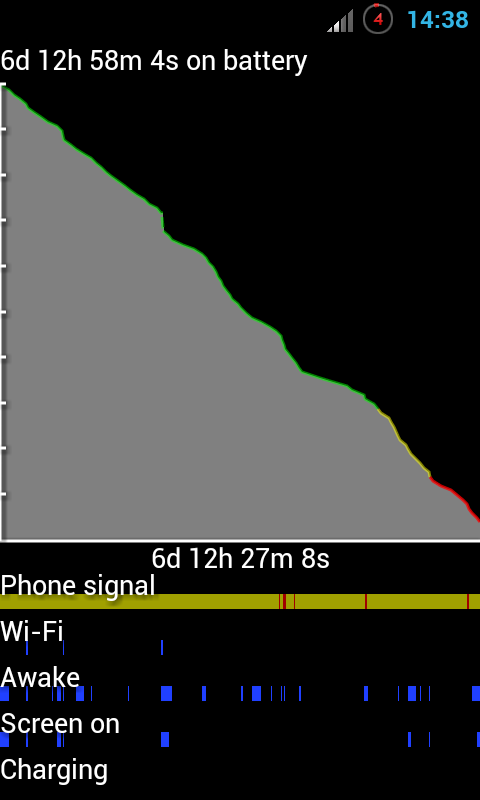
I didn't use my phone much last week, just the one kernel flash, a spot of browsing and a few calls/texts and managed to get really good battery on 2.6.3 with steps 100 - 1200 undervolted by 75mV, everything else left alone.

SC20120101-143833.png
 
Back
Top Bottom