• After 15+ years, we've made a big change: Android Forums is now Early Bird Club. Learn more here.

Root [THEME] MTDEV Ultimate ICS build 20120831

G60 you're the man! Awesome theme! I run into couple of issues that might just affect me b/c i'm running 360 and its android 4.0 theme.

1. When I open the T-Mo Theme Chooser, MTDEV theme preview is missing (or should I say black).
2. I get the following error when trying to apply the theme: sorry, this theme is missing assets for your device's screen size. I hit Apply anyway and it did apply the theme
3. Everything looks great except for the power control widget where icons are blurry.

I absolutely love the battery life icon. I kept wondering how can I replace the standard icon with the percentage after seeing the Battery Widget? Reborn! Beta icon.

This is normal, since I am simply decompiling and recompiling this is how it breaks down. I tried to change the black and it wouldn't install.

I like this but i think the power control widget should be stock CynoCream (or transparent), the facebook widget should be black, and the circle mod battery color is the wrong hex. I have a transparent png for power widget if you're interested.

PM me a link :)

I wouldn't mind a circle mod, something like this, but don't do it only on my account, only if others are interested.

I like it fine, shoot me the images.

g60 I notice that above screenshots have Google now search bar how do I switch? Mine still has Ics search bar.

I wiped my phone and there was no update for the google search bar. I think google pulled it that's why it's back to stock. You can just uninstall the search bar update, and I don't think it will update.
 
I have also experienced this. When typing in Dolphin.
It also seems like this theme may be causing a little more battery drain than the default theme in MTDEV CM7. I'm not 100% certain on that. But it does seem like my battery has been draining a little faster since I installed this. Anyone else experienced this?

Nice to know it's not just me. I personally haven't noticed any decrease in battery life, but that's one of those things that's just very subjective.
 
It's sort of mentioned by g60 and myself, earlier in this thread, and I also posted about it in inub's thread where this theme originated.
I don't use dolphin unless something won't load properly in opera mini and it doesn't seem to suffer from this, but Playstore does.

edit:
to clarify, I'm referring to the bug that the top half of the screen disappears when typing in a search window.
 
It's sort of mentioned by g60 and myself, earlier in this thread, and I also posted about it in inub's thread where this theme originated.
I don't use dolphin unless something won't load properly in opera mini and it doesn't seem to suffer from this, but Playstore does.

edit:
to clarify, I'm referring to the bug that the top half of the screen disappears when typing in a search window.

I've noticed, at least for me, once I start typing it seems to "fix" the issue. It's just blank until I start typing. So I can tolerate it. Hopefully it will get worked out in future releases. I love the theme! :D
 
I wouldn't mind a circle mod, something like this, but don't do it only on my account, only if others are interested.

c8f52903-d036-b8c6.jpg

I think I can add this along side the other icon selections. Is this open source, or am I going to have to draw it manually?
 
I've noticed, at least for me, once I start typing it seems to "fix" the issue. It's just blank until I start typing. So I can tolerate it. Hopefully it will get worked out in future releases. I love the theme! :D

Same problem here!
 
Being a noob to android......
How do you uninstall this?

Thanks!
Do you want to completely remove the theme? Or do you want to just change the theme? Regardless, I will show you how to do both. And it's OK, we all were noobs at one time. :) Anyhow, to uninstall the theme, open up the app drawer, go to scroll down to settings, tap settings, and scroll down a little and tap Applications, tap Manage Applications, scroll down to and tap on MTDEV Ultimate ICS, and tap uninstall. To change the theme, go to the app drawer, scroll down to theme chooser, tap it, and select the default theme (Cyanbread) and tap apply.
 
I wouldn't mind a circle mod, something like this, but don't do it only on my account, only if others are interested.

c8f52903-d036-b8c6.jpg


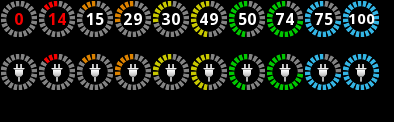
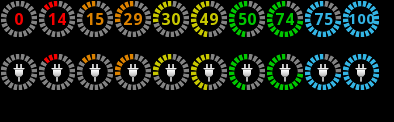
For the people who wanted this, i ran the theme thru the kitchen and i believe i made it exactly like this, since the kitchen uses different numbers i set the blue to be 33B5E5, which i find to be closest if not exactly like the ics color, the percent numbers are white, but i added another link where all percentage numbers match the color of the ring

CircleBatteryWhiteNumbers.png
<<Screen for Links Below(Circle Battery White Numbers)

Circle Battery with White Percentage Numbers (Smooth Charge Animation, No Percent Shown During Charge)
UOT-09-04-19-08-1.zip


Circle Battery with White Percentage Numbers(Hybrid Charge Animation, Half the time percent shown other half is smooth charge animation)
UOT-09-04-21-03-1.zip


CircleBatteryMatchingNumbers.png
<< Screen for Links Below(Circle Battery Matching Numbers)


Circle Battery with Matching Percentage Numbers (Smooth Charge Animation, No Percent Shown During Charge)
UOT-09-04-19-33-2.zip


Circle Battery with Matching Percentage Numbers (Hybrid Charge Animation, Half the time percent shown other half is smooth charge animation)
UOT-09-04-21-22-1.zip


Since i used the kitchen these arnt apk's, there flashable zips

1. Dont unpack but move whole Zip to sd card
2. Boot into CWM Recovery and install zip from SD
3. Choose zip and install, should be fairly quick to install
4. Reboot
5. Now in the Theme Chooser if you originally were running or had the MTDEV Ultimate ics there will be 2 of them

the Original MTDEV Ultimate ICS build 20120831 and

MTDEV Ultimate ICS 20120831 UOT <<this is the one you'll want to select


i changed absolutely nothing but the battery icon so everything else should remain the same, i would also only suggest choosing and installing one of the links i post as they all probly have the same name in theme chooser it'll either overwrite or become very hard to tell which is which lol


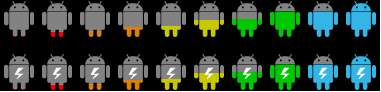
Im Currently not using or dont normally use any of the circle battery icons, ive currently got mine as a little android guy cause it makes me laugh lol, like this
androidmanbatterypic.png

Just did this for fun and figured maybe i could help out in some way lol

ps. sorry for the size of this post lol but i wanted to give the people some choices lol
 
Looks good Tokens, Thanks!
I've been using android phones, for a few years now, think it's about time to start learning some of the easier hacks/theming, etc.
 
Looks good Tokens, Thanks!
I've been using android phones, for a few years now, think it's about time to start learning some of the easier hacks/theming, etc.


thx, glad i could help ya out, i actually was just changing mine to the little android guy and i saw they had the one u and someone else asked for so i was like why not lol i throw it in there, then after a few minutes i decided to add the choices lol


so again for anyone whoes getting them, i would suggest only flashing 1 of the links i posted, if your going to try a different link id suggest uninstalling the other first


and Smooth animation shows no numbers at all during charging

while the Hybrid does half the time the battery percent gets shown and the other half of the time it shows smooth charge
 
all I really like from this theme is the pop up transparent boxes with blue outline.

if anyone wants a really good theme try ice9
forum.xda-developers.com/showthread.php?t=1327602
 
thx, glad i could help ya out, i actually was just changing mine to the little android guy and i saw they had the one u and someone else asked for so i was like why not lol i throw it in there, then after a few minutes i decided to add the choices lol


so again for anyone whoes getting them, i would suggest only flashing 1 of the links i posted, if your going to try a different link id suggest uninstalling the other first


and Smooth animation shows no numbers at all during charging

while the Hybrid does half the time the battery percent gets shown and the other half of the time it shows smooth charge

the lil android guy icons looks cool where is the link to download ????????
 
UOT Kitchen. Kitchen

follow the steps, easy peasy!

i was looking for something already made i aint got much time to create but thanks i guess i can mess around with this :D not big on GUI based creating im more of a comand line type of guy but thanks for the info
edit: one of the steps suggest to wipe caches before flashing is that a requirement will anything go wrong if i dont wipe ? will it run better if i wipe ? reason i ask because i just made one and looks fine but seems a lil off i just seem the percentage on the battery go up lol another question since its flashed how do i delete it ?
 
Back
Top Bottom