• After 15+ years, we've made a big change: Android Forums is now Early Bird Club. Learn more here.

Root [TOOL] AIO ROOT, UNROOT, and RECOVERY INSTALLER (GUI EDITION)

might have helped... a while ago lol

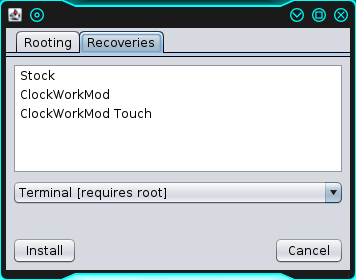
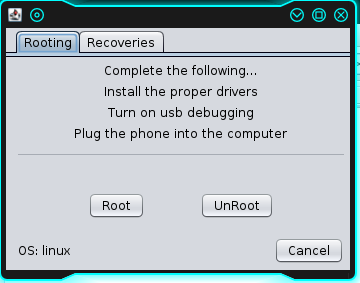
Screenshot-06302013-031815PM_zps5bd850fe.png
Screenshot-06302013-031745PM_zps0843150c.png


all the java functionality is in place, just gotta finish up the bat, jar, and command files, package everything, and we're good to go

it detects the os you are using and adjusts accordingly so no need to pick and choose anything just run the jar and it does all the work for you. and for right now these are all the functions youre gonna get out of it, rooting, unrooting, and recovery install, ill work on adding in all the little extras later
 
have you gone to bed yet? lol

lol yea i was just looking stuff up, doing a little research into general functions last night, i didnt even finish downloading netbeans till about 4 hours ago so i couldnt have started if i wanted to

their little gui editor made the layout stupidly simple to make, the hard part was designing the functions kuz that all had to be done by hand
 
i am excited to try it out :)

well, me too lol. i have to make it work first though so we will both have to wait. shouldnt be long just gotta adjust a thing or two in my batch scripts for my c++ edition, then convert them to unix bash format and it should be good to go. be back with a finished copy shortly
 
This JavaTool.. Being as it's written in Java(?) Does that mean it'll work across windows/Linux/Ubuntu/Mac? Super "All-in-one?!"

 
This JavaTool.. Being as it's written in Java(?) Does that mean it'll work across windows/Linux/Ubuntu/Mac? Super "All-in-one?!"

yes, and it even detects what os you are using, notice in my screenshot it says OS:linux in the bottom left corner of the rooting tab, i test ran it in windows earlier, said OS:Windows 7. the program is not only able to run on any os due to it being java but the platform specific codes are sorted out and run properly for all three OSs
 
Do you have an icon for it? I can make a linux installer so it can be opened from a dash icon. It doesn't need an icon, but it would be cooler.
 
here see if you can make this an icon for now

J_zps190c5619.png

i realize the sizing isnt great and it may not even be the right format... but it can easily be converted im sure
 
yes, and it even detects what os you are using, notice in my screenshot it says OS:linux in the bottom left corner of the rooting tab, i test ran it in windows earlier, said OS:Windows 7. the program is not only able to run on any os due to it being java but the platform specific codes are sorted out and run properly for all three OSs

!..The Final product in all its Brilliance..!
Gawd, I LOVE this forum!! :beer::D:beer: :cool: :beer::p Junkie, U kick @$$!
 
thank you sir, and i will most likely be updating it to add some new features at some point in the near future. this is basically a beta version with the most basic functionality, i still have a few more tricks up my sleeve. but after about 6 straight hours of coding and debugging i think im gonna take a break from it for now so you will all have to wait and see what becomes of it
 
Here is the JavaAIO Installer for Linux - Warp Sequent Edition.

The installer will create a directory ~/.JavaAIO and put required files in it, download the newest versions of JavaAIO.jar, updater.jar, and DeviceMenu.jar (Thanks PlayfulGod for providing the static links for us), and create a .desktop file in ~/.local/share/applications so JavaAIO can be launched from your dash and use junkie2100's icon ;)

All credit goes to junkie2100 for the great tool. I only made the installer ;)

To Install:
Extract, double-click, choose run, Enjoy!

OR in terminal:
Code:
cd /path/to/file && ./JavaAIO_installer_linux

To use the app after install:
Open dash (usually the windows key), type JavaAIO, press enter
OR
Navigate to ~/.JavaAIO in file manager, Double-click JavaAIO_run, choose run, Enjoy!

OR in terminal:
Code:
cd ~/.JavaAIO && ./JavaAIO_run

To Uninstall:
Navigate to ~/.JavaAIO in file manager, double-click uninstall, choose run, Enjoy!

OR in terminal:
Code:
~/.JavaAIO/uninstall
 
ok that link is dead... new version XD i added a pause in so that the application halts when its running a process, that way nobody gets confused thinking its not working

JavaAIO.jar | by junkie2100 for Warp Sequent

hey i got a question, has anyone tried it in windows? lol kuz i havent and im not 100% sure on the windows functionality. might have to change up a thing or two to get it working properly
 
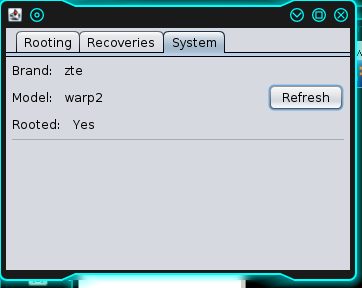
ok well i am not posting another new version but i fixed an issue with the system tab, it didnt start the adb server before hand so youd get garbage about the server being started, now it starts up the server before running the commands, and i decided to go with a simple yes or no on the rooted entry. thinking about putting in the build number too just kuz i can lol. be able to tell exactly what version of what rom you are running might be useful

you guys have any ideas on what else i could cram in here? any values youd like to see pulled from the phone and made easily viewable, any functions not yet in place, a new tab with a picture of a naked lady, anything at all you name it and ill try to do it granted i think its a good idea and worth the effort involved

heres a screenshot of my new panel, just in case anyone was wondering but didnt feel like downloading it

Screenshot-07012013-015608PM_zpscc57e577.png
 
if i can figure out how to do any of that stuff through a terminal emulator id be happy to add it, not sure if its even possible though

here is a new version with a new feature though. it allows the direct running of adb commands

say you want to list devices, instead of having to have adb installed, opening terminal or command prompt, and using adb devices you can just open my program and type devices in the box, it uses its built in adb functionality

JavaAIO.jar | by junkie2100 for Warp Sequent

but remember to use this file you need to have the "files" folder that came in the original versions zip
 
if i can figure out how to do any of that stuff through a terminal emulator id be happy to add it, not sure if its even possible though

here is a new version with a new feature though. it allows the direct running of adb commands

say you want to list devices, instead of having to have adb installed, opening terminal or command prompt, and using adb devices you can just open my program and type devices in the box, it uses its built in adb functionality

JavaAIO.jar | by junkie2100 for Warp Sequent

but remember to use this file you need to have the "files" folder that came in the original versions zip

Do I extract/ throw this in with the "files" folder of your javaAIOtool? I used ROM toolbox to speed up the read/write speed of my SD to 2072kbps and my download speed virtually doubled.. I wanna be able to permanently embed that function without the toolbox
 
well ill have to figure out how to do that in the command line interface. if it cant be done using a terminal emulator it cant be done on here. im limited to what i can do through adb shell

i do however have another idea... im gonna throw in a buildprop editor that pulls it apon the click of a button and writes it back when you click another
 
nice work junkie :) Is there any way you could upload JavaAIO.jar to a static link (ie. www.junkie.com/JavaAIO.zip)? If so I can write my installer to download it so it will always be the newest version. Otherwise it will need to be updated as often as you feel like making things more awesome ;)

or I could create an updater script if there was a static link

or both lol
 
Back
Top Bottom