
• After 15+ years, we've made a big change: Android Forums is now Early Bird Club. Learn more here.

Root [UnBrick Guide]LG LEON LTE - MetroPCS (LGMS345) KDZ Firmware

Let the error stay up see if percentage still goes on device goes up
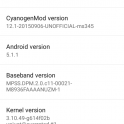
I had an error in the beginning around %60 I uninstalled the mobile tool restarted windows and reinstall after that and adjusting the settings as mentioned at the start of this thread the lg mobile tool revived my phone.
 
okay so i wanted to go back to stock rom. The link you provided didn't work for me so i got MS34510e_00.kdz and flashed it to my phone seems to be working fine
24bvne0.jpg
 
Last edited:
Well flashing failed but doing the normal upgrade via the support tool to 10E worked just fine. So for people who soft brick their phone, for me it was that simple. I didn't have to use the flash tool.
 
Alright I have the lg Leon t-mobile k 345 or something like that and I rooted it turned it off turned it on all it does is vibrate will not come on when I take the battery out a little icon appears it says I don't have the battery connected is there any way to recover from this
 
I just bricked my T-Mobile LG Leon trying to root, and soft bricked it. This method described by the OP saved me, and now I have my phone back. I only changed the firmware for the correct one for T-Mobile (H34510E).
:D
 
Just a heads up to anyone who uses this or has used it. This is stock Metro Firmware 5.1.1, it has been stated that the update locked the bootloader on the T-Mobile version of this device, it might be possible that the same happens to the Metro version. If that is the case I will try to figure something out for the people that have used this
I did a system update and am now on 5.1.1 10e. Ive heard my bootloader is locked, and my phone cannot be rooted unless downgraded. I do not have root or custom recovery. Would these files restore my phone to a condition in which it can be rooted, have custom recovery, and allow me to run custom roms? I was told my external sd cant be written to unless i have cm12 installed. Also, i just noticed a unlock oem button under dev options. Does this do anything for me?
 
Last edited:
I did a system update and am now on 5.1.1 10e. Ive heard my bootloader is locked, and my phone cannot be rooted unless downgraded. I do not have root or custom recovery. Would these files restore my phone to a condition in which it can be rooted, have custom recovery, and allow me to run custom roms? I was told my external sd cant be written to unless i have cm12 installed. Also, i just noticed a unlock oem button under dev options. Does this do anything for me?
Well I went from Metro PCS version 12b to 12d and rooted the phone. Clicked that OEM unlock in Dev options. I was able to install TWRP and the custom rom.
 
Remove the back cover
Take the battery out and put it back in
then hold the VOLUME UP ONLY while plugging usb cable in
keep holding until you see :Firmware Update"

I've been trying that, but it just sits at the LG logo for a while and the screen occasionally flashes black
 
I am so grateful that you posted this, and it seemed to work fine until the popup that says 'can't connect to server, please try again' shows up. I tried multiple times, with varying intervals, and nothing seemed to change
and of course, my laptop was connected to wifi the whole time.
Do you know why this happened?
 
I am so grateful that you posted this, and it seemed to work fine until the popup that says 'can't connect to server, please try again' shows up. I tried multiple times, with varying intervals, and nothing seemed to change
and of course, my laptop was connected to wifi the whole time.
Do you know why this happened?
Not sure why it happened, when I was having connectivity issues I un-installed and reinstalled and changed to the com port to a higher number. I was connected to wifi through the whole process.
 
Not sure why it happened, when I was having connectivity issues I un-installed and reinstalled and changed to the com port to a higher number. I was connected to wifi through the whole process.
great, I'll try that. Thanks for the quick reply
 
When I go into download mode, I get to Firmware Update where I am prompted not to unplug the connection -- followed by a progress bar which is static, 0%. I don't know if it'll take an hour plus, but... That's as far as I've gotten with this.
 
When I go into download mode, I get to Firmware Update where I am prompted not to unplug the connection -- followed by a progress bar which is static, 0%. I don't know if it'll take an hour plus, but... That's as far as I've gotten with this.
it will say 0% even if its unplugged. Device isn't being flashed until you see bar hit 1% and see extra text at the bottom.
 
So thanks, everything worked out. It booted up. The only thing was (And I'm not complaining) The instructions weren't all that detailed... and I was tired late at night. Anyways, It worked, thank you.
 
Last edited:
Will this by any chance allow me to have my phone be gsm unlocked? Just bought this LG leon off a guy and feel like i basically got played since i cant use it on any provider other than metropcs. Any advice or help is greatly appreciated, Thank you.
 
Will this by any chance allow me to have my phone be gsm unlocked? Just bought this LG leon off a guy and feel like i basically got played since i cant use it on any provider other than metropcs. Any advice or help is greatly appreciated, Thank you.
As far as I know the gsm unlock for MetroPCS can be done by calling MetroPCS and requesting the unlock code.
 
As far as I know the gsm unlock for MetroPCS can be done by calling MetroPCS and requesting the unlock code.
The MetroPCS version of the Leon has a built in app for the sim unlock. You have to have 90 days of service on the device before it is able to be sim unlocked. The day the device was activated starts day one. Unlocking the bootloader is a different story.
 
Back
Top Bottom