
• After 15+ years, we've made a big change: Android Forums is now Early Bird Club. Learn more here.

Verizon to release Major update for S3

Status
Not open for further replies.
I have changed nothing since the update (non rooted) but I feel like things are getting a little better over the past few days.

Although I did lose GPS a few times taking a new route to work this morning.

I currently have 3 bars (-99 dBm) and here is my speed test.
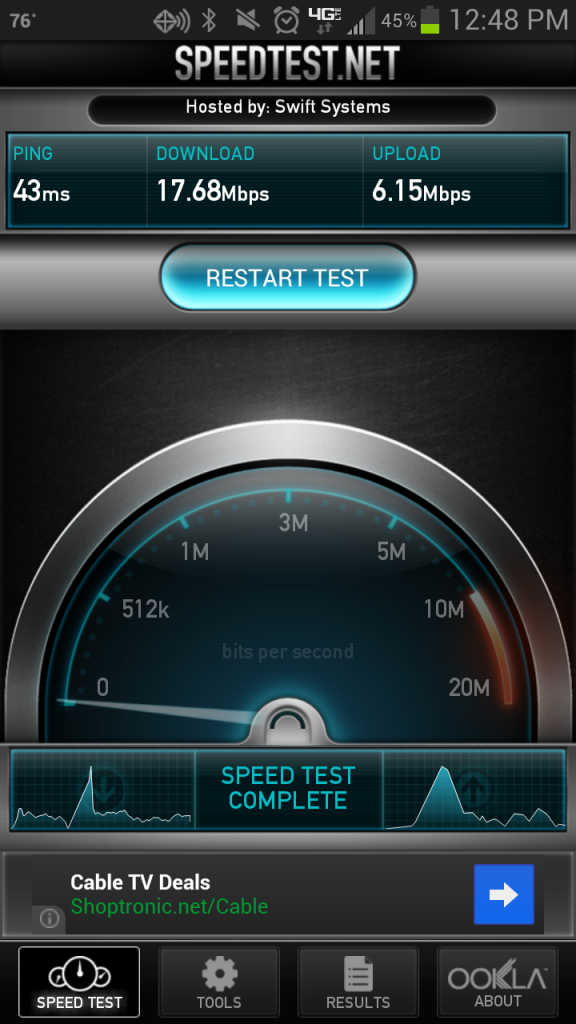


Funny you say that. Cuz things seems extremely worse for me today. The worst it's ever been. Ever since the update, which has been a week now, my phone goes to 3g everyday when I get home. It's never done that before this update. The signal is so inconsistent, the bars jump all over the place, images load extremely slow, the play store times out, news apps are slower then ever. We need an update to fix this s_it!

 
Yeah, you can, but the hand prompts you that it is on, even though it really isn't, every reboot. I don't recall this on previous versions.

I messed around with it and found that if I long press the notification and force close it, the hand goes away (until the next reboot anyway...)

I feel like my phone is mocking me "Talk to the hand"...
 
When you long press on it and get taken to app info, isnt there a notification box below "force stop" that you can uncheck? Or just disable the app?
 
I've jumped through Verizon's hoops. Replaced SIM card... factory reset. No difference, signal is still crap.

However, changing from GSM to LTE/CDMA whatever, seems to have improved signal!
 
I think its designed for the blind mate, it tells you when you tap and select things :thumbup:

EDIT ninjad by the mighty Rxpert :D
 
My battery sucks since this update. Spoke with Verizon and the gal said they aren't aware of any issues. Recommended factory reset and possible phone replacement. I see others have done the reset with no fix. My phone was fine before. Then she passed me to level 2 rep and he said the same. Verizon needs to stick with phone service and stay away from phone updates.
 
yup, my battery is completely screwed. I barely make it through the day with my extended battery. I can only imagine what it does to a standard battery. wow.
 
I've never been to serious to root but after talking with Verizon, Samsung and Google, yes I called all of them, I can say with confidence that we will not be seeing any update anytime soon. Thus the root. Hope I don't brick it! This sucks royally!
 
I've never been to serious to root but after talking with Verizon, Samsung and Google, yes I called all of them, I can say with confidence that we will not be seeing any update anytime soon. Thus the root. Hope I don't brick it! This sucks royally!
Follow the guide and it will happen, then you'll wonder why you waited so long. By the way, I did encounter 1 problem on mine and also a difference with the guide, listed below.


  • TWRP Custom Recovery did not install the first time through, for some reason - maybe I made a mistake, and as I booted into recovery mode, I was using the Stock Recovery but didn’t know it. I got a “Signature Verification Failed” error when I tried to install the SU and Boot loader, but didn’t know what it meant until I looked it up online. Found a video. (Might be good to ad this to the guide - what it means if you get this error!)
  • This appeared when booting after successfully completing the entire process: “Android is upgrading – starting apps” so don't be surprised.

  • Second bullet point on step 5: "Upon exiting your custom recovery to reboot first time, you will be asked if you want to "Disable recovery flash", you MUST select Yes," - I did not get this option in TWRP. But, it worked! Online I found others didn’t get this either.
If you have any other problems just post them and you'll be surprised at how quickly you'll get the help you need.

Good Luck!
:thumb:
 
Update again on my phone since updating software: New SIM card did nothing (as I figured). They are sending me a new phone. Oh and I also noticed that I had used 1/4 of my data in 2 days! I rarely get close to 3/4 of my data in one month.

After speaking with 2 level 2 tech support people neither acted as if they heard of this before. The person at the Verizon store also said he never heard of these problems. I doubt they will fix it soon. I'm just hoping this new phone they send me doesn't already have this crap update added to it. If it does then I will have to learn to root.
 
When you long press on it and get taken to app info, isnt there a notification box below "force stop" that you can uncheck? Or just disable the app?

Yes, but it was grayed out and I couldn't change that yesterday. Just checked it again, and I was able to uncheck the notification so hopefully that's the end of this annoyance.
 
Hey guys, stop complaining. NSA spy software is really hard to implement.

You try to do it better instead of all the naysaying.
 
Hey guys, stop complaining. NSA spy software is really hard to implement.

You try to do it better instead of all the naysaying.


You may be joking, but for folks in those g-ment positions that may think we work for them, rather than the other way around- they would not be ;)
 
I have a tiny scratch on my screen. Im at least using this to get a replacement phone. Screw you VZW. I'm getting my moneys worth! (Actually hoping this may fix a few other problems Im having)
 
I have a tiny scratch on my screen. Im at least using this to get a replacement phone. Screw you VZW. I'm getting my moneys worth! (Actually hoping this may fix a few other problems Im having)

Are replacements shipping with the old good version or will they immediately update with the bad version?
 
Im just wondering.. isnt there a system app you could disable to prevent the phone from updating or would it mess other things up?
 
Im just wondering.. isnt there a system app you could disable to prevent the phone from updating or would it mess other things up?

If it's anything like on my Thunderbolt, there's a file you can rename and it should keep it from checking for updates, though you had to be rooted.
 
Status
Not open for further replies.
Back
Top Bottom
