
Install the app
How to install the app on iOS
Follow along with the video below to see how to install our site as a web app on your home screen.
Note: This feature may not be available in some browsers.
-
After 15+ years, we've made a big change: Android Forums is now Early Bird Club. Learn more here.
You are using an out of date browser. It may not display this or other websites correctly.
You should upgrade or use an alternative browser.
You should upgrade or use an alternative browser.
Root wifi tether not working on cm7- FIXED!! 5/21/11
- Thread starter outkast25
- Start date
-
- Tags
- htc evo 4g


darkworld260
Well-Known Member
can someone help me figure out why wifi tether is giving me errors? here is a pic of the show log. I dont know what the errors mean or how to fix them. thx p.s. Im running cyanogen7 and tiamat sbc kernel
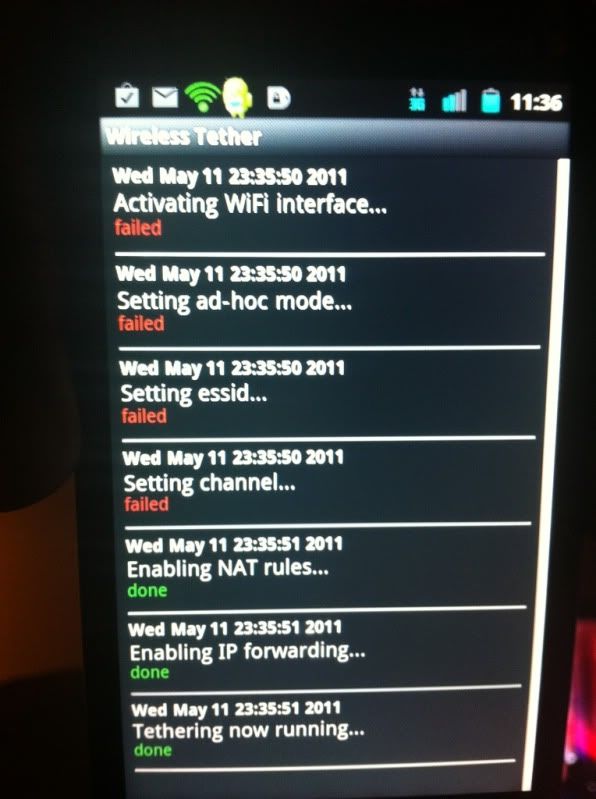
What i did to fix the error is after tryed to turn on wifi tether and got the error i simply restarted my phone and the problem was solved.

corybantic
Well-Known Member
I'm having the same issue with Destroyer 7. Could it be a ASOP issue?

takirb
Android Enthusiast
I'm on King's Ultra GB ROM RLS4, had same issue with tether at first. This worked for me yesterday, been using Wireless Tether constantly since -
Possible fix for Wireless Tether on CM7 + AOSP ROMS | Android Support | Android-Support.com | Support,Reviews, News, Applications, Games and New Releases|
Built-in hotspot didn't work for me at all.
Possible fix for Wireless Tether on CM7 + AOSP ROMS | Android Support | Android-Support.com | Support,Reviews, News, Applications, Games and New Releases|
Built-in hotspot didn't work for me at all.

beastinbolts
Android Expert
With some asop roms. You have to use the wireless tether version 3.0 only way I have found to get around this problem

frenchy714
Android Expert
beastinbolts
Android Expert
the wi fi tether apk shoulp fix this.. run it as an app from your app tray then turn it on..bye clicking on your screen . do not go to menu\wireless networks... run it as an app...
beastinbolts
Android Expert
That sounds exactly what I was dealing with to the t...when u say now native wifi not working .............
beastinbolts
Android Expert
were you able to resolve it? were you on cm7? tiamat?
Yep yep and yep......it was 3.0 that fixed it.
every time I use any thing below that I would test my wifi tether out and it would fail. And then it would cause just turning on wifi to fail.... causing me to have to restore...to working state. but when I started using 3,0 no more problems

what did you do to get it going again? just in case some other people have issues and need some answers.
beastinbolts
Android Expert
awesome...... your the first person i have ran in to that had the same problem......glad its fixed
dallas1scholar
Newbie
Flashed he Destroyer v2 rom and had the same wifi issue. I went ahead and tried the wifi tether 3.0 and I see the wifi hotspot pull up on my computer and I can even get link to it but I am unable to open any internet links....anyone have any way to correct this?
beastinbolts
Android Expert
Sorry I don't understand
dallas1scholar
Newbie
Sorry I don't understand
I can access the wifi hotspot via my desktop computer however I am not able to view any internet pages.
which wireless tether app are you using and what rom? here is a guide that might help: http://androidforums.com/evo-4g-all...net-tethering-w-evo-4g-3g-wireless-wired.html

9to5cynic
Android Expert
Okay, to test connectivity, click start, run and type cmd from there type ping google.comI can access the wifi hotspot via my desktop computer however I am not able to view any internet pages.
if you have connectivity, it will say pinging (some IP address) and then at the end it will give you 4/4 or something. (successful pings)
If you cannot do this, it means that you are connecting it as Ad-hoc, (device to device) and there is no gateway. As an example, when I connect my ipod to my laptop to ssh into it, i connect via an ad-hoc network. There is no connectivity from my computer to the internet and no internet to my ipod.
Does your phone have data service when you connect?