• After 15+ years, we've made a big change: Android Forums is now Early Bird Club. Learn more here.

Root Wireless Tether in Infrastructure Mode

Well update to beta 4 is now available. I never had the issue with wifi locking up but I put beta 4 on and everything is going fine. My wifi is usable after disabling tethering.

The 2 settings in the op should be the only things you need to change if you're stating fresh. You can enable encryption (I'm using wpa psk2) and access control as well.
 
Beta 4 running fine so far, the best of any yet. I rarely used it, but the last one that worked for me was Beta 2.

Been having trouble with VirginMobile lately. I may start using this and save $50/month. Plus Virgin Mobile has a 2.5GB 3g limit, which will not last the whole month if you use Netflix.

This is running as fast or probably faster on average than VM ever did with much less trouble.
 
Hello, noobie here. I have used this in the past with success connecting to my SGT7510. Well now it will connect, but there is no Data connection. I am running beta 3.1 beta 4 Any help would be appreciated.
Thx
 
i have problem with my wifi beta4. once i started it its ok but then when i stop & turn it on again it would not turn on. it just stuck ...then my un root acer tab cant connect just scanning & scanning .. any help please .. (follow everything in the 1st post)


1st post.
 
I have this same issue. If I stop tethering and then try to restart it will not work. I must take the battery out and restart to phone to re-tether
 
I have the same problem as far as trying to stop and restart the tether. If you hit the back or home button you should get back to your home screen. Then if you reboot it will work. But, I have never had it freeze up so that I have to remove the battery. Maybe they will fix this on Beta 5. Not a biggie as far as I am concerned.
 
Try going into your phone settings/wireless and networks and disable and reenable wifi then activate the hot spot again. Let me know if that works. I'm not having the issue you guys are.
 
Try going into your phone settings/wireless and networks and disable and reenable wifi then activate the hot spot again. Let me know if that works. I'm not having the issue you guys are.
I used the beta 1 till now because of the problems being experienced but I had no trouble with this one.
 
i just downloaded beta5. so far so good. running infrastructure & it keep my tab connected & try once to disconnect & reconnect working .. hopefully no more hassle.

thanks
Necrotoxin & new optimus & etc
 
Where is Beta5 sorry only see beta4...Hot spot is activated and wifi tethers. Just no Data on the Tablet. It's like the 3G is being blocked.
 
Hi Everyone...

Has Anyone Here Managed To Tether Their HP Touchpad To A Prevail Using The Above Method???

I Manage To Get The Device To See It And Connect To It, But When You Try To Use It...It Says No Internet Available.

Any Help Will Be Appreciated.
 
infrastructure, the beta 5 and switching the wifi on and off fixed the issue with restarting the hotspot. But, still no data connectivity. It just connects to the tablet and then stops. I am thinking about re-rooting the tablet.
Thanks for the help!!
 
Anyone know how to get infrastructure mode on the Optimus M? I'm currently running the CM7 beta with the new Beta-5 with no luck. I tried ALL the betas including the stable 2.0.7 & 2.0.8-pre1 and get errors trying to run softap and netd. I can connect fine using wext (ad hoc) but would like to broadcast in infrastructure.
 
Anyone know how to get infrastructure mode on the Optimus M? I'm currently running the CM7 beta with the new Beta-5 with no luck. I tried ALL the betas including the stable 2.0.7 & 2.0.8-pre1 and get errors trying to run softap and netd. I can connect fine using wext (ad hoc) but would like to broadcast in infrastructure.


Change the device profile. I used one that isn't actually for this phone but similar enough that it works. Just try put some other profiles and read the log. Sorry but I don't have an optimus m so I can't help directly. Once you change the profile you'll have to choose softap again because it'll be using a different binary.
 
Change the device profile. I used one that isn't actually for this phone but similar enough that it works. Just try put some other profiles and read the log. Sorry but I don't have an optimus m so I can't help directly. Once you change the profile you'll have to choose softap again because it'll be using a different binary.
I have an optimus m I will look and see, have not worried about it much as the optimus connects to everything, the prevail not so much unless it is in infrastructure mode.
 
Anyone know how to get infrastructure mode on the Optimus M? I'm currently running the CM7 beta with the new Beta-5 with no luck. I tried ALL the betas including the stable 2.0.7 & 2.0.8-pre1 and get errors trying to run softap and netd. I can connect fine using wext (ad hoc) but would like to broadcast in infrastructure.

I have an optimus m I will look and see, have not worried about it much as the optimus connects to everything, the prevail not so much unless it is in infrastructure mode.
Ok looked through it, using wireless tether 3.1 beta 1 cuz that is the version i have on the optimus, should be same as the beta 4.
Use device lg optimus S and softap I used wpa2 encription and it worked for infrastructure mode.
But when you turn it off the phone needs time to reset the wifi I think it was 2+ mins before it could connect back to home wifi.
 
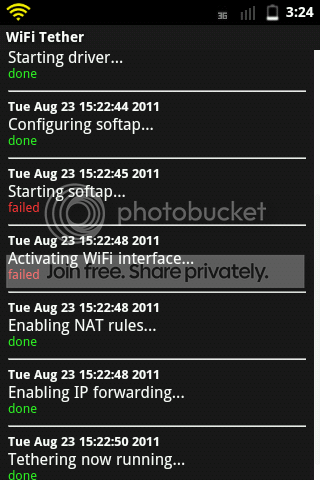
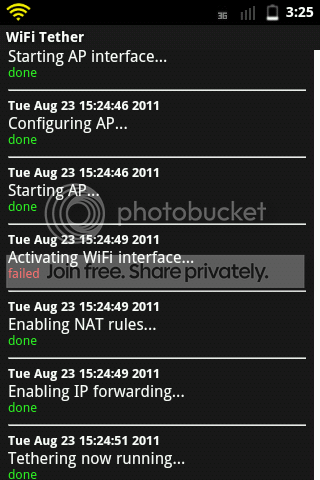
It took awhile but I tried every possible configuration with all the profiles and no luck on the Optimus M. It came up with the same errors whether it was softap or netd. Here are some pics:

Errors from softap
Softap.png


Errors from NetD
NetD.png


As I said wext (ad hoc) works fine just would really like to broadcast in infrastructure.
 
Ok looked through it, using wireless tether 3.1 beta 1 cuz that is the version i have on the optimus, should be same as the beta 4.
Use device lg optimus S and softap I used wpa2 encription and it worked for infrastructure mode.
But when you turn it off the phone needs time to reset the wifi I think it was 2+ mins before it could connect back to home wifi.
Just went back to beta-1 with a fresh install to try your settings and nothing. I still get the errors from softap as it shows in my picture above.
 
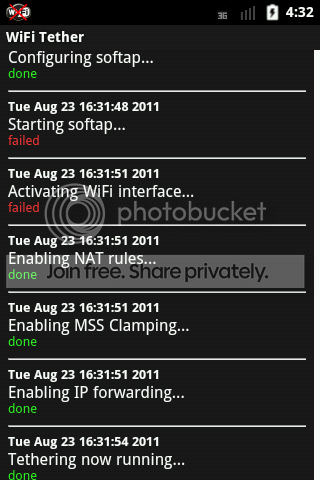
Same exact errors with the exception of MSS Clamping, and it turning on my wifi automatically.

mss.png


I'm thinking maybe it's a CM7 problem as it looks like you're on the stock OS.
Maybe flashing to another rom might help since CM7 is still in beta.
 
Back
Top Bottom