
• After 15+ years, we've made a big change: Android Forums is now Early Bird Club. Learn more here.

Root Wireless Tether in Infrastructure Mode

worked perfectly, ps3 picks up the ssid and everything, only problem i have with it is the speed i know 3g isn't like cable or anything but it takes awhile to connect to Playstation network, and then it hardly wants to go to playstation store, any way to speed this up, i feel that speed could be the cause of this, i get operation time out errors sometimes.

i've already changed the proxy codes for the phone to 0.0.0.0

 
worked perfectly, ps3 picks up the ssid and everything, only problem i have with it is the speed i know 3g isn't like cable or anything but it takes awhile to connect to Playstation network, and then it hardly wants to go to playstation store, any way to speed this up, i feel that speed could be the cause of this, i get operation time out errors sometimes.

i've already changed the proxy codes for the phone to 0.0.0.0
how is your signal strength? what speeds do you get with it using speed test app, or some similar?
while doing those tests what is the ping? latency?
All of those will determine how good your ps3 will connect.
Honestly I would never try to use mine for ps3 it would be worse then dial up where I live.
 
HI everybody....got the prevail and the toshiba tablet, ive done everything from change the profile and set up method as mentioned earlier, it connects but no internet. the funny thing is my laptop conectected to the phone and internet. ive been at it for a few days and i feels like im one step away from getting my tablet online....advice please!
 
Try this
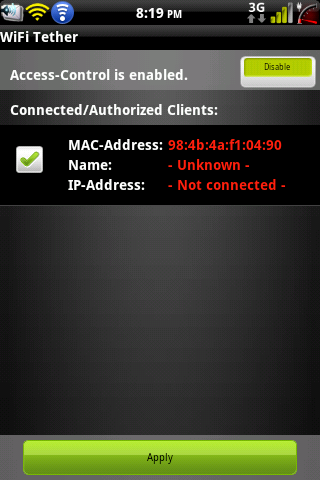
Go to menu>access control and enable it. Give it su.
The tablet will show up place a check in the box on the left side and press apply
ScreenShot-3.png
 
acces control was enabled for my device and it was green when it connected...by the way how do you get a screenshot of your screen like that...now thats nifty! the box is xhexked i dont see any apply options
 
acces control was enabled for my device and it was green when it connected...by the way how do you get a screenshot of your screen like that...now thats nifty! the box is xhexked i dont see any apply options
there are a few ways, the easiest is probably android app, available in the market I think its called screenit
 
Alright thanks for the app haha theres an app for everything lol...any who i applied settings and it said unable to restart secured wifi
 
Go into settings and UN check Force wifi driver
Also please reboot before declaring pass or fail
 
If you follow the first post you shouldnt have any issues getting it working but if you do just go ahead and post and im sure we can get you squared away
 
I did everything it sayed. put it to Samsung galaxy indulge and softop master or what ever it dated.n it goes through fine with no errors but I can't connect my laptop or ps3 to it
 
if you want to connect your ps3, you can connect your phone to your laptop (i use open garden wifi, on the market) then, on the laptop, open the control panel. next go into Network and Internet. then Network and Sharing Center. on the left side click Change Adapter Settings. Hold Ctrl, and click Local Area Connection then Wireless Network Connection. they should both be highlighted. right click them and select Bridge Connection. this makes it so your Ethernet port works as an "out" not an "in". you can hook your router up to it and your ps3 will connect to the router. (had to do this to get xbox to work for gaming, however i connected it using just an ethernet cable (no router)but it is still laggy (because 3g isnt the strongest where i live)
 
I had just tested it out on my evolution.as soon as it connected to it.it had Pope's up a Facebook notification and just stoped working
 
The higher your ping is the worse you are for trying to play games on 3g it just doesnt work at all or is very laggy if you have a high ping that why dialup isnt the best for playing mmorpgs or for using with consoles. I had a constant 850-1500ms ping with the boost prl even tho i had a decent 100-120kbs down it would still take forever to load any webpages. I now get a decent 200-300ms ping using a sprint prl on my phone.
 
with my 360 directly tethered to the phone, it gave me a message about the connection being too slow. bridging it through laptop bypasses this message, but as mentioned, only kinda works. And my ping varies greatly (between 180-1700:eek:) depending on time of day and which way the wind blows lol
 
Back
Top Bottom