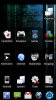
absolutely. essentially you get two screens when you open the app (see the html link below, second screenshot). one is a huge list of all yours apps; the other is your labels, with all the apps for each label sorted by label (think an expandable javascript left nav on a basic website - click a label to expand and see the apps inline beneath it). the first screen is useful for finding out which apps aren't labeled yet.
you go in and assign any app any number of labels.
then, you add a "folder" to your home screen, which is an apps organizer folder. you pick a label, and it shows up on your desktop (with a custom icon you can specify) as a folder, with all those apps in it.
there's a few more advanced features (like long-pressing an app to uninstall direct from apps organizer), but that's the general idea. let me know if you want me to go into more details. i'll try to post a screenshot today.
edit: here's the developer's screenshots, the first is the folder view when you click a label folder off the home screen; second is the first screen inside the app as mentioned above. you can also see the star feature - you can star or unstar apps, then inside the folder show only starred apps. so my favorite games in my games folder are starred, but the "ok" ones aren't, in case i want to play something i haven't played in a while i just turn the star off in the folder to "see all".
Screenshot of Apps Organizer
also attached is my home screen with all my folders and custom icons