• After 15+ years, we've made a big change: Android Forums is now Early Bird Club. Learn more here.

Help ZTE Flash N9500 bricked....HELP HELP

I was wondering if I can get some help Sprint ZTE FLASH N9500....IT seems I have bricked my phone completely.. I rooted my phone and everything was working fine... Then I flashed a recovery from ROM MANAGER.. It wiped my stock recovery and unfortunately I have no recovery at all. I did a back up of my phone, but It was lost... I know I know big mistakes on my part. SOOOO trying to do a back up of my phone before something else went wrong. The software was for a different phone and It wiped my IMEID, MRL and other phone info, and access to the network, BT, and WIFI were lost. Soooo now I have nooo clue what IVE DONE and my phone turns on but it just goes black... No recovery, not boot. I was thinking of copying the rom of a ZTE avid that my husb has, but I copied the build props before the phone went black and it was okay but the icons were tooo small. After I flashed the build for the ZTE FLASH it was still missing all the things I mentioned. Some one please help me. :confused::(
 
first of all, replace it if its in warranty :)

if not, Then does your phone goes in ftm mode?
volume down + power see if it goes in FTM mode..
 
yes it does it is the only way that the abd commands know theres a device but when i want to get for examnple serial no or devices it always says unknown.. and i am thinking of jtag but i dont know... i bought a new one online today I cant be phoneless.
 
hey i have this same phone i can give you the system dump if you want it just message my yahoo michaelcraig634@yahoo.com and can you get into your android system i can help you or if you can get into ftm i rooted mine and messed with the build.prop so than it wouldnt let me into my android system so than i went to ftm and ftm works with adb so i rerooted it with this one program because it wouldnt let me remount the system as wr so than i remounted it and luckly zte websight had the build.prop so i just pushed it into my system and once again i could boot up
 
hey i have this same phone i can give you the system dump if you want it just message my yahoo michaelcraig634@yahoo.com and can you get into your android system i can help you or if you can get into ftm i rooted mine and messed with the build.prop so than it wouldnt let me into my android system so than i went to ftm and ftm works with adb so i rerooted it with this one program because it wouldnt let me remount the system as wr so than i remounted it and luckly zte websight had the build.prop so i just pushed it into my system and once again i could boot up


Hello brother, I have complete nandroid back and if you can remount external sdcard on ftm mode, then we can push recovery and it will also be helpful for others for future.

Can you please let us know the steps for mounting Ext sd card ?

also, That backup is with my friend. As i soon i meet him, i will get the nandroid back & upload it. If you can have backup and can upload then to, it would be great.

REgards
 
mounting sd card is unnecessary, you could use cache or data or even system if you wanted though i dont recommend it. or reboot to bootloader and flash without having to push it to the phone first if youre up for getting the drivers to work
 
Hey there... I know a good amount about Android, so I thought that I should root it. I looked and looked and looked and only found a root, that was universal. I knew that meant bugs and trouble, also knowing that this phone has 0 development for it which is weird because it is a very capable phone.

I know for a fact that the phone is soft bricked, I can't get into the OS. I can get into the BL and FTM mode, so I know there is something that I can do to fix this phone.

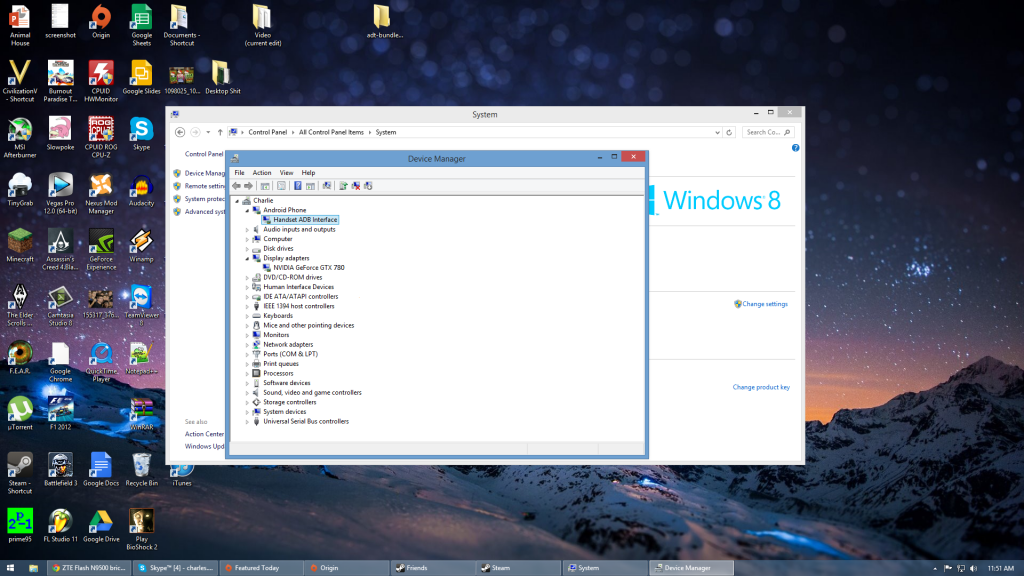
I tried the methods that I found on here, but kept on running into issues. I can't get ADB set up right it seems like. I am pretty sure I have the correct drivers installed, when I plugged the phone in and try to boot it up, on my PC I installed the Drivers. I need to find out ASAP what I can do to get back into the OS. I tried to go into the bootloader and to a wipe, but I get a message that says the system/data is crypt, I think that means I can't access the phone's internal data via the bootloader.

WAT DO
 
do you mean corrupt? and bootloader doesnt have wipe options... thats stock recovery. it works, the original poster of this thread fixed her phone using the cwm i developed so it can be done just gotta get it on the phone, check the cwm thread and follow the instructions carefully. makr sure to manually check the device manager
 
do you mean corrupt? and bootloader doesnt have wipe options... thats stock recovery. it works, the original poster of this thread fixed her phone using the cwm i developed so it can be done just gotta get it on the phone, check the cwm thread and follow the instructions carefully. makr sure to manually check the device manager

screen_zps44c957f6.png


I have this

Would it then be the adb program itself? :confused:
 
are you attemptinh to do terminal method or fastboot through bootloader? and are you aware that manual mounting of the sd card may be required if you use ftm to do terminal method... if you think youre in bootloader mode when it says thay however youre wrong, and bootloader uses fastboot not adb
 
the problem most likely isnt the drivers, and it probsbly isnt adb, that only really leaves one possibility lol. maybe id hou explained exacrpy what youre doing i could help
 
are you attemptinh to do terminal method or fastboot through bootloader? and are you aware that manual mounting of the sd card may be required if you use ftm to do terminal method... if you think youre in bootloader mode when it says thay however youre wrong, and bootloader uses fastboot not adb

I couldn't be using the terminal method, since I can't get into android at all.

I am using fastboot mode.

I just need help to get the stock build working again, so the phone can be used. i don't care about the root at this point, I just want to be able to use the phone again. What do you need to know from me, so I can help you figure out the problem? :hello2:
 
terminal method is what uses adb and the "dd /sdcard..." commands. it can be done eithout the rom working if ftm allows adb, i know what youre trying to do, but ehat i need to know is what steps have you performed and what steps did you have issues with
 
fastboot method uses adb to run "adb reboot bootloader" from there on out its fastboot commands, no more adb. if you put the cwm image on the sd, you arent following the right directions. not to say that hurts anything but fastboot doesnt involve that so if youre using the instructions that involve the sd youre uaing the terminal method
 
lol, it happens. it can be very difficult. hell it may not even be technically possivle. i dont have one i have a force
 
Hello,

This device dont bootup in bootloader.. it just end up with blank display with no device found on pc..

Plus FTM mode supports ADB.. through FTM mode she can push recovery..
Remember i was asking you about manually mounting device on adb.. That's was my reason of asking..

I dont have flash in hand.. I have system.img on my office pc.. but pulling it out from office pc is not easy these day.. I sold all my flash.. Now i m on vital..
 
blank display with no device found is probably bootloader... force is a black screen with nothing but the red notification light on. the reason it cant be recognized is windows sucks, it cant find the drivers automatically so you gotta put it in bootloader then manually install the proper drivers
 
oh... windows 8 im unfamiliar with, and ive heard there are extra steps to install drivers manually. if you can get into the device manager while the phones in bootloader mode and plugged in and manually install the drivers thatd be great if not youll have to manually mount something like the sd card or cache while in ftm and i dont have the command on hand. the info is out there to do both though im sure
 
build? building implies something completely different which requires linux. speaking of linux tho go talk to my buddy superr in the warp sequent section. he has a tool that may help. bootable linux that will have the drivers already as well as adb and fastboot. no install necessary
 
Linux ubuntu can be install directly from windows 8... no need of cd or anything.. it will create a multi operating system.. again if you want you can unistall it from windows 8.. your pc will be same like before...
 
Back
Top Bottom