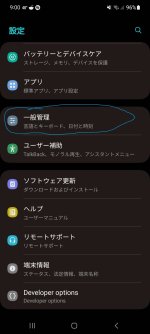
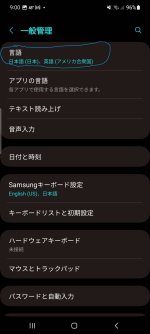
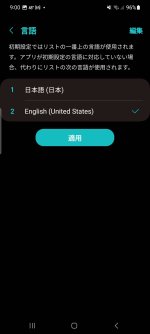
Help Remove change language function from the space bar.
- By fuxkYpu
- Apps & Games
- 2 Replies
Trash response.Install a different keyboard from the play store
Follow along with the video below to see how to install our site as a web app on your home screen.
Note: This feature may not be available in some browsers.
Trash response.Install a different keyboard from the play store
Oh my dear friend, you are really funny!Well. Everyone is today 🤣

 Gabier

Sorry I haven't replied to these replies/discussion. The initial replies indicated that it is a "deadend" for upgrading this tablet. The reason I would like to upgrade/update the tablet is that as of now I can not access my email provider. When I try to log-in the message is "upgrade my browser" but there is not an upgrade available for Firefox or for Chromium. As of now I have not checked for access to my bank account but I suspect I will get same result. Have been busy with other things lately.
The discussion that has been posted is informative for me; I know only a wee bit about operating systems, etc. :-(( I logged on today to ask if it might be possible to remove the whole opsys. and install something else. I did this with old computers running Win 95, etc. and installed various Linux distributions, but I have not kept current on doing this sort of thing.
Guess that is a "long enough" explanation of my reason for "upgrading" the tablet.


The Play Store will force access to check for updates, and if install automatically is selected, will update accordingly

I'd recommend sideloading the APK by downloading it from a website via your browser. I've had far too many instances where Play Store deems apps 'not compatible' but when I sideload them they work fine, and I've also had instances where Play Store allows an app to install that's clearly NOT compatible, and causes chaos.
It's one of the main reasons I don't use app stores anymore at all. Google still has yet to fix this 'bug'. The last false positive was a couple of years ago, I wanted to install Amazon Music to my Note II. Play Store is perfectly capable of allowing the 'last older version compatible' to work, as it can install an old version of TikTok for the same phone, but under the app listing for Amazon Music, it shows 'your device is no longer compatible with this app' and won't allow the thing to install. I was able to successfully sideload the APK and it worked fine, the Federation didn't collapse, and galaxies didn't explode. Google, fix your crap!
Yeah sometimes it kind of have to dive into deeper space as well, it is a hard task to keep at it from on a daily task though, I do take heeps of breaks from typing from my desktop and tablet, trying to keep it fresh in my mind. Well congrats on becoming a nurse. I have a side gig as well. So yeah..I believe that if you want professional point, you can go to professionals, who could help you with this. I have always wanted to write better things and even in my college i've trained to write nursing research papers for sale well, such tasks were always given to me and other students. So i guess i have trained on them. But i will never have such mastery to become write, instead i work as a nurse, which is also a good profession in my opinion
I'll try this. ThanksI had this issue, it was from a malicious play store overlay/update. I went into settings, apps, playstore, disabled. Then clicked top right menu (3 dots). Clicked uninstall updates. Cleared storage, and proceeded to do same with Play Services app. Then re-enable both. Open play store, go into settings, click about, and under play store version, click update play store. Repeat until it says you're running current version. Last step is to go into Phone Settings, Security, and it should show Google Play System Update, check that and it should update play services and add security patch.
Go into settings, Network and Internet, Internet, then click settings icon, scroll down, click access point names. Get APN info from Google. Can just search for it. Add apn's manually.For a month now my Google pixel 6 cannot receive calls. All calls immediately go to voicemail. I missed lots of important calls. I contact my carrier (Tmobile) and one agent was able to fix it for one call. Next day the issue comes back. The fix is using 'Reset Option' / 'Reset Wifi - mobile - Bluetooth' then immediately shutdown the phone. It's very annoying. When I google about the issue I found that many people experience the same symptom.
I consider Google pixel 6 the worse phone in the world, because it cannot perform the main goal of a phone.
They prob have a persistent spyware, or have your google as an enterprise/managed device. Only way you can check is by system logs. Some kind of new backdoor that seems to follow all accounts made... I'm dealing with this on my normal phones. My GrapheneOS Pixel seems to be secure so far.Buy a new device. Look into GrapheneOS. Sandboxed OS, allows degoogling phone. Pixel devices work great. You can disable all apps then quickly enable again, without losing your data.
Most newer androids have an option for setting as security key for google, not sure if google is integrated in your laptops.I frequently have to log into multiple laptops either using my regular AD acct or my Administrator account and both passwords are long and the Administrator password changes every 30 days.
I was hoping someone could suggest a USB key that I could use to enter these credentials, change change when needed and use it to enter either my regular or Administrator credentials instead of me needing to type them in myself.
I don't need mult factor authentication, just the username and password for either my regular AD account or my Administrator account.
Any suggestions would be greatly appreciated.
Thank you.
👍Try doing sysdump through adb. you'll need to enable developer mode and enable USB. Be careful, if connected to a compromised computer it could affect your device. Sysdump should have the reason it's restarting. Another option is going a bug report. Both are going to be tedious, lots of reading.I got Tab S5e a month ago, I've ordered it from Amazon. It was a 128 GB/6 GB version. Okay, since the day I picked it up, it works great and functions very well but it restarts randomly like a few times a day. When my tablet is off and I'm not using it at the time, it restarts randomly as Tab S5e logo appeared on screen, meaning that it resets themselves.
The tablet also turns itself on while my tablet is off and on plug charging.
The battery is still good. Both volume and power buttons aren't sticky. The tablet also rubs faster and I had no problem with that.
Here are the things I tried to prevent this but didn't help.
- Switching to Safe Mode
- Wiping system cache
- Removing the plastic rubber case
Will you help me find the solution without even returning it?
Thank you.