• After 15+ years, we've made a big change: Android Forums is now Early Bird Club. Learn more here.

Phone is In between Carriers

what a cluster f_ck this is. i'm sorry you are having this much trouble.....i'm glad i do not have to deal with those as my carrier options....good luck and keep us posted.

Latest: chatted with a rep from Visible. Told her what Consumer Cellular told me about the number being too far down the pipe, and she agreed, told me she could see what happened, and it would require a manual activation, which should take place in the next 24 hours. Meanwhile, Consumer Cellular turned my account back on, then off again when they realized they couldn't get to the number, and promptly charged me $26. This is so awesome! But, it's worth it. Currently, my only means of internet access is a slow AF AT&T DSL line. With us getting rid of Direct TV and going to streaming tv, the overage charges on the DSL have jumped to $200 a month. Visible gives you actual unlimited streaming data, off Verizon's network.

Root android 10 moto e

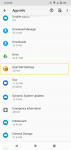
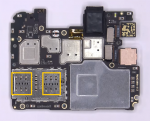
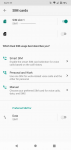
By the way, all the Moto E 2020s have 2 Sim Card slots, the North American ones have Dual SIM as well, but there is space for one SIM in the SIM tray. However, for SIM 2, IMEI is 0, and you might not be able to connect to all networks, as some prohibits IMEI 0 Phones. There is also the Dual Sim app, hidden, which shows dual SIM capabilities of the phone. Also, a picture of the motherboard found in a teardown video of a US Youtube channel confirms the North American Moto E 2020 phones are dual sim. (www youtube com/watch?v=Vn-hSHofawY)
Screenshot_20201002-182112.png Screenshot_20201002-182207.png sim1.PNG

No pit binary

Did this happen after flashing firmware in Odin?Otherwise, you may be looking at a hardware failure (motherboard). :(

You could try Frija to download the proper firmware for your Samsung J7sky pro. Afterwards, you'll have to extract the .PIT (Partition Information Table) along with the other four partitions and place then in Odin but I must warn that messing with the .pit is very risky. Certainly not something for the novice and in my opinion a method of last resort.


https://androidmore.com/extract-samsung-pit-file/

Portable apps on an android

There are portable apps that will run on a thumb drive with any kind of OS - Windows, Linux, iOS. Is there a portable app that will run on android? I would love to install a portable version of Firefox and a password vault on the mini-sd card in my phone. I know I could just try to install it, but I am afraid that failure might not be an indication that it is not possible :(

I presume you're referring to this?
https://portableapps.com/

That will only run on a Windows PC, and NOT Linux, MacOS, iOS, etc. I did try it myself for a while, but gave up because of viruses and worms on the school Windows PCs.

Whats this and whats it used for com.lge.launcher3

The REVVL line of phones from T-Mobile are their budget line. I couldn't find too much about who actually makes them so it's likely a "lowest-bidder" in China. The crashing launcher could be anything, but if Android 10 was recently installed, then I'd suspect something in the system cache that's either corrupt or incompatible. A factory reset should clear that up. If you are using a 3rd party launcher, it can easily crash on a the wrong phone. They can't test them all. If it is a launcher you installed, then try a different one. There are plenty of reliable, proven launchers available.

Gboard dictionary hasn't worked for over 3 years, any plans to fix it?

If you've having you are having a problem with this for three years, this would appear to be more of an issue with you need to address on your phone, as opposed to being 'something should fix'. (There do not appear to be any widespread online reports and articles stating this is common problem.)
Have you tried clearing the Gboard app cache? Also try long-pressing on the Space Bar, a 'Change Keyboard' dialog window should pop up, where you can add/delete different keyboards (English, Spanish, etc.) and a button to the Language settings menu.

Strange problem conecting to windows.

Hi peeps,

I have couple of windows PCs. Both have shared drives but for whatever reason I can only access one of them on Android. All the windows PCs on the network can access all the shares on all other PCs so there is at least basic sharing working. I have multiple phones and tablets and all are the same - they can access one PC but not the other. I have Kodi and Total commander installed - it's the same in both apps.

Strange thing is when I attempt to access the non working drive in total commander it seems to lookup a DNS of 92.242.132.16 which seems to be a public DNS server. I have no idea why it's trying to go to an external DNS as everything is on the same lan. Checking the share settings on both PCs they seem to be the same with a couple of exceptions.

The non working has a workgroup setting - the working one does not


Any ideas what could be causing this.

<edit - removed Hyper-v as I nave now removed fromnon working PC - no difference.>

Chronic memory problems

When you're viewing the Settings >> Storage menu, try tapping on 'Videos' and see if that shows any more details as to what video files are there. Do you have any kind of file manager app installed? A file manager app will be more useful in moving files and folders than just the Settings menu, and keep in mind the Gallery app is just a media file manager, with by-design limitations on what files it handles. An actual file manager is intended to be more comprehensive. Anyway, since you're down to just a few hundred MBs of internal storage, try installing this 'Explorer' file manager app:
https://play.google.com/store/apps/details?id=com.speedsoftware.explorer
It has a good feature set, a nice user friendly interface, and most importantly only has a 4.5MB install size.
Or this 'Ghost Commander' app is an alternative:
https://play.google.com/store/apps/details?id=com.ghostsq.commander
It's install size is only 1.5MB and it has a more extensive feature set but its user interface is more utilitarian.
There are plenty of other very viable choices (see the screen caps for each to find one to you liking) but do keep in mind until you can free up some storage space your options are limited.

Also, double-check your Settings >> Apps menu. There does seem to be a lot of apps there. And if you do find apps you've installed that you don't use any longer, don't just use the 'Uninstall' button to remove them, use 'Clear data' first, then Uninstall. This removes all of the apps settings/config files/support files.

Filter

Back
Top Bottom