• After 15+ years, we've made a big change: Android Forums is now Early Bird Club. Learn more here.

Fast Notepad files location on Chromebook

Hi.

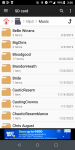
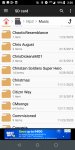
I found a thread about the location of the Fast Notepad files, but it didn't help me at all. I found some app files under Play files/android/data, and according to the thread I should find a folder named "com.taxaly.noteme.v2", but it's not there - I can identify the apps that all the folders belong to and fast notepad isn't one of them.

I have several notes on it so it has to be somewhere right? I have a Chromebook CB311-9H-C5KP (N17Q8). Where else could I look for them? I need to reset my chromebook to factory settings as it's being glitchy, so I would greatly appreciate any help I can get. I'm attaching a sreenshot of the folder although I don't see how it'll help - the "Color.Note" you see is for another notepad app called Color Note".

Thanks in advance!

Attachments

  • Screenshot 2022-11-26 14.57.44.png
    Screenshot 2022-11-26 14.57.44.png
    135.5 KB · Views: 235

Help Google account vs Samsung account backup?

Hello,

Does a Google Account backup contain everything in a Samsung Account backup?

Is doing a Google Account backup enough or do I need to do a Samsung Account backup too?

Does Google Account backup Samsung Notes app data?

If you restore from a Google Account to your new Samsung phone, are you able to restore Samsung Notes app data, settings like clock alarms, keyboard options (and full list of the data that Samsung Account will backup seen below)?

Thanks

-----
Info:
"Content types that can be backed up using Samsung Cloud
Note: Individual files over 1GB will not be uploaded.

Backing up your data is a little different than syncing. When you back up, you save your device's files to the cloud, so they can be redownloaded later. These files won't automatically appear on your other devices unless you manually restore them. Syncing, on the other hand, automatically adds updated information to a device.

Below are some apps on your phone or tablet that support the back up and restore feature. We've also listed what kinds of data will be backed up from these apps:

Call logs: Call and message history

Clock: Alarms, world clocks, and timers

Apps: Installation files and app settings

Calendar: Events and tasks saved on your phone or tablet

Messages: Enhanced messages, multimedia messages, and text messages

Contacts: Contacts, email addresses, and business cards saved on your phone, tablet, or USIM

Home screen: Layout, wallpapers, and Samsung DeX settings (your default wallpapers won't be backed up)

Settings: Accessibility settings, ringtones, Samsung Keyboard options, Wi-Fi settings, and Always on Display settings (your default ringtone won't be backed up)

Voice Recorder: Saved audio clips recorded using the Voice Recorder app

Samsung Daily: Your personalized content preferences and settings
Note: Samsung Daily is only available on select phones, such as the S8. Newer phones use Samsung Free instead; however, this service cannot be backed up." source Back up and restore data or files on your Galaxy device https://www.samsung.com/us/support/answer/ANS00060517/
-----
Info:
Back up and restore data or files on your Galaxy device https://www.samsung.com/us/support/answer/ANS00060517/
How to set up Google account on Samsung Mobile device? https://www.samsung.com/sg/support/...t-up-google-account-on-samsung-mobile-device/
How to set up and use the Google Accounts https://www.samsung.com/levant/support/mobile-devices/how-to-set-up-and-use-the-google-accounts/
How do I set up my Google account on my Samsung Galaxy device? https://www.samsung.com/ie/support/...y-google-account-on-my-samsung-galaxy-device/
How to create or remove the Google account on your Galaxy phone https://www.samsung.com/latin_en/su...move-the-google-account-on-your-galaxy-phone/
-----

Help What is wrong with connections

Hey there interweb helpers,

Newbie here. I have has issue with my phone for the past YEAR. Yes year and it is driving me nuts!!! Ever since I got the S21, my network connections have been just awful. Let me start off here....

I have an S21 on Verizon. I live in an area (even though I can look across the bay and see Seattle) that has horrible coverage for all carriers. I am kind of stuck with Verizon due to my where my wife works, they are the only ones to even get spotty service in some parts.

Well, since I am not out and about much, I am home most of the time....which btw has almost no service at the house. I figured I can just connect to my wifi at home and be able to use the phone like normal. WRONG!!!
Ya know, I got my WIFI calling on, connected to my home internet (which is really fast and a nice powerful router spreads it around the house). I can rarely take or make calls at home. Text messages struggle or even say "Cant connect to network" blah blah blah....Calls do not come through, texts wont come through, definitely can NOT text pictures from home.

Another thing is, this is not 100% of the time. Sometimes everything works just how it should, I would say a 50/50 shot at that.

Previously I had a Pixel 4xl and it had similar issues.

My wife's phone (S21+ultra) has no issues like mine. Her's works just how the phone should. I would really like to be able to have a phone that I can use when needed. I am sitting about 4 feet from my router right now with perfect wifi but can not even send a text. Someone please help :-)

Also the whole picture over wifi thing??? any knowledge on that?

google drive app

i have downloaded pdf files on my android device which i see by documents/download folders.
my google drive app where i also have pdf files is switched off. when i switch this app on ,
i see my android pdf files and pdf files from google drive all together in my android documents !my wish is not to see these g.drive files between my android files, just separately - android documents and g.drive app...
how can i do it?

Help How to prevent incoming interruption when transfer data?

I am going to use Samsung SmartSwitch to transfer from old phone (Note8) to new phone (A32). During the transfer process I do not want incoming calls/messages/whatsapp/app notifications... anything to disturb during the transfer process. (Intention is not to interrupt the transfer process or stuck or incomplete message).

What quick settings panel icons should I disable and enable? What else to do to prevent interruption and smooth transfer? Thanks

screenshot of Note8 quick settings panel icons: https://i.imgur.com/sXeqI0g.png https://i.imgur.com/U4bE324.png

Transparent notifications lockscreen and quick settings panel

Hi,

I have Android 11 Stable on my OnePlus 7 Pro. I don't have the rooted phone, nor do I want to. I would like to know if it is possible to have the notifications on the lock screen in semi-transparent cards. And equally apply it to the quick settings panel. This option that exists, for example, in Samsung devices, does not exist in OnePlus.

With the dark/light mode, logically, all I get is a dark or white background.

I don't know if it would be possible with Andromeda and Substratum. And if it were possible, with what theme would it be achieved?

Or in some other way.

Google device policy

Hello, good afternoon, I have problems with the Google device policy. When I start the section with the app, I create the work profile and then the app gives me a network error and in the notification bar I get the necessary action in the account, could you please help fix it

Attachments

  • IMG_20221124_142819.jpg
    IMG_20221124_142819.jpg
    464.8 KB · Views: 561
  • IMG_20221123_165816.jpg
    IMG_20221123_165816.jpg
    229.9 KB · Views: 152

Deleted wifi connection

Hi everybody. I'm using an android 10 phone. I deleted some wifi connections, now I need to restore one of them. Since random mac adress is activated, each time my phone gets a new mac adress when I connect to a wifi. I need to connect with my old mac adress which was created randomly. Is it possible to restore the connection or find the old mac adress for that connection. In other words, I can connect to wifi, there is no problem with that. My problem is, the old connection's mac address had priority. I was able to use internet without limitations, now new connection has a new mac addres and I have no priority. No I cant get privillage to my new mac address, no I dont have access to modem's settings if I could, I would define my new mac address as privillage.Thank you all.

Help Can't move apps to SD card

I've been following the instructions for moving apps to the SD card to free up space, but there are no options for changing storage location. Not grayed out -- there are no options at all. I tried a third party app that took me to the same screens, so no help there, but it did identify 10 apps as movable. My SD card seems to be working normally. I can move photos to there, but they don't take up much space.

Most of the used internal storage is the Android system and the apps (about 6-7 GB each). Clearing the caches and user data helps get a bit of space, but not much.

Moto e5 Play, Android 8.0.0, 16GB internal, 16GB SD card

Help How to backup Samsung Notes?

Q1. How to backup Samsung Notes app data to PC? (phone is faulty unstable dying soon, need to backup to PC first then restore backup to new phone)

Q2. Does Google account backup Samsung Notes app data to Google account by default?

Q3. How to set Google account to backup Samsung Notes?

I do not use Samsung Cloud, I only found guides that backup Samsung notes to Samsung cloud. e.g. https://www.samsung.com/za/support/...d-device-to-a-new-device-using-samsung-cloud/

Thanks.

Help Go to date calendar feature

Just got my first samsung phone, always had LG smartphones, last one a V40. Every calendar app on LG had a go-to-date feature which made going to a specific date easy and quick. Not present on the stock calendar on the S21 nor in google calendar. Such an obvious feature to include. Does anyone know of a calendar app which has this feature?

Recover Data from Several Android Phones with broken screens

I was in Spain doing an extended hike over 2 months. During that time I m managed to break 4 phones. They appear to be damaged primarily on the display as they all seem to work to some degree e.g. alarms come on when they are powered. Unfotrtunately none of them are set to Android remote control as I bought them while hiking and did not have the time to set this up. They have never been on my home network or had a sim card from my country. I was hoping to use a USB hub with HDMI to access them using an external mouse, keyboard and monitor, but I tried this on one and nothing much happened. What can I do? The devices include a Huawei P20 Pro, and Redmi Note 10C, a cheap Realme phone. All were Android. Thanks

32 or 64 Micro Sd card

I purchased a onn. 32gb micro sd card for phone storage from walmart for 7.98$ and a 64gb micro sd card sandisk for 11.99$

It says the sandisk 64gb is150 mb/s and the onn. 32gb is 100mb/s.

Which one is better to use?

Its for saving photos, videos on my g power 2021 3gb 32gb.

It says sandisk is number 1 selling brand for micro sd cards and ultra plus micro SDCX UHS-1 for better pictures and full hd video.

Im not sure what the CX UHS-1 is means vs the keep onn. microSDHC full hd video.

Does it look like the 32gb says "Full HD video" will be just as good as the 64gb sandisk which also says full hd video.

What do yall guys use? I attached a photo of both products which is better to use?

I really only need one which one is the better one to use i can return the other one.

I think 32gb is enough but you never know 64gb videos may be long.

The thing is my old quest 5 use to take 400kb pictures im sure and this g power 2021 takes bigger pictures in the mb 2-3mb 1.5mb stuff of that sort better quality videos.

Can you guys direct me in the right direction the sandisk or 32gb micro sd card for my g power 2021.

Attachments

  • IMG_20221123_153140007.jpg
    IMG_20221123_153140007.jpg
    649.5 KB · Views: 251
  • microsdcard (2).jpg
    microsdcard (2).jpg
    677.3 KB · Views: 163
  • microsdcard (3).jpg
    microsdcard (3).jpg
    449.4 KB · Views: 143

Unlock phone options

I have found that you can set either a pin or a password or a pattern to unlock phone. You can also set Fingerprint unlock. If the fingerprint does not work (as is often the case) it defaults back to whatever (pin, password or pattern) you have assigned.

Now, for a number of reasons, I am reluctant to use fingerprint unlock. I logically assumed that I could set up both a pin and a pattern and if the pattern failed for some reason, it would default back to the pin. It seems that this is not possible so if the pattern doesn't work, you have to go through an elaborate process to reset unlock method.

My question is: Is it possible to set up a pin and a pattern at the same time and use either to unlock phone or use pin if the pattern fails?

Filter

Back
Top Bottom