• After 15+ years, we've made a big change: Android Forums is now Early Bird Club. Learn more here.

Drop Number Game 2048 - Merge Number Puzzle

Drop Number Game 2048: Merge Numbers 2048 Puzzle is a new brain-training puzzle game that will keep you entertained for hours and help you lighten the tension. So, let's not confine ourselves to the square tile of origin as a starting point!

Drop Numbers Game 2048 is an amazing number merge block drop puzzle game.
Focus on the number drop from the block stack and combine the same numbers. You must combine numbers, match numbers, and merge blocks to obtain higher numbers, such as make 2048 or even greater in this 2048 tile puzzle game.

Tap, drop, and combine colorful drop numbers blocks of the same number to score high!
You get fun, colorful block numbers.
So, 1024 becomes 2048, which then becomes 4096, which then becomes infinite. The more you combine, the higher your score! The difficulty grows steadily as the number of bricks increases in size.

It is possible to utilize a boost item to preview the next incoming block if it is too difficult to solve!

If you're used to solving block puzzles, you'll have no trouble playing the Drop Number block Game 2048 - Merge Number Puzzle !!

Number Drop Game 2048 - Merge Number Puzzle is one of the popular number games that are both free and entertaining. It aids in thinking and brain training.


Drop Number 2048 Online Game - Merge Number Puzzle games are for you if you enjoy arithmetic & maths number drop games, 2048 logic puzzle games, or addicting number block puzzle games.

How to play 2048 Drop Number Game:
A slide or a touch on the block will do.
If you slide your hand down to accelerate the block, the block will automatically fall from the top.
When two identical blocks intersect, their numbers are immediately added together.
The higher your merging number, the more points you will receive! Get bigger numbered blocks and earn higher points!
With boosters like Hammer and Color Hammer tools, you can increase your score.
Can see the next block with coins.
Can get one higher point block initial to get more points

Features:
This game is completely free to play.
This Drop number 2048 game online is also available.
Visual effects are more comfortable with the simplicity of the user interface, which is new and simple.
"Classic and creative blend of traditional blocks and classic 2048 games, new gameplay based on a drop."
There is a double difficulty in terms of vision and hand quickness. It's easy to learn but difficult to master.
You can challenge yourself to the highest record at any time.

Feedbacks
In particular, you'll become addicted to the game when the difficulty level steadily grows with huge numbered blocks.
In addition, this game is perfect for those choosing a number game to play 2048 online, Number tiles match games, and filling and sorting activities.

Can play Drop Number Game offline too. Come and play Drop Number merge puzzle Game 2048 - 2048 drop number puzzle is easy to learn and tough to master! Merge Number Puzzle and become a Merge Number Puzzle game champion now! Have fun with casual games!


COLLAPSE
Attachments

  • 512_Drop_no.png
    512_Drop_no.png
    227.3 KB · Views: 405

im looking for a app that looks and feels like opening and using different windows on a pc

hey guys, so im doing reaction videos on my android 11 phone, and i have the ability to activate free floating windows, but the issue is that once they are closed out, the size and position will doesn't stay set.
what id love to save have is a app that can easily switch between windows and save the size and position, so even if the phone is reset the apps can be opend and immediately go where i want them to go.

I've tried several apps but haven't gotten anywhere, I've tried probably the most popular app but i don't think it can float any app that i have installed, it looks like it just has basic apps, but i want to float any installed app on my phone.

even if I need to pay for a qpp that's fine, as long is it Will do what i need it to

Erratic altitude profile on GPS tracking

Happy New Year to all. I use my phone to track my hikes. I normally use flight mode to conserve battery life and this works well. However I find that if I switch flight mode off, apart from using more battery, the altitude profile becomes wildly erratic. This is is best shown by the accompanying profile where I turned flight mode off half way through the hike, at the summit, to make a call and accidentally left it off for the return route, which was mostly along the same track (through forest).
Profile.jpg
You can see the difference. This is a consistent finding in many different locations using two different android phones (both Motorola Moto G series) and several different apps (Oziexplorer, ViewRanger, MayMyFitness, Endomondo). If I turn off data and Wifi it is no better. If I turn off High Accuracy in the phone's GPS settings, it is no better. Does anyone know why this occurs and how I can prevent it so I can leave my phone's network on while hiking if I need to for some reason? Thanks for any help.

Two Older Android Phones I've been asked to recover

A friend of mine gave me her two (older) Android phones -- one is flaky, the other I don't know but they both boot. She is not tech savvy - and asked me to recover photos, contacts, texts, etc. I am not familiar with this platform, as I use another company's phone (grin), but I work in IT/tech, so I can figure it out with the right guidance.

The phones are an LG and a UMX. There are no model numbers on the device that I can see.

My assumption is that to access all this data without passwords/codes whatever she had, I would need to root it first. I am not clear whether there are other means.

In any case, I would appreciate some guidance so I can get the task done.

galaxy a21 question

i jsut got the galaxy a21 from tracfone because they told me my lg k20 was going offline in February. anyway, i managed to get the apps installed but i need to figure out how to get the greenify app to get the shortcut onthe home pages? when i go into the settings and tell it to create a hibernation shortcut it tells me it put one in the launcher one-click but i do not see it in the apps or on any home pages so where is the one-click launcher located? i found the app launcher and game launcher but they do nto seem to be working for the greenify shortcut i made.

thanks

button press when phone is locked

Have a verizon galaxy s20 fe 5g phone. When locked I can use a fingerprint, password else camera to unlock it. I put my locked phone in my pocket then during a doggie walk the darn display is doing things...like pressing number on the phone dial screen.

If phone is locked when inserted in pocket why then later does it seem to be reacting to my side pants pocket press against it and the phone unlocking itself and doing things? Guess a slight change it is seeing my face when placing it in a pocket was not thinking so.
thank you and a safe and happy new year everyone

Microwave disappearing in puff of smoke

Yes, it's an exaggeration, but not by much. Yesterday I was cleaning the counter under where that oven had been. Unfortunately, I did not realize a burner was on, which might have had something to do with that slight popping sound. Then I noticed that a nearby outlet, but not the microwave one, had a red light switched on suddenly. I unplugged the thing (yeah, I should have earlier) and left it off the rest of the day and night. Just recently I plugged it back in the outlet (no dice), the other part of the outlet (no), and another outlet (still not). Finally I got really stupid and tried it in one more outlet, next to the red one. There was a nasty noise and a bit of smoke, along with a dark scorch mark (?) that I was thank goodness able to scrub off easily. I assume the microwave is toast, though I sure would love to get it repaired. I bought it for $25 at a yard sale earlier this year and it works (worked) great. What do I do about the outlets and such? I suppose that will take a professional electrician.

A hot cereal from the 1970s?

In the mid-'70s, there was a hot cereal that I'd eat every single day; I LOVED it. It was kind of granola-ish, but not really. I remember it had coconut, dates(?) or raisins, and it came in the same type of packets today's hot cereals do, i.e., a 10- or 12-pack box of individual bags; you'd add hot water to the contents of a bag--or two, in my case, I liked it so much!--stir it up, add a pat of butter and eat.

For the life of me, I cannot recall its name! And it's been driving me crazy (crazier?) for ages! I've tried searching Wikipedia, Google, blogs devoted to cereal through the decades, etc., but I've come up empty.

The words 'harvest' and 'morning' always come to mind when I think of it, but that may or may not mean anything.

Can anyone either tell me from personal memory what this was, or point me to a way to figure it out? It definitely was *not* a child-targeted cereal, you know, like "Super-Duper Sugary Blinkos!" or anything like that; it was a 'wholesome' adult-oriented cereal, but kids loved it, too.

Using GIT to get remote code

I do not know from the online tutorial if I am properly establishing a connection with a git repository that is on a network.

All I have learned from a tutorial is how to set up a local repository, but getting data off of a network repository is knowledge I have yet to stumble upon or learn about and I wanted to save time by asking some online help forums.

I have just started using git after not using it for a while.
I have created a repository.
Then, as I was instructed, I made a “git clone” command which consisted of “git clone” followed by a path.
I expected this to get the contents of the path and put it into my repository – meaning the directory I made. This did not happen. What do I do?
How do I get a local copy of a remote work space for me to work on?

I am wondering if there is something like a "fetch" command I should be using.

The video tutorial I was looking at instructed how to make a local repository. But if I am trying to get code from a network location, how do I go about making that happen?

I was instructed at my job to run this command (copied here in pseudo code)

git clone blah-blah:/blah/git/noogie/dork_monkey/

and when I did this grom git-bash it did not produce any errors which led me to think it was the command I needed to do.

But I did this from the local directory that I used

git init

to set up as a local repository.

I assumed that typiing a "git clone..." command would have copied all of the files on the blah-blah server over.

But it did not.

I wonder if all this might have something to do with the fact that I need to get my network up and running first.

In my File File Explorer window, when I click on the "This PC" icon on the left, I can see I have five Network locationis mapped to drive letters.

But when I click on the Network icon I get an error.

Which One?

Have been using almost four years the LG K20 Plus. No issues with but I am to understand LG is not making smartphones anymore. I also have saved my ZMAX Pro (Z981). Question is which h do you thing is the better phone? I know it has better resolution but is there anything else I am missing? Metro is my provider.

Awesome gift, less awesome sequelae

I was given an Ascent small quadcopter. It looks pretty cool and fun. After I went through hell extracting it from its packaging, I found out that it's "supposed" to be charged by COMPUTER usb only, which is great because I don't have one. Is this for real? I had never heard of such a thing. Maybe the company is involved in manufacturing computers, chips, or something that way. Of course, I guess that gives me yet another reason to rush out and buy one.

MFAuth - 2FA Auth + Cloud Sync

MFAuth is a free and secure application that offers 2-step verification for managing your online accounts and services, thus helping to protect your accounts from hackers. The app brings together best-in-class security practices and seamless user experience and can work in both online and offline modes.

This app generates one-time tokens on your device which are used in combination with your password. Just enable the two-factor authentication in your account settings for your provider, scan the QR code provided and you're good to go!

Features:
* Generate verification codes without an internet.
* Add accounts via QR code, image, etc.
* Works with many providers and accounts like Google, Amazon, Twitch, etc.
* Personalise icons, labels, light and dark themes etc.
* Support for 8 different languages.
* Biometric security available.
* Auto-backup options with MFAuth or Google cloud services.
* MFAuth web platform to quickly see your OTP codes on browsers. Works with Chrome, Firefox, Safari and all other major browsers.

Cloud Sync (Premium)
Never lose your codes again! With Cloud Sync, you can easily backup your 2FA accounts to your own Google Drive or the MFAuth cloud server. Using the Cloud sync feature, you can easily restore recently changed data with ease.

MFAuth Web - Browser Version (Premium)
2FA on the desktop is now easier than ever before! You can easily log into your MFAuth account from your favourite browser and access your codes. No need to manually type in the codes again.

Multi-platform support
MFAuth authenticator syncs seamlessly across any device that can run a browser. You can use MFAuth web platform for easily access your codes.

Multiple ways to add Accounts
For your convenience, you can either use QR Code or add an account manually by entering your secret key.

Backup with Auto Sync
Never lose your codes again! With Auto Sync on, you can easily backup your 2FA accounts to your own Local Storage. This keeps you in total control of your data while providing effective backup and you can easily restore recently changed data with ease.

Dark Theme
Now enjoy the dark mode in the app. Easily change between the light and dark mode in the app.

Multiple widgets
With MFAuth Authenticator, you can easily add multiple widgets for your favourite accounts on the home screen for quick access. These widgets come in multiple layouts, so you can choose whichever suits you the best. With high level of customizations, you can easily choose to require additional security to access the accounts from your widgets.

Multiple language support
Experience the app in a more intuitive way by using it in your language. The app comes with the support of 8 languages. Don't see your language in the app? Reach out.

Personalization
The app allows you to set unique icons to your accounts, either by selecting icons from the provided list or by uploading them. This helps you to easily recognize and sort your accounts. You can also choose from 2 different modes design modes to show your accounts.

Organize via Labels
With the inbuilt labels (and the ability to add new ones), you can easily group and manage a large number of accounts. The inbuilt search feature helps to find any account in seconds.

Biometric security
Protect your accounts by using biometrics (Fingerprint). This helps protect your codes from prying eyes or in case someone gets access to your phone. You can also block screen capture via screenshots and other methods.

Compatibility
MFA supports the HOTP and TOTP algorithms. These two algorithms are industry-standard and widely supported, making MFA compatible with thousands of services. Any web service that supports Google Authenticator will also work with MFA.

Permissions:
Camera permission is needed to add accounts using QR codes.

Download MFAuth on Google Play: https://play.google.com/store/apps/details?id=in.atozappz.mfauth

Help Laggy UI after clean flashing ROM

Hi there, Merry Christmas to y'all everywhere( We don't have Christmas here in my country, anyway.
Ok. Here we go:
I wanted to give my Mi A2 to someone else( completely working and smooth like it should be, has AICP Rom for long time), since that person doesn't like totally vanilla ROM, I decided to flash a more feature packed ROM on mi a2(in this case Pixel Experience), I do this, clean flash,following the usual procedure since I'm used to flashing ROM and stuff

after booting up, everything is sluggish and laggy, even in Phone Setup Wizard, started using phone, setup the apps needed, still laggy and sluggish.. Until that person starts complaining that phone is seriously slow, I say "OK, maybe I did something wrong or maybe this ROM has problems that I'm not aware of" I flash another ROM (Lineage OS), I do the previous stuff, still sluggish, just like previous ROM, exactly same scenario, it doesn't even matter if I have installed apps or just flashed phone, still lags.
Frustrated, why A2 became like this? Did it hit number of flashing rom attempts?(LOL, such thing exists? Flashing cant slow down the phone unless that ROM has problems) decided to go back to stock ROM, successfully flahed stock, boot up, still sluggish and laggy.. I don't know wth is going on...
My mind is racing:
"what is happening?"
"The phone was just fine when on AICP, after flashing, what happned?"
"Is it my fault? "
"Should I have just used factory reset instead of flashing ROM?"
Guys, there is something wrong
,will update the post with logcat and recording if needed and I have the time to do it. Feel free to ask questions.
TIA

OTG FAT32 format

Hello,

From time to time, I need to format large sdcards in Fat32 (200gb, 400gb...) to use them with different small electronic devices.
These devices can only format SD cards up to 64gb but work well with larger Fat32 preformatted SD cards.
Until now, I have been using a Windows 10 computer to format the SD cards in Fat32.
I am trying to avoid computers (PCs and Macs) so I am looking for an only-Android solution to format large SD cards in Fat32.
I have a OTG SD card dongle to read/write external SD cards.
How can I use Android and its OTG capabilities to format large SD cards in Fat32.
I can't find the option neither in the Android settings, or any APP.

Is there a way to do so?

Thank you for your help.

[DEC/31/21] BUKK DECEMBER update U.S.A.

Just released for U.S. S21 devices is update, BUKK.

This is showing a December 2021 Android Security patch

The models to receive it so far are G99*U1 carrier unlocked devices.

Rolled out, so far, to the following CSC codes...
  • USA (CCT) Xfinity Mobile (Comcast)
  • USA (USC) USA
  • USA (VZW) Verizon
  • USA (CHA) Spectrum Mobile (Charter)
Build number = G99*U1UES4BUKK

Build date = 21 December???

Android Security patch = December 2021

The, "K", designation indicates a November update as all December update builds are, "L".

Strange that Verizon, G99*U, are pushing out a later, December, BULC build. See...

https://forums.androidcentral.com/showthread.php?t=1036784&p=7020665&viewfull=1#post7020665

[DEC/31/21] BUKK DECEMBER update U.S.A.

Just released for U.S. S21 devices is update, BUKK.

This is showing a December 2021 Android Security patch

The models to receive it so far are G99*U1 carrier unlocked devices.

Rolled out, so far, to the following CSC codes...
  • USA (CCT) Xfinity Mobile (Comcast)
  • USA (USC) USA
  • USA (VZW) Verizon
  • USA (CHA) Spectrum Mobile (Charter)
Build number = G99*U1UES4BUKK

Build date = 21 December???

Android Security patch = December 2021

The, "K", designation indicates a November update as all December update builds are, "L".

Strange that Verizon, G99*U, are pushing out a later, December, BULC build. See...

https://forums.androidcentral.com/showthread.php?t=1036784&p=7020665&viewfull=1#post7020665

[DEC/31/21] BUKK DECEMBER update U.S.A.

Just released for U.S. S21 devices is update, BUKK.

This is showing a December 2021 Android Security patch

The models to receive it so far are G99*U1 carrier unlocked devices.

Rolled out, so far, to the following CSC codes...
  • USA (CCT) Xfinity Mobile (Comcast)
  • USA (USC) USA
  • USA (VZW) Verizon
  • USA (CHA) Spectrum Mobile (Charter)
Build number = G99*U1UES4BUKK

Build date = 21 December???

Android Security patch = December 2021

The, "K", designation indicates a November update as all December update builds are, "L".

Strange that Verizon, G99*U, are pushing out a later, December, BULC build. See...

https://forums.androidcentral.com/showthread.php?t=1036784&p=7020665&viewfull=1#post7020665

im looking for a interactive lyrics app

hey guys, im for a app that would have scrollable lyrics and the ability to click on certain words that i don't understand and get definitions and sentences, it would need to have a large variety of lyrics and word definitions, because this would be used for reaction videos, so i can do full breakdowns of songs easier, also if it also explained the meaning behind the songs that would be great

[GAME] New Year Postcard

Google Play: NewYear Postcard

Genre: Puzzle.

Description:

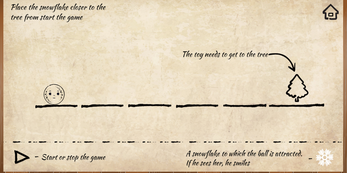
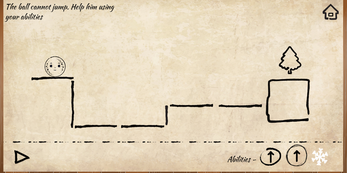
Indirect control puzzle platformer. You need to help the Christmas tree decorations get to the New Year tree. To create a New Year postcard and save it on your device!

Advertising in the game: You can see that an advertisement has been added to the Android version of the game, but you can only see it if you want to (the “Say ”Thank you" button). There will be no banners or before/during/after the level.


PqIyDB.png
ZEb0b9.png


Have a good game! =)

340106d1640849948-game-free-new-year-postcard-icon_256-2.png

Moto G Stylus (2021) - where's the stereo?

I'm sure I'm not the only one that upgraded to a new Motorola phone and discovered after-the-fact that they nixed the stereo speakers in all the new models
sad.png
I was especially angry because the "Motorola Moto G Stylus" is listed everywhere as having stereo sound, but the 2021 version does not.
After it was delivered, my carrier and Motorola both basically told me thanks for your money, get lost.

The speaker on the 2021 is okay, though I had a Motorola Moto G 2nd Gen for almost a decade and was always proud of the fact that it had stereo, and certainly wanted it with the upgraded phone.
Aside from feeling I was deceived.... the speaker works except in games like Jackpot, where the sound most definitely only comes from one side of the phone, and it just ruins the experience.
Also I sometimes have trouble hearing people in the car using the phone on speaker, which is required by law in my state.

I'm intrigued by one thing though- the 2nd earpiece speaker already on the Motorola, even in the 2021. Why can't that be turned on too, so they both play? Surely that would make a difference, not true stereo like the older Motorola phones... but at least enough so some games don't sound so one-sided.

I believe people are calling the concept "Dolby Atmos Surround Sound", per an app I can't find a way to install......turning on the earpiece ALSO when playing videos and games.
There are YouTube walkthroughs for doing this on a number of mono speaker phone models (Galaxy Note 3, Galaxy S8, OnePlus6) but nothing anywhere for Motorola.
There are apps to turn on just the earpiece, or the main speaker, but nothing to do both.
Is there any way to manage this programatically?
BUT SURELY!

Filter

Back
Top Bottom