• After 15+ years, we've made a big change: Android Forums is now Early Bird Club. Learn more here.

Android tablet forgets settings

Hi. Go a new tablet Lenova M10. Try connecting it to my computer.
Go to settings, Search USB, Select Use USB for. Chhose File transfer. am now connected until.........
I re start my tablet and bacj to square one. I bought a cheeper tablet called an ALBA. Had the same problem. Got reid of it and I still have the same problem.

I don't have any proble with my mobile phones (2 of them and my camcorder.

HELP anyone?

Help Using External Mic with Note 10+

I have an event coming up that I will be recording with the Note 10+ video camera. It's outside... so I purchased an external microphone to put on the podium, running a cable to the Note 10+ on a tripod.

After trying just the mic and cable, I got nothing. I did a YouTube search and learned that I needed an adapter with a built-in DAC like this one.

NO SOUND!

Does anyone here know what I'm doing wrong? Thank you!

Should I have these settings on or off?

Hi all,
I am not real tech savvy. I just upgraded from a Samsung Galaxy S5 to an S8 plus (yes I know I'm behind the times) and there's 3 settings on my new phone that I'm not sure about on the pull down menu. I've Googled and I'm still lost. So, do I want mobile data, NFC, and wi-fi calling on or off? I don't know if it matters but the majority of the time I'm at home and connect to my home wi-fi, although I do sometimes access apps when I'm out and about, but I NEVER use all my paid data. I also have unlimited talk and text. It would be greatly appreciated if someone could tell me if these 3 things are needed or not on my phone.

How do you get rid of all that bloatware?

I have searched for answers. Several say a change has to be made in Device Administrators under Security. I do not see anything like device administrators and I have so many apps taking up space. I know you can disable them but they are still taking up space. Several, the Disable button is greyed out so that you cannot disable them? What the heck? Why are buyers made to accept these they do not want.

Is there any help here? Thanks! ":-Dx jack

[GAME] Quarter Monkey, New Multiplayer Trivia Game Challenge your friends!

Hello Guys

Just Released a revamped version of Quarter Monkey 1.1.0 on Google Play Store, it's a trivia game where you challenge people in different Categories

Starting with our first category as World Countries, and waiting for your suggestions for next categories.


Google Play Link

Quarter Monkey


artboard-1-png.5301349


Features

  • Play as guest and save your progress without any need to register

  • Register to gain access to store and profile

  • Create and join public or private rooms

  • play with friends, real people or intelligent bots

  • Buy Special characters when you play more
If you have any ideas for future categories, updates, features or if you found any bug/mistake please let us know! we really appreciate users feedback

Email: apes@apessmartsolutions.com


Screenshots

post-special-png.5301351


simulator-screen-shot-iphone-se-2nd-generation-2021-05-02-at-16-30-33-png.5301353


simulator-screen-shot-iphone-se-2nd-generation-2021-05-02-at-16-31-55-png.5301355


simulator-screen-shot-iphone-12-pro-2021-05-05-at-00-24-26-png.5301357


post-png.5301359

AUE1 BIG update for Global, Exynos, S21 series, camera, bugfixes & May security patch

It looks as though Samsung has pulled the previous AUDA update for reasons known only to themselves at the moment. After a hesitant roll-out to 7 countries it has been dropped for this new release. A pity really as I found the AUDA firmware to be pretty good. The changelist for AUDA and the new AUE1 are identical, 21556388.

This latest update is the 10th for the Global, Exynos, S21 series and is currently being rolled out by Samsung.

This big 1.1GB update is for camera, general bugfixes and May security patch.

Initially, as always, this is rolling out to the non-carrier branded, stock Samsung CSC codes first.

The Galaxy S21 Global, Exynos, devices that will receive this update are...
  • S21 5G model SM-G991B
  • S21+ 5G model SM-G996B
  • S21 Ultra 5G model SM-G998B
This latest release replaces the G99*BXXU2AUC8/G99*BXXU3AUDA March/April builds.

It is a FOTA, (Firmware Over The Air), update and you can check... Settings > Software update... to see if it is available for you.

Changelog

    • Performance of camera has been improved
    • Enhanced QuickShare
    • The security of your device has been improved
    • After updating, you will not be able to downgrade to the old software because of updates to the security policy

The update = G99*BXXU3AUE1

Download = 1149.41 MB (TBC)

Build date = 01 May 2021

Release date = 06 May 2021

Camera version = 11.0.02.96

One UI version = 3.1

Android Security patch = May 2021

This is the 10th stable update in 98 days. Average = 1 update every 10 days.

(N.B. This post will be updated as more information becomes available)

AUE1 BIG update for Global, Exynos, S21 series, camera, bugfixes & May security patch

It looks as though Samsung has pulled the previous AUDA update for reasons known only to themselves at the moment. After a hesitant roll-out to 7 countries it has been dropped for this new release. A pity really as I found the AUDA firmware to be pretty good. The changelist for AUDA and the new AUE1 are identical, 21556388.

This latest update is the 10th for the Global, Exynos, S21 series and is currently being rolled out by Samsung.

This big 1.1GB update is for camera, general bugfixes and May security patch.

Initially, as always, this is rolling out to the non-carrier branded, stock Samsung CSC codes first.

The Galaxy S21 Global, Exynos, devices that will receive this update are...
  • S21 5G model SM-G991B
  • S21+ 5G model SM-G996B
  • S21 Ultra 5G model SM-G998B
This latest release replaces the G99*BXXU2AUC8/G99*BXXU3AUDA March/April builds.

It is a FOTA, (Firmware Over The Air), update and you can check... Settings > Software update... to see if it is available for you.

Changelog

    • Performance of camera has been improved
    • Enhanced QuickShare
    • The security of your device has been improved
    • After updating, you will not be able to downgrade to the old software because of updates to the security policy

The update = G99*BXXU3AUE1

Download = 1149.41 MB (TBC)

Build date = 01 May 2021

Release date = 06 May 2021

Camera version = 11.0.02.96

One UI version = 3.1

Android Security patch = May 2021

This is the 10th stable update in 98 days. Average = 1 update every 10 days.

(N.B. This post will be updated as more information becomes available)

AUE1 BIG update for Global, Exynos, S21 series, camera, bugfixes & May security patch

It looks as though Samsung has pulled the previous AUDA update for reasons known only to themselves at the moment. After a hesitant roll-out to 7 countries it has been dropped for this new release. A pity really as I found the AUDA firmware to be pretty good. The changelist for AUDA and the new AUE1 are identical, 21556388.

This latest update is the 10th for the Global, Exynos, S21 series and is currently being rolled out by Samsung.

This big 1.1GB update is for camera, general bugfixes and May security patch.

Initially, as always, this is rolling out to the non-carrier branded, stock Samsung CSC codes first.

The Galaxy S21 Global, Exynos, devices that will receive this update are...
  • S21 5G model SM-G991B
  • S21+ 5G model SM-G996B
  • S21 Ultra 5G model SM-G998B
This latest release replaces the G99*BXXU2AUC8/G99*BXXU3AUDA March/April builds.

It is a FOTA, (Firmware Over The Air), update and you can check... Settings > Software update... to see if it is available for you.

Changelog


    • Performance of camera has been improved
    • Enhanced QuickShare
    • The security of your device has been improved
    • After updating, you will not be able to downgrade to the old software because of updates to the security policy
The update = G99*BXXU3AUE1

Download = 1149.41 MB (TBC)

Build date = 01 May 2021

Release date = 06 May 2021

Camera version = 11.0.02.96

One UI version = 3.1

Android Security patch = May 2021

This is the 10th stable update in 98 days. Average = 1 update every 10 days.

(N.B. This post will be updated as more information becomes available)

How can I connect my WiFi enabled adaptor?

I have purchased an instrument-to-smartphone/tablet adaptor that is reported to use WiFi to do things like transfer items (MIDI Files) between an instrument and smart devices (phones, tablets). I have successfully installed the adaptor onto my router and it shows in the GUI list of recognized devices. I'll admit to not being very proficient with networking so maybe there's something simple that I'm missing.

Documentation for the adaptor covers only installation onto LAN, which I've done. I'm thinking that if I can "see" the adaptor on any of my "smart" devices (I have both Android and IOS) maybe I can click on it to see and copy data.

My e.g., tablet only shows the network name that I'm using for WiFi

Huawei t1 8.0 pro Rooting help

Hi there I have a tablet which is a few years old now and not 100 per cent sure but think they come with a locked bootloader ive tried versions of king root even pc version its a Huawei T1 8.0 pro build.number T1 821LV100R001C238B003 is there any way of rooting this device. Is still has Android 4.4.4 any help with this thanks

Where are my contacts stored?

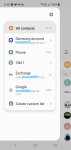
Looking at this screen from the contacts app I am now confused as to where my contacts are stored.

It seems to say that I have 2,127 contacts - then says 'phone' 1,427, Exhange 10, google 1,453. - that totals 2,890.

I thought I had saved all my contacts to my google account - so where have the 'phone' ones come from? and, how do I copy them across to Google? can someone please explain this to me!

InkedScreenshot_20210505-204833_Contacts_LI.jpg

Camera Tips and Manual for Galaxy S7 Active ?

__First a quick question:
How to avoid taking burst shots instead of pics, on Galaxy S7 Active?
I only know to point and shoot, to take pics, but even while doing that I keep taking burst shots without wanting to, when using the back camera, by mistake. I don't even know how this happens, please help!

__I also see that there are many modes and settings using the back camera, I would really like to be able to learn how to use them!
Is there an original or 3rd party Manual that covers in detail photography tips on the Galaxy S7 Active camera?
Or a focus group, blog, etc., devoted to photography on the Galaxy S7 Active ?
Thanks!

Long time coming...about @tommo47

I know some of you have wondered whatever happened to member @tommo47, and I felt like it's time to make it official. To the best of my knowledge, he died.

We were engaged in multiple times daily PMs for months. We shared personal information that we wouldn't want made public, and I have to be mindful of that as I choose my words.

The last I heard from him was on August 20th, just another, regular, daily PM, nothing to worry about. He finished it by asking me a question. I replied, and then heard nothing. I waited a couple of days, knowing he was ill, and tried again. Nothing.

As he posted in his thread, he had been diagnosed with, and was being treated for, esophageal cancer. This is where it gets tricky not to violate his trust. He had been given a very bad prognosis, but had assured me that he and his wife were dealing with it, and that he had no plans to give up on life. Then everything stopped.

Over the months I've tried contacting various places where he lives (in the UK), places he had mentioned in our PMs, like the hospital that was treating him and its associated nutritionists who were going to his house. I've come up empty. I understand medical privacy laws and everything, but I've also contacted shops that may have worked on his 'rig'--his prized Triumph motorcycle with the Watsonian sidecar, which was delivered on July 12, the day before his birthday. Empty there, too. I've searched obituaries and death notices but have not found anything there either.

My guess, and this is purely a guess, is that he died unexpectedly and unrelated to his cancer. Perhaps a heart attack or something like that. He absolutely was doing okay given the circumstances, and was super excited to have the rig he had dreamed about for years. He was looking forward....

I'd give a million dollars to be proven wrong. Nothing would please me more than to have tommo pop in and say, "how dare you declare me dead?!" But I don't think that's going to happen. :(

Unknown notification sound with out banner

I'm using Samsung Note 8, I'm getting unknown notification sound from my phone but no visible notification, popups or banner from any of the applications. This sound is not even in my notification sound list. Very annoying sound like Tu Tu Tu....
I disabled all notification sounds, put in Do not Disturb mode, still sound comes. There is no sound when I switch off wifi or data. I installed several system notification log apps... in that also not showing.
I disabled notification reminder, disabled NFC. This is not related to NFC this sounds even it is alone in bed or table.
I don't remember when it started.. may be 6 to 7 months... still it is there.

Please help...

Distribute app privately to specific clients/organizations

I have a Google Play Console developer account and want to distribute an app to specific companies/clients privately.

What I'm not 100% sure about is what type of Google Play account the clients need, as I need to collect their organization IDs to share the app with them. Do they also need to set up a Developer Account so I can share the app privately with them?

Filter

Back
Top Bottom