• After 15+ years, we've made a big change: Android Forums is now Early Bird Club. Learn more here.

Root [ROM]MIUI.us DefyX 1.10.7

Flashed this over 1.9.30 and just did a wipe. Everything went fine.

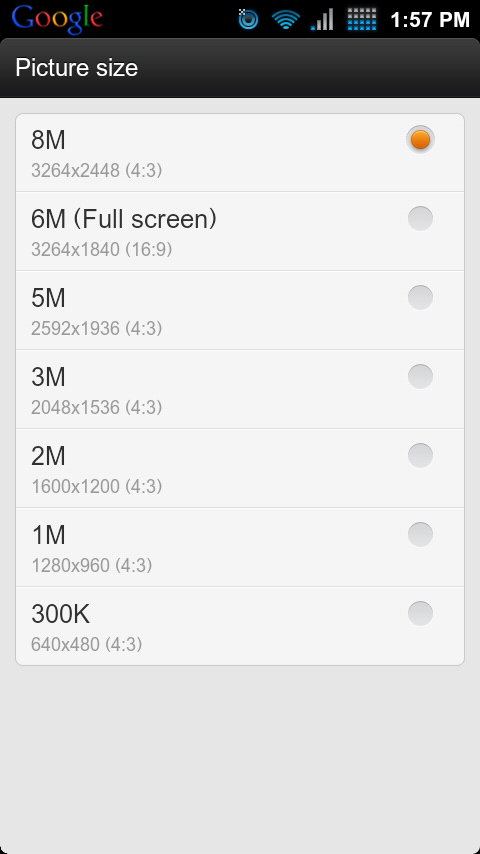
camera is working in 8MP mode fine. No force closes yet.

I'll keep you guys updated
 
shot_000001.png
 
Flashed over 1.9.30 and I'm getting FC whenever I try to load any of my contacts.

Can I just re-flash 1.9.30, or will I need to SBF?

Also, if I want to try out CM7.1, will I need to SBF?
 
Try fixing permissions in recovery. :D

Correct me if I'm wrong, but I don't think you need to sbf to go between 2init roms, unless they they aren't the same base (GB /Froyo).

In other words you might be able to simply flash RevNumbers version of CM7, but not the Froyo version.
 
Try fixing permissions in recovery. :D

Correct me if I'm wrong, but I don't think you need to sbf to go between 2init roms, unless they they aren't the same base (GB /Froyo).

In other words you might be able to simply flash RevNumbers version of CM7, but not the Froyo version.

How do I fix permissions? Is that in CWM or stock recovery?

**nm. Found it, but it didn't fix anything.
 
did you wipe anything or just flash?

Don't flash this in recovery like you have been doing pre and post FY/GB kernel versions, or well I should say SBF BEFORE you flash the zip, wiping date/cache/dalvik after the ROM is installed. There's a warning after you flash in recovery stating to do this, of course unless otherwise instructed (as the nice people here have done) if you don't SBF and then install you will be forced to SBF without having the chance to back any apps (no data) before hand. After doing so DO NOT restore any data, only the apps themselves -

Hope this helps -

And of course...


must sbf to .602 in order to install this

[ROM] MIUI.us DefX 1.10.7


From the OP
 

There were 2 OPs before the threads were merged, and one said it was ok to flash over another GB rom.

Either way, I SBF'd and wiped everything before AND after re-flashing DefyX 10.7.1 and I still got the force-closes on my contacts.

I'm happily taking CM7.1 for a spin now.
 
I just downloaded through ROM manager and installed right over the last miui with only wiping delvik... No sbf or data wipe required... I'd be surprised if the zip didn't work the same way...

dxc actually fixed the file where it could flash over the original, so im going to edit the op to state otherwise
 
There were 2 OPs before the threads were merged, and one said it was ok to flash over another GB rom.

Either way, I SBF'd and wiped everything before AND after re-flashing DefyX 10.7.1 and I still got the force-closes on my contacts.

I'm happily taking CM7.1 for a spin now.

Ah, I see - sry about that - with your contacts crashing I'm pretty positive that has allot to do with the backup service, on Androids end and Google's end (gmail). After wiping/installing you know you have to reactivate, after that it asks you if you would like to "import" "sync" something of that nature, your verizon & or gmail backup service, which in turn attempts to restore your phone to the way it used to be as if you had just done a non-rooted wipe/restore. Every time I go through this process after SBFing I opt out to "restore" data or import data that was backed up from the previous build, ESPECIALLY when the instructions call for NO data restoring. I do opt in for backing up FROM THAT POINT but nothing pre installation. Its still safe to login to your gmail, (market wouldn't work if you didn't anyway) but if you see the sync icon constantly running and apps start pushing onto your phone your going to run into problems, that's verizons backup restoring, there's also google's push when I think your problem exist since contacts/calendar/ect. are backed up when the scheduled sync starts, but so is verizons backup service to a certain degree.

Don't let this bias you on miui though, its just the framework switch that's making this different than just applying a package via CWR. I mean definitely go with which ROM you like the best (and I love CM7 just as much as the next) but if the new 7.1 requires SBFing you could just as easily run into the same problem unless it simply has to do with system contact file - long story short (sry for the elongated book) but this is the only case I've seen, which steers me to believe its not a build/bug issue but rather a procedure problem.

SBF again if you still wish to retain miui and try the above when first setting up the phone and see if it does the same, if not try the previously mentioned "new" .30 version. Hope this helps, good luck! :)


CM7.1 is having the same FC issues with contacts.

It appears to only start after I start merging contacts.

Bingo
 
I just downloaded through ROM manager and installed right over the last miui with only wiping delvik... No sbf or data wipe required... I'd be surprised if the zip didn't work the same way...

Wow, one day too late :rolleyes: oh well, nice clean slate is always refreshing
 
/me likey that notification bar.

Does it come by default with this rom?

Yeah that's not the stock theme, but the google can be removed or added depending on the theme, some are more customizable than others. If you have ANY app, say weather bug ect. that constantly displays temp or whatnot it gets overridden anyway, google/carrier text that is. You only see it when you pull down the notification bar.

If you like blue and honeycomb try the SJ_Honeycomb theme, I love it and it has many different options to alter the theme.
 
Yeah that's not the stock theme, but the google can be removed or added depending on the theme, some are more customizable than others. If you have ANY app, say weather bug ect. that constantly displays temp or whatnot it gets overridden anyway, google/carrier text that is. You only see it when you pull down the notification bar.

If you like blue and honeycomb try the SJ_Honeycomb theme, I love it and it has many different options to alter the theme.

Where can I find this theme?

Ok also, what are the installation steps to install this rom?

Is it stable?

Thanks man.
 
Where can I find this theme?

Ok also, what are the installation steps to install this rom?

Is it stable?

Thanks man.

runs great so far for me. battery seems much better. installation says to sbf to .602 but i did not since i was on a .602/.605 based rom i just cleared data/cache/dalvik
 
Ah, I see - sry about that - with your contacts crashing I'm pretty positive that has allot to do with the backup service, on Androids end and Google's end (gmail). After wiping/installing you know you have to reactivate, after that it asks you if you would like to "import" "sync" something of that nature, your verizon & or gmail backup service, which in turn attempts to restore your phone to the way it used to be as if you had just done a non-rooted wipe/restore. Every time I go through this process after SBFing I opt out to "restore" data or import data that was backed up from the previous build, ESPECIALLY when the instructions call for NO data restoring. I do opt in for backing up FROM THAT POINT but nothing pre installation. Its still safe to login to your gmail, (market wouldn't work if you didn't anyway) but if you see the sync icon constantly running and apps start pushing onto your phone your going to run into problems, that's verizons backup restoring, there's also google's push when I think your problem exist since contacts/calendar/ect. are backed up when the scheduled sync starts, but so is verizons backup service to a certain degree.

Don't let this bias you on miui though, its just the framework switch that's making this different than just applying a package via CWR. I mean definitely go with which ROM you like the best (and I love CM7 just as much as the next) but if the new 7.1 requires SBFing you could just as easily run into the same problem unless it simply has to do with system contact file - long story short (sry for the elongated book) but this is the only case I've seen, which steers me to believe its not a build/bug issue but rather a procedure problem.

SBF again if you still wish to retain miui and try the above when first setting up the phone and see if it does the same, if not try the previously mentioned "new" .30 version. Hope this helps, good luck! :)


Bingo

So, I tried out your theory, and you might be right...

I did another factory reset and flashed 1.10.7 over CM7.1 DefyX and this time I told Android NOT to backup/restore with my account. Sure enough, it seems to be working so far... BUT, I haven't been brave enough to start merging contacts to see if that screws it up again. I'm contemplating just living with several instances of every contact until the next MIUI release. :)
 
Back
Top Bottom